coordinate system, by the orientation of the current TCP. To test the given orientation, the
Rotate tool to this orientation [HOLD] button can be used.
Halt program execution if limit has not been reached: If enabled, then the program
execution will be stopped when the target position is reached or was already in collision (so
the search is not successful). If the search is successful, then the program continues. If
disabled, then no pop-up message is shown but the user can handle any possible errors by
the return value of the command.
See return values in the 6.5. Return Values section.
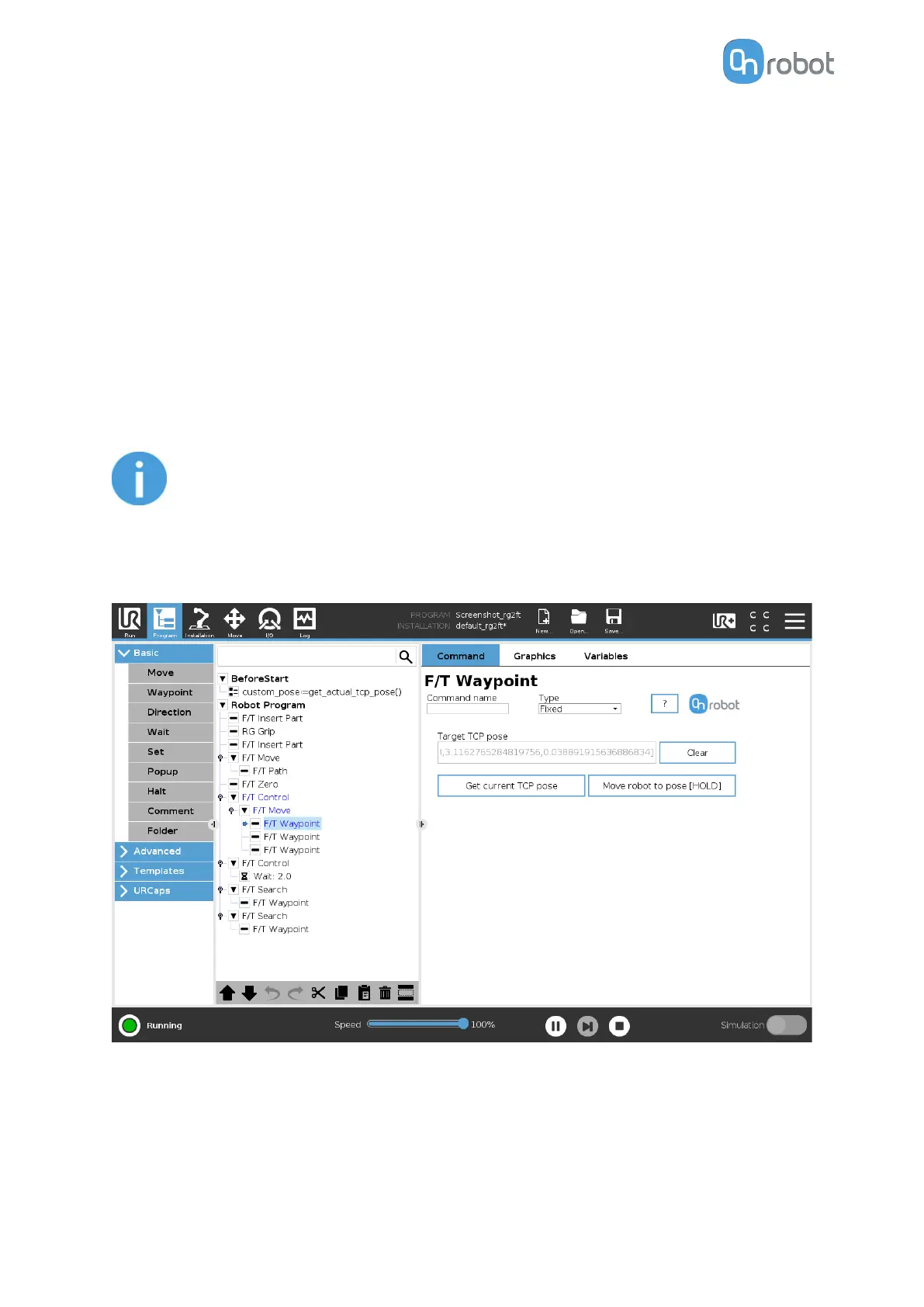
F/T Waypoint
The F/T Waypoint command is used together with the F/T Move or F/T Search command,
to move the robot along a route. There are three types of waypoints (Fixed, Relative, and
Variable), that can be used in any combination.
NOTE:
Do not use consecutive F/T Waypoints that only contain rotations in the same
F/T Move command. Use more than one F/T Move commands to achieve
rotations without translational movements.
Type: The type of the waypoint. It can be set to Fixed, Relative, or Variable.
Target TCP pose: The position represented by the waypoint in the robot route. It is a read-
only field and can be filled by using the Get current TCP pose button.
Clear: deletes the contents of the Target TCP pose field.
Get current TCP pose: inserts the current TCP coordinates into the Target TCP pose field.
OPERATION
95



 To Next Page