EasyManua.ls Logo

Opengear ACM5000 - Opengear Classic RJ45 Pinout (Option -X0); Cisco Rolled (Cyclades) RJ45 Pinout (Option -X1)

Opengear ACM5000
335 pages
Print Icon
To Next Page IconTo Next Page
To Previous Page IconTo Previous Page
Loading...
Chapter 2: Installation
26 Console Server & RIM Gateway User Manual
- Refer Appendix D - Connectivity and Serial I/O for RS422/485 pinout and connection details
So in summary:
Model
Serial Port
Dedicated Console/
Modem port
#
Connectors
Pinout
RS232
RS422/485
ACM500x
2,3,4
RJ
X2 Cisco
Y
N
N*
ACM5004-I
4
RJ
X2 Cisco
Y
Y
N*
ACM550x
4,8
RJ
X2 Cisco
Y
N
N*
ACM550x-I
4,8
RJ
X2 Cisco
Y
Y
N*
IM42xx-2
8,16,32,48
RJ
X0 Classic or
X1 Avocent or
X2 Cisco
Y
N
Y
IM4216-34
16
RJ
X2 Cisco
Y
N
Y
IM4004-5
4
RJ
X0 Classic
Y
N
Y
CM41xx
16,48
RJ
X0 Classic
Y
N
Y
CM4008
8
RJ
X0 Classic
Y
N
Y
CM4001
1
DB9
DB9
Y
N
Y
SD4001
1
DB9
DB9
Y
Y
N*
SD4002
2
DB9
DB9
Y
Y(1 port)
N*
*The first serial port can be reassigned to be a console/modem port
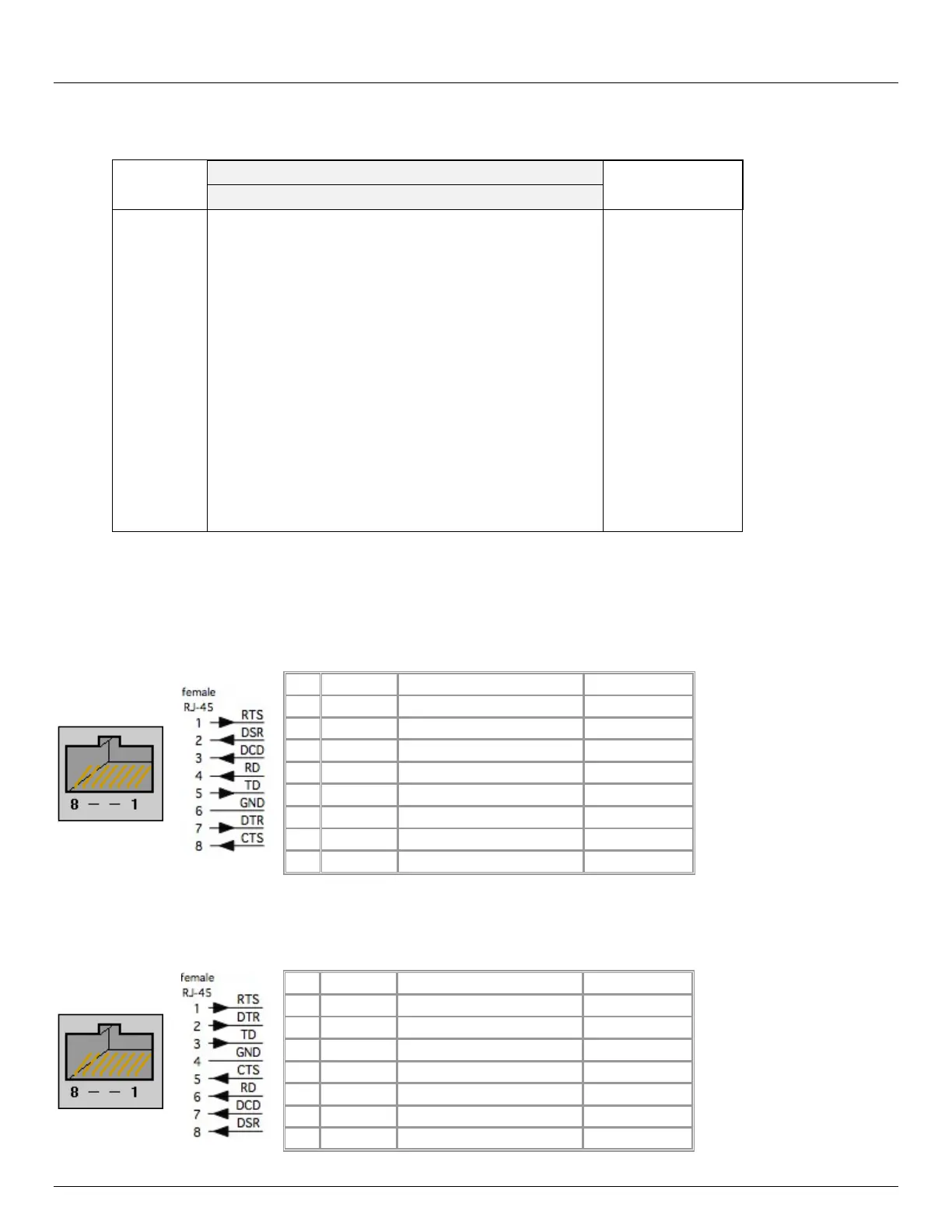
2.4.1 Opengear Classic RJ45 pinout (option X0)
The CM4000, CM4100 and IM4004 models have the Opengear Classic RJ45 pinout shown below. The IM4200 console
servers are also available with this RJ45 pinout as an option:
PIN
SIGNAL
DEFINITION
DIRECTION
1
RTS
Request To Send
Output
2
DSR
Data Set Ready
Input
3
DCD
Data Carrier Detect
Input
4
RXD
Receive Data
Input
5
TXD
Transmit Data
Output
6
GND
Signal Ground
NA
7
DTR
Data Terminal Ready
Output
8
CTS
Clear To Send
Input
2.4.2 Cisco Rolled (Cyclades) RJ45 pinout (option -X1)
The IM4200 console servers are the only products which are available with this RJ45 pinout option. This makes it easy to
replace Avocent Cyclades products, and is convenient for use with rolled RJ-45 cable:

PIN
SIGNAL
DEFINITION
DIRECTION
1
RTS
Request To Send
Output
2
DTR
Data Terminal Ready
Output
3
TXD
Transmit Data
Output
4
GND
Signal Ground
NA
5
CTS
Clear To Send
Input
6
RXD
Receive Data
Input
7
DCD
Data Carrier Detect
Input

Table of Contents

Related product manuals