70
Network control
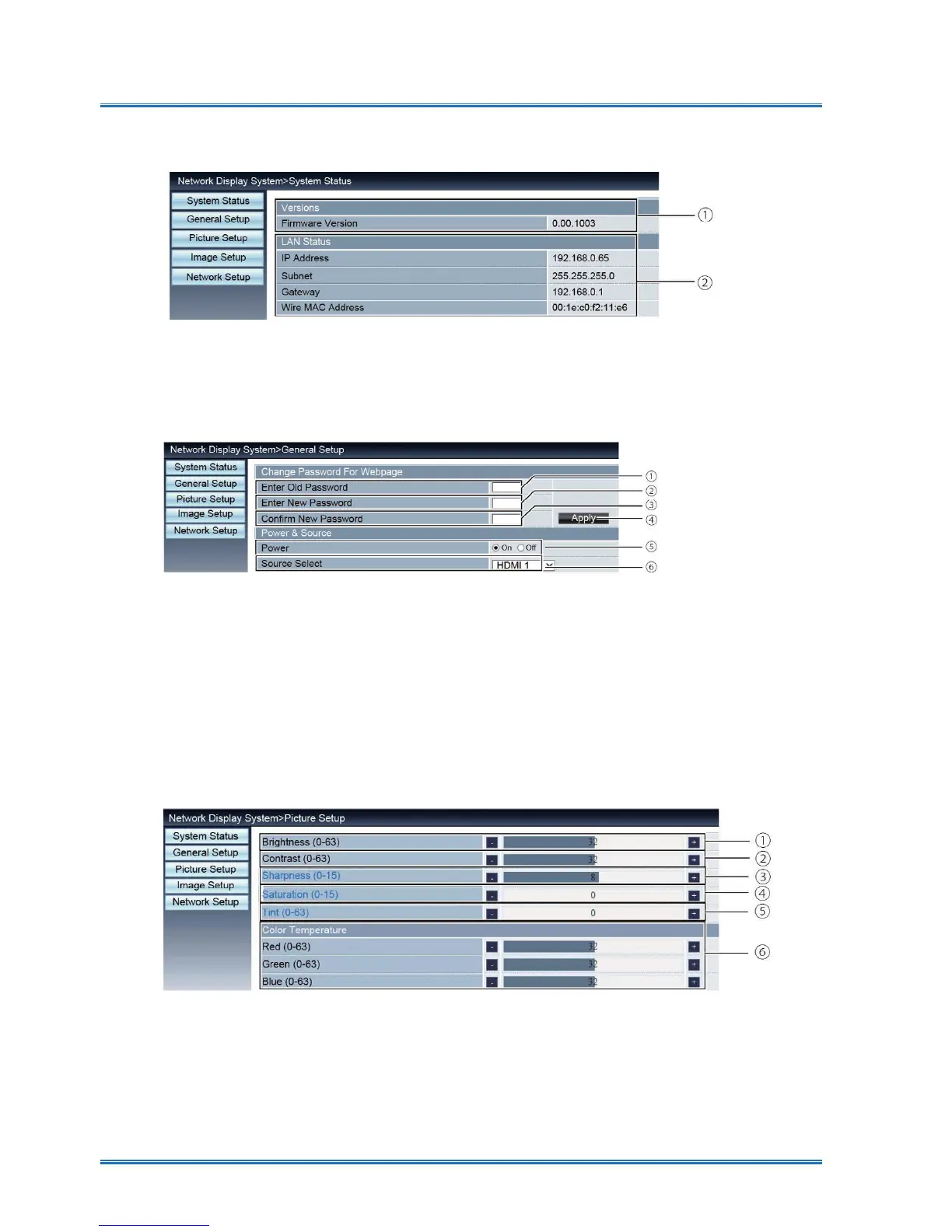
[General Setup] page
①
Enter old password: EQWHUWKHSDVVZRUGIRUWKHFRQ¿JXUDWLRQ
②
Enter new password: Enter a new password.
③
&RQ¿UPQHZSDVVZRUGRHHQWHUWKHQHZSDVVZRUGWRFRQ¿UP
④
Power & Source: Update settings.
⑤
Power: Switch on the power of the projector on / off.
⑥
Source select: Switch the input source of the projector.
[Picture Setup] page
①
Brightness: Adjust the brightness of the projected image.
②
Contrast: Adjust the contrast of the projected image.
③
Sharpness: Adjust the sharpness of the projected image.
④
Saturation:Adjusts color saturation of the projected image.
⑤
Tint: Adjusts the tint of the projected image.
⑥
Color Temperature: Adjust the color temperature of the projected image.
①
9HUVLRQV'LVSOD\VWKH¿UPZDUHYHUVLRQRIWKHSURMHFWRU
②
LAN Status: Displays the LAN. connection status
.
[System Status] page



 To Next Page