CLEAR SINGLE OR ALL TRACKS
Press SHIFT + Clear to erase all the note events of the selected track. Or press SHIFT and long
press Clear to fully reset all tracks. Steps information, time division, length and note offset will be
set to default values but MIDI channels and MOD destinations of every track won’t be affected.
TRACK SELECTION
It is possible to change the selected track in different ways:
- Press the sequencer button and any pad
- Hold any pad long enough not to toggle the step, the track of this row will be selected
- When Track Selection Priority setting is enabled, tapping any pad of a different track will not
toggle the step but set that track as selected.
In the case you want to use these functions to affect ALL tracks at once, this means clear all tracks,
extend all tracks, randomize all tracks, rotate all tracks, etc. press FIRST the respective Sequencer
button and then the regular button commands. This also works for Global Velocity, Gate and
Modulation, affecting all tracks at once.
For example, Randomizer (Random generator) on a track (SHIFT + Random) creates a Mono
sequence on the selected track by randomizing the pitch, gate, velocity and time offset.
But Randomizer on ALL tracks (Seq button + SHIFT + Random) creates a rhythmic pattern on ALL
tracks, keeping the same note per track, ideal for drum kit use. It randomizes the triggers, velocity,
gate and offset of all tracks.
A row pad + SHIFT + Random: randomizes the velocity of the steps of the selected track.
TRACK PARAMETERS
As explained, each Track has its own Init and End points, with individual length and time divisions.
Review Init and End.
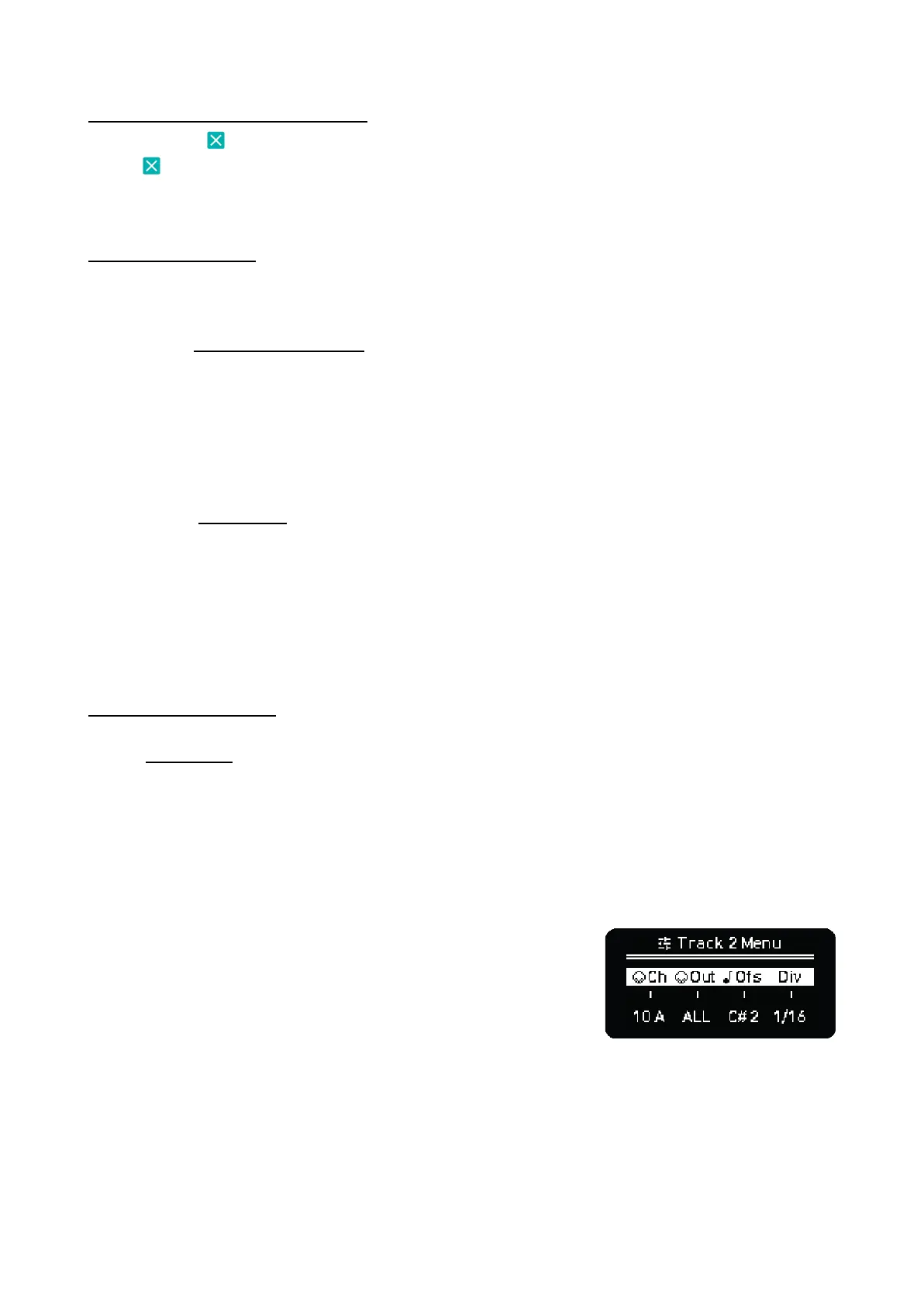
To access Track parameters hold the first pad on the desired track and hold the Sequencer button in
which Multitrack is active or hold the Sequencer button and press the first pad of any track row.
This menu is momentary while the keys are being pressed so you are back as soon as you make
changes and release the buttons. We recommend using your right hand to press the two buttons and
the left to turn the encoders. In this screen you can modify:
Track MIDI Channel. By default all track channels are the same
as the Sequencer MIDI channel, change this parameter to send
each track on individual or grouped MIDI channels to have total
flexibility.
MIDI Output. By default the MIDI output port is the same as the
Sequencer. But you can adjust this setting per track.
Note Offset changes the base note of all the steps of the track,
by semitone on chromatic or by degree in any other scale. It’s
useful for setting drum racks or samplers.
Time Division per track. We’ll expand this later on.



 To Next Page