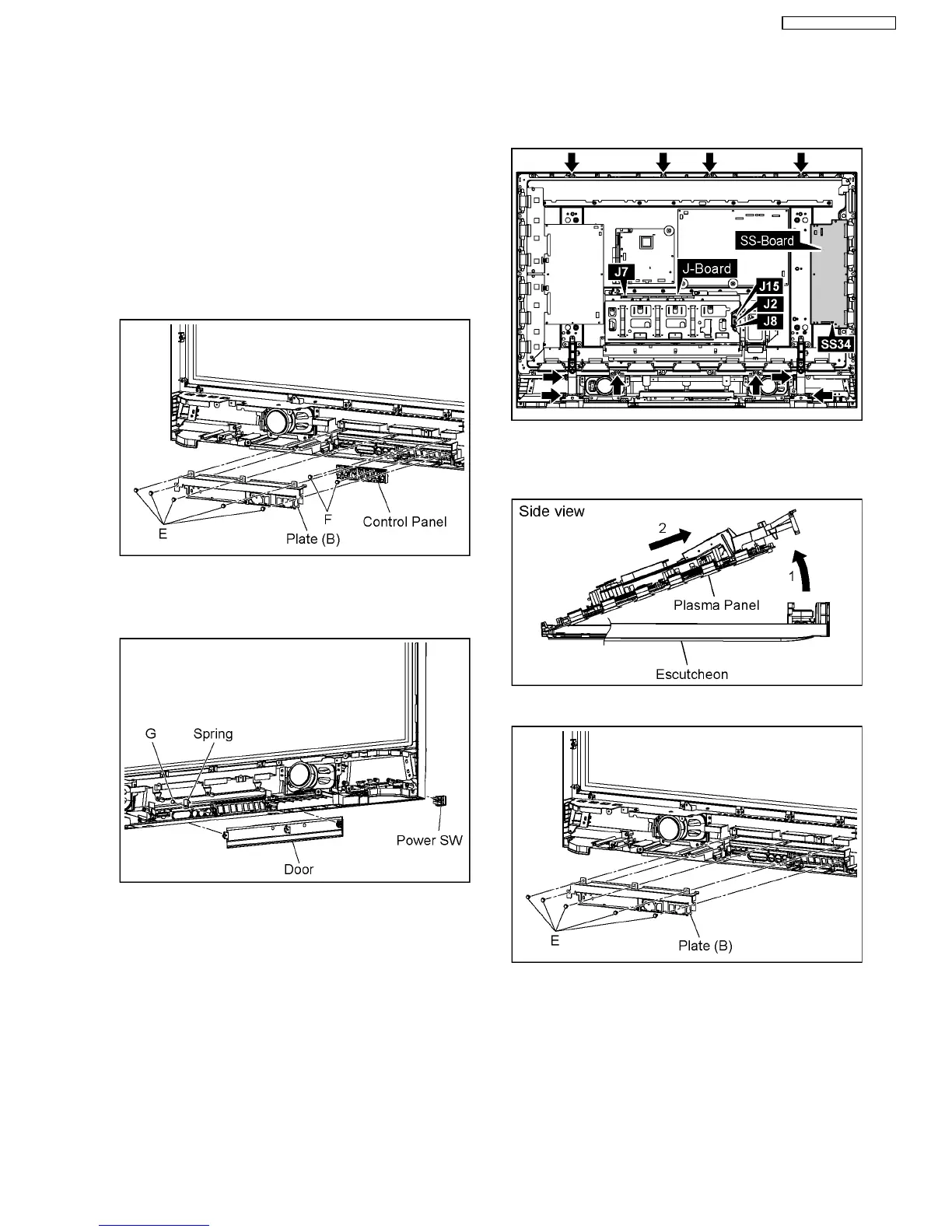
6.17. Removal of the Control Panel,
the Power SW and the Door
1. Remove the S-Board Block.
(Remove to the Removal of the S-Board)
2. Remove the K-Board.
(Remove to the Removal of the K-Board)
3. Remove the GK-Board.
(Remove to the Removal of the GK-Board)
4. Remove the 5 screws(E) and then remove the Plate(B).
5. Remove the 2 screws(F) and then remove the Control
Panel.
6. Remove the 1 screw(G) and then remove the Spring.
7. Remove the 3 hooks and then remove the Door.
8. Remove the 4 hooks and then remove the Power SW.
6.18. Removal of the Front Glass
1. Disconnect the couplers(J2, J7, J8, J15, SS34).
2. Remove the 10 screws.
3. Pull the bottom of the Plasma Panel forward (arrow1).
4. Slide the Plasma Panel and then remove the Plasma Panel
(arrow2).
5. Remove the 5 screws (E) and then remove the Plate (B).
6. Remove the each screws and then remove the Glass Fixed
Plate (A, B, C, D).
7. Remove the Front Glass.
15
TH-37PG9W / TH-42PG9W













 To Next Page