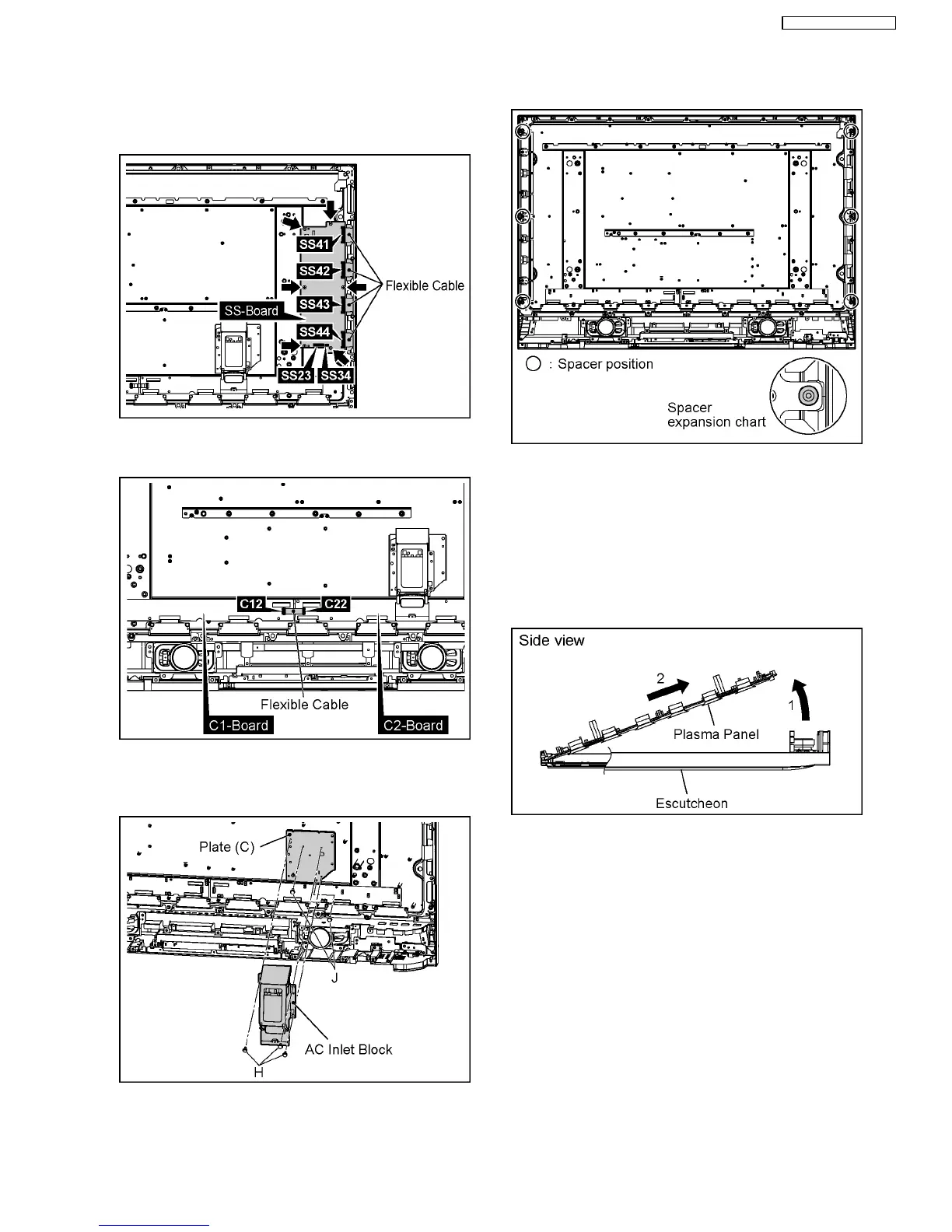
13. Disconnect the couplers(SS23, SS34).
14. Remove the Flexible Cable from the couplers(SS41, SS42,
SS43, SS44).
15. Remove the 6 screws and then remove the SS-Board.
16. Remove the Flexible Cable from the couplers(C12, C22).
17. Remove the 3 screws and then remove the C1-Board.
18. Remove the 3 screws(H) and then remove the AC Inlet
Block.
19. Remove the 2 screws(J) and then remove the plate(C).
20. Remove the 6 Spacers and Spacer Rings from the Plasma
Panel.
Caution
·
Please confirm the installation place of Spacer and
Spacer Ring when you exchange the Plasma Panel,
and install Spacer and Spacer Ring in an original
installation place after exchanging the Plasma
Panel.
21. Lift up the bottom of the Plasma Panel in the direction of the
arrow1 and pull the Plasma Panel in the direction of the
arrow2 and then remove the Plasma Panel.
19
TH-37PG9W / TH-42PG9W













 To Next Page