P350 Operation Manual 8
1.6 “Gamepad” USB Controls
The USB type A connector can be connected to an approved Gamepad controller, providing console-like control and
performance in a convenient package.
CAUTION: Please note that most gamepad controllers are not waterproof, and should not be used outside while wet
weather is expected.
The controls are proportional and ‘direct drive’, i.e. if the operator pushes the crawler joystick 50% forward it will drive
at roughly 50% speed, or 100% forward at 100% speed forward, and vice versa. The crawler will stop when it is left
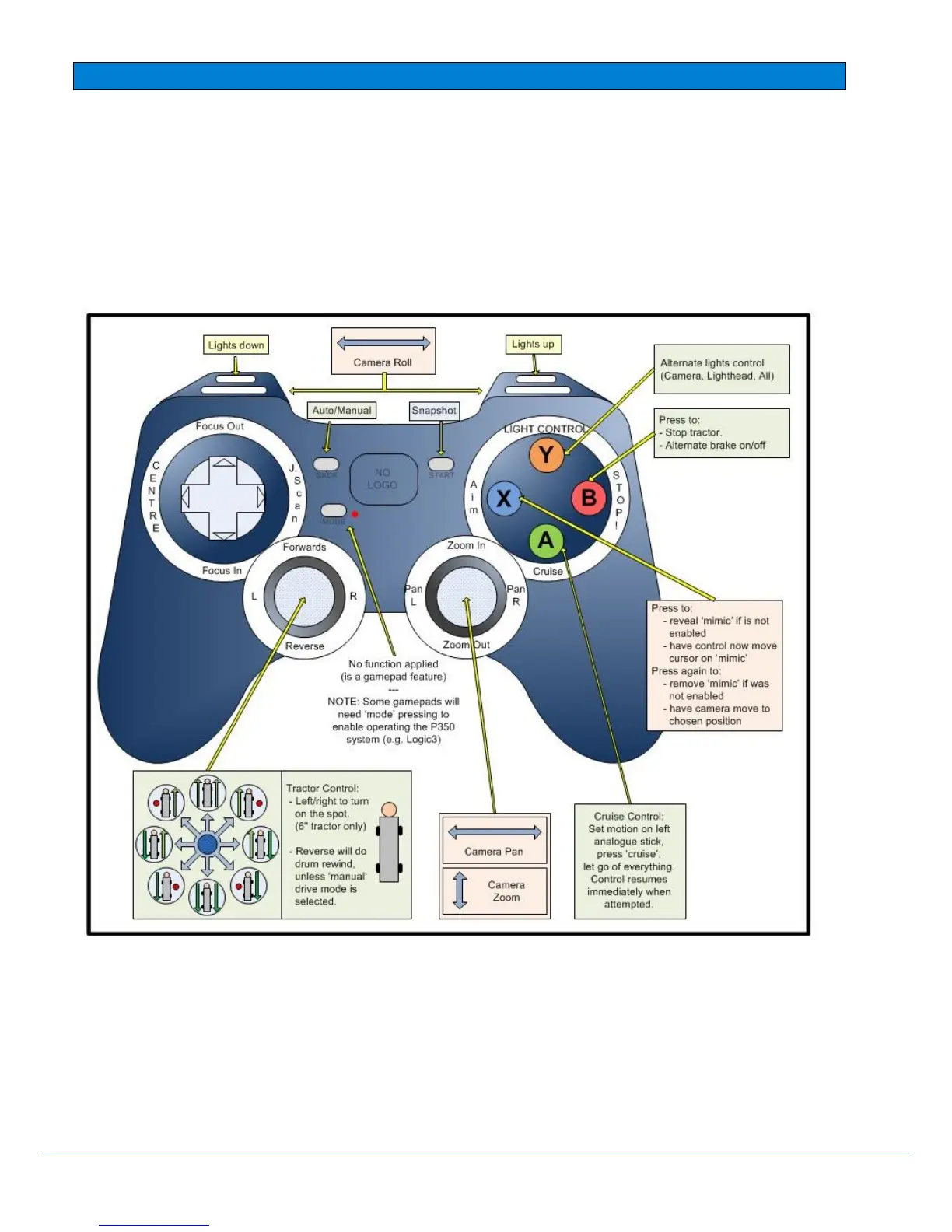
in the center position. Please see the below diagram of mapped functions.
CAUTION: The P350 does not support untested and unapproved 3
rd
party gamepads, which may produce unexpected
operation when used with our software. As such any damage or losses incurred while using other gamepads will not
be covered by any warranties.
Fig 1.14 Gamepad controller function map
NOTE: Ensure the selector switch, on the back of the gamepad, is on the position marked X
NOTE: these devices typically calibrate themselves every time they are powered up. If the joysticks appear off-center
or behaving erratically, cycle the power to reset the calibration routine.



 To Next Page