P350 Operation Manual 82
9.6 Cable drum replacement
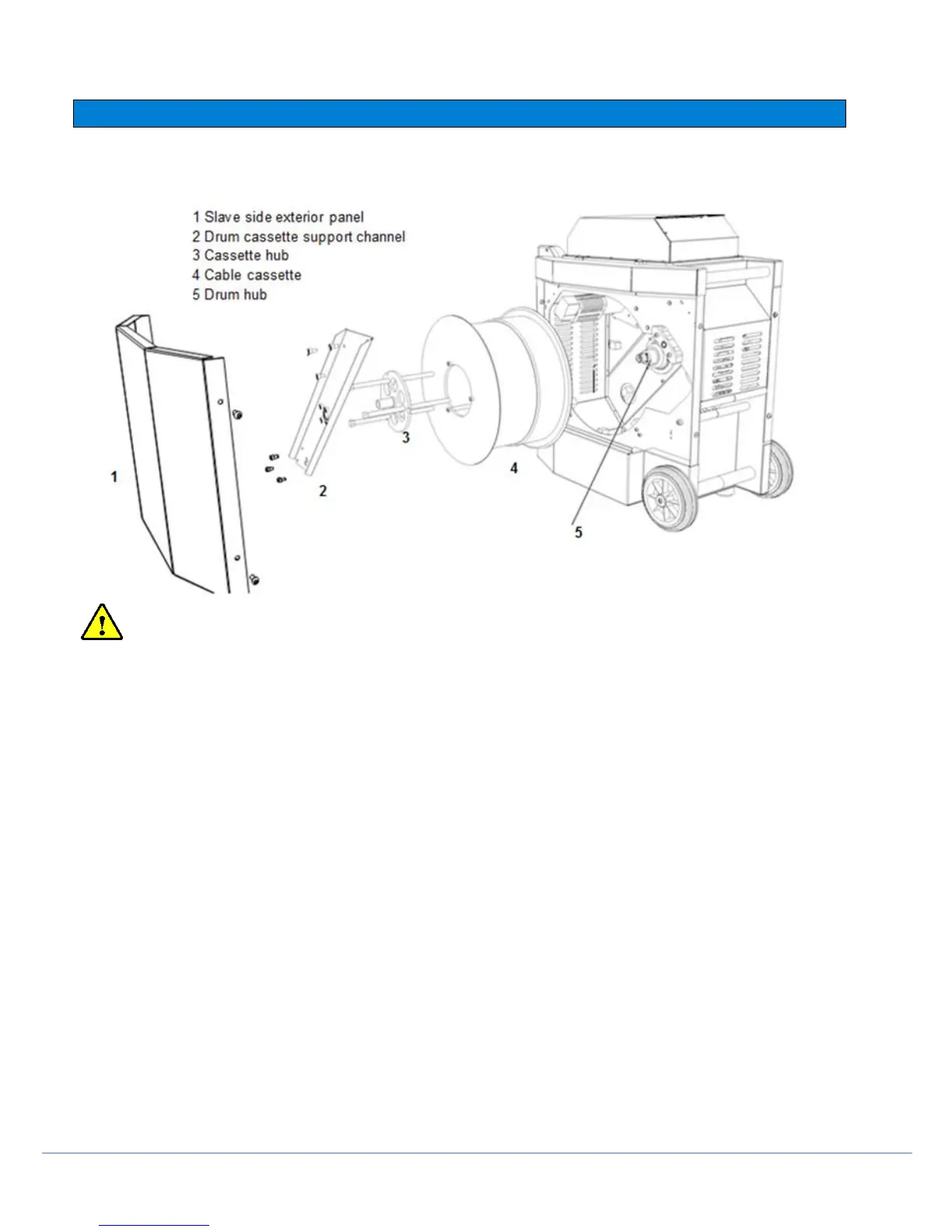
Appendix 9.4: Drum cassette replacement (exploded)
WARNING ! Switch the system off and disconnect the power lead and all other cables before you continue.
In the powered drum, the cable is housed in a cassette. This component is user-replaceable. The following procedure
outlines the removal and replacement of the cable cassette.
Disassembly
1. Remove the slave-side panel
2. Remove the drum-cassette support channel
3. The drum cassette is held in place by the cassette hub. Do not remove this hub yet; proceed to the next step.
4. Remove the cable from the cable layering mechanism. To do so:
a. Lift the spring loaded pinch roller to the upright position
b. Unfasten the cable retaining rollers. The rollers are held in place by thumb screws on the reverse side
. of the cable layering mechanism.
5. Finally remove the top horizontal exterior cable guide.
6. Remove the cassette hub.
7. Disconnect the internal cassette cable connector from the drum hub.
8. You can now remove the cassette from the drum hub
Appendix 9.5: Powered drum with slave side panel and drum support channel remove



 To Next Page