Before using your camera
1
16
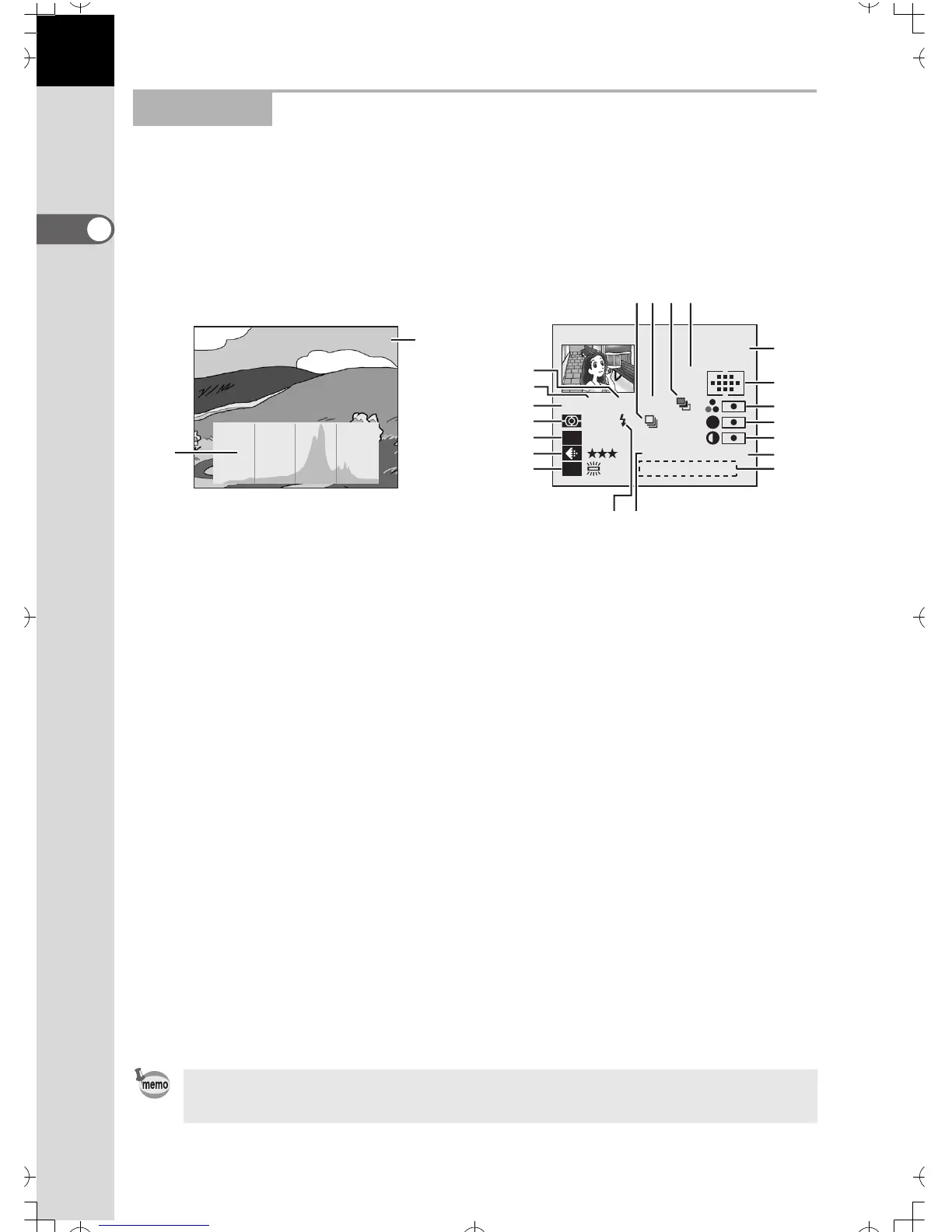
The camera switches between Normal Playback Screen → Histogram
Display → Detailed Information Display every time you press the INFO
button during playback.
2. Playback
• Histogram • Detailed information
1 Histogram 10 Metering mode (p.57)
2 Folder name / File name (p.124) 11 Sensitivity (p.54)
3 Drive mode (p.44) 12 Recorded quality / pixels (p.51,
52)
4 Exposure compensation step
(p.79)
13 White balance (p.55, 142)
5 Auto bracket / Multiple exposure
(p.82, 84)
14 Flash mode (p.86)
6 Focus mode (p.70) 15 Color space (p.128)
7 Aperture value (p.64) 16 Focus points (p.74)
8 Shutter speed (p.62) 17 Saturation (p.117)
9 Capture mode 18 Sharpness (p.117)
7 :Green program AE mode
(p.59)
19 Contrast (p.118)
e :Hyper-Program (p.60) 20 Lens focal length
b :Shutter speed-priority AE
(p.62)
21 Captured date and time
c :Aperture-priority AE (p.64)
a :Hyper-Manual (p.66)
Press the four-way controller (23) in the histogram display to move the
histogram display position up or down.
100-0120
1
2
100-0121
1/2000 F2.8 +0.5Ev
P
AF.S
100mm
12:00
800
ISO
WB
L
sRGB
N
2003/10/01
S
11
12
13
8
7
34 5 6
14 15
9
10
2
16
17
18
19
20
21


 To Next Page