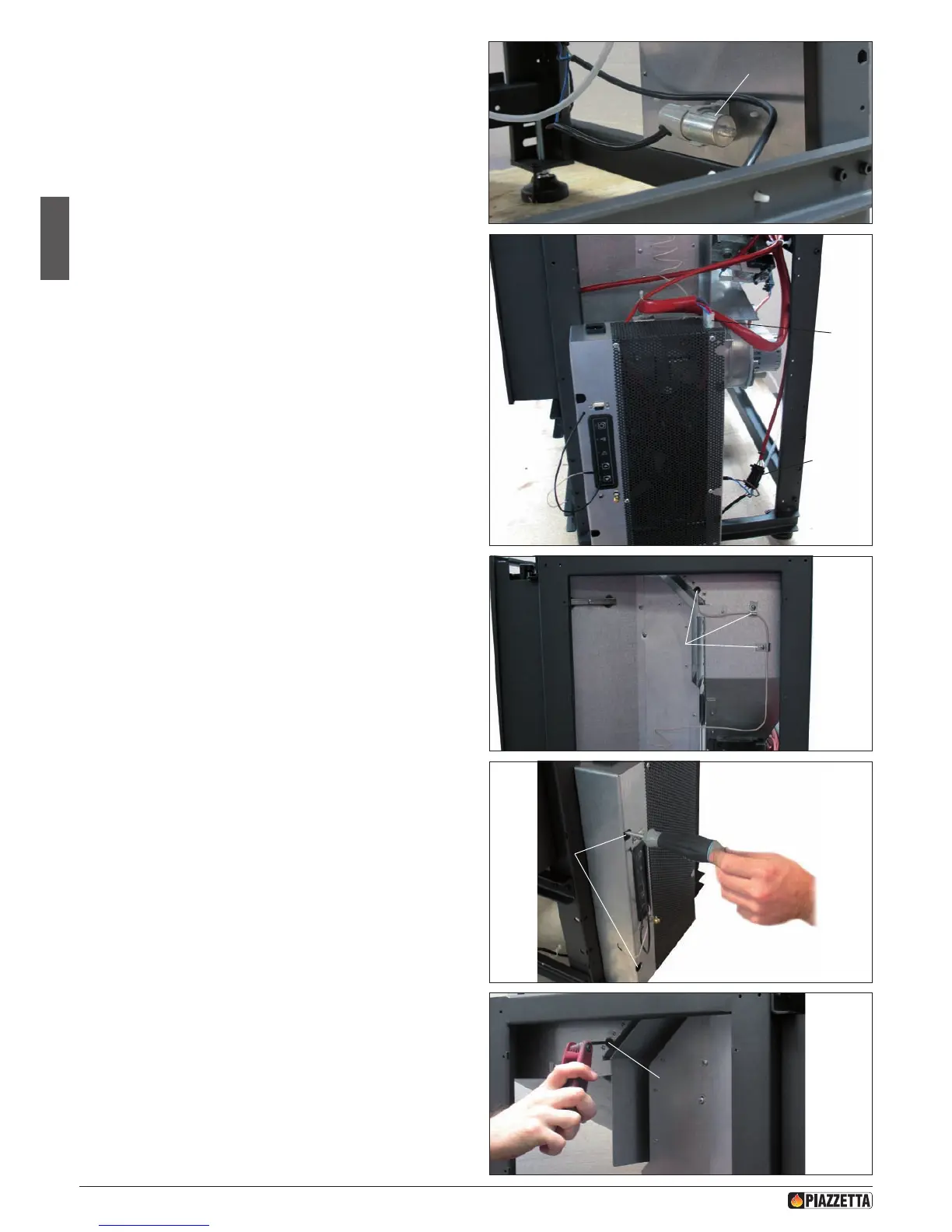
- Disconnect the capacitor (3) of the ue gas fan from the relative snap-
in support to be found in the rear part of the electronic board support.
- Disconnect the power cable connector (4) of the ue gas fan.
- Disconnect the wiring from the electronic board support at the point
of the relative quick connector (5).
- Loosen the relative clips (6) to remove the safety thermostat capillary
tube from its housing.
- Loosen the relative fastening screws (7) in order to remove the
electronic board support.
- Fasten the electronic board support to the opposite side and secure it
using the 2 previously removed screws.
- Remove the plug (8) from the left side of the thermostat housing,
insert the thermostat bulb and secure it with the relative clip provided.
- Ret the plug of the thermostat housing onto the right side.
Restore all the previously removed connections, taking particular care
over the placing of the electric cables and the thermostat capillary tube.
Use the ties to be found in the product to secure them.
a Check that the cables cannot come into contact with parts
that could become hot during operation.
Check that the low-pressure tube is not attened.
Fig. 33
Fig. 34
Fig. 35
Fig. 36
Fig. 32
3
4
5
6
7
8
H072047UK0 / DT2001513 – 04
20



 To Next Page