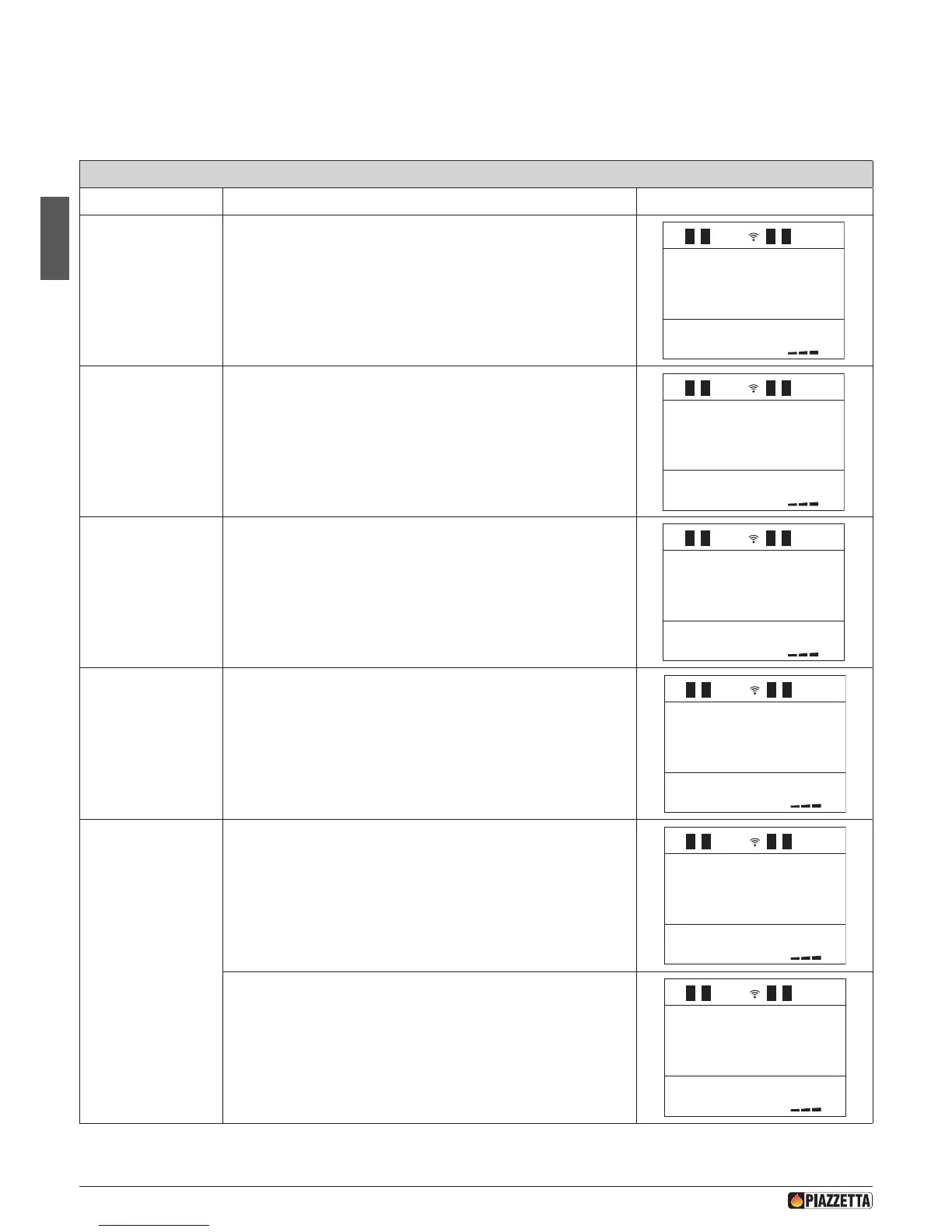
Function Action Display message
Select set chrono
menu
Press the MENU key then using the SELECT MENU key, select SET CHRONO
and conrm by pressing the SET key.
off
06 :00
0 9:00
off
01
25
.
c
01
20 :30
1
1
1
1
1
1
1
PROGRAM
DAY
ENABLE
DAY
START D
PROGRAM 1
STOP D
PROGRAM 1
STOP D
PROGRAM 1
SET D
POWER 1
SETTEMP
ROOM 1
SET D
VENT-1
START D
PROGRAM 2
Select day program
Press the MENU key then using the SELECT MENU key, select PROGRAM
DAY and conrm by pressing the SET key.
off
06 :00
0 9:00
off
01
25
.
c
01
20 :30
1
1
1
1
1
1
1
1
ENABLE
DAY
START D
PROGRAM 1
STOP D
PROGRAM 1
STOP D
PROGRAM 1
SET D
POWER 1
SETTEMP
ROOM 1
SET D
VENT-1
START D
PROGRAM 2
Enable or disable day
program
Press the SELECT MENU key, select on to enable the day program or off to
disable the day program and conrm by pressing the SET key. If you have
disabled the program by selecting off and do not wish to carry out further
programming, press the ESC key to return to the previous menu or the
MENU key to return to the initial display.
off
06 :00
0 9:00
off
01
25
.
c
01
20 :30
1
1
1
1
1
1
1
1
1
START D
PROGRAM 1
STOP D
PROGRAM 1
STOP D
PROGRAM 1
SET D
POWER 1
SETTEMP
ROOM 1
SET D
VENT-1
START D
PROGRAM 2
Set start-up time for
1st operating cycle.
Press SELECT MENU to set the start-up time, advancing in ten-minute
jumps (for example, you want the stove to start up at 06.00) then conrm
by pressing the SET key.
1
1
1
1
1
1
1
1
1
SET
CHRONO
PROGRAM
DAY
ENABLE
DAY
STOP D
PROGRAM 1
STOP D
PROGRAM 1
SET D
POWER 1
SETTEMP
ROOM 1
SET D
VENT-1
START D
PROGRAM 2
Set shutdown time
for 1st operating
cycle.
Press SELECT MENU to set the shutown time, advancing in ten-minute
jumps (for example, you want the stove to shutdown at 09.00) then
conrm by pressing the SET key.
1
1
1
1
1
1
1
1
SET
CHRONO
PROGRAM
DAY
ENABLE
DAY
START D
PROGRAM 1
STOP D
PROGRAM 1
SET D
POWER 1
SETTEMP
ROOM 1
SET D
VENT-1
START D
PROGRAM 2
In this stage a shutdown time need not be set. Press SELECT MENU, set
the readout off and conrm by pressing the SET button.
1
1
1
1
1
1
1
SET
CHRONO
PROGRAM
DAY
ENABLE
DAY
START D
PROGRAM 1
STOP D
PROGRAM 1
SET D
POWER 1
SETTEMP
ROOM 1
SET D
VENT-1
START D
PROGRAM 2
PROGRAM DAY - 1st operating cycle
This type of thermostat allows for three types of programming (DAY - WEEK - WEEK-END) always saved; the programs can be enabled or disabled
by selecting the SET CHRONO menu. We recommend having only one program active in order to avoid program overlap.
a THE CLOCK MUST BE SYNCHRONISED BY SETTING CURRENT DAY, HOURS AND MINUTES THE FIRST TIME THE PROGRAM IS ACTIVATED,
similar to buying a new watch and setting the current time. To set current time see the section SETTING THE CLOCK. This operation is
necessary only the rst time that the clock is activated.
H072047UK0 / DT2001513 – 04
40



 To Next Page