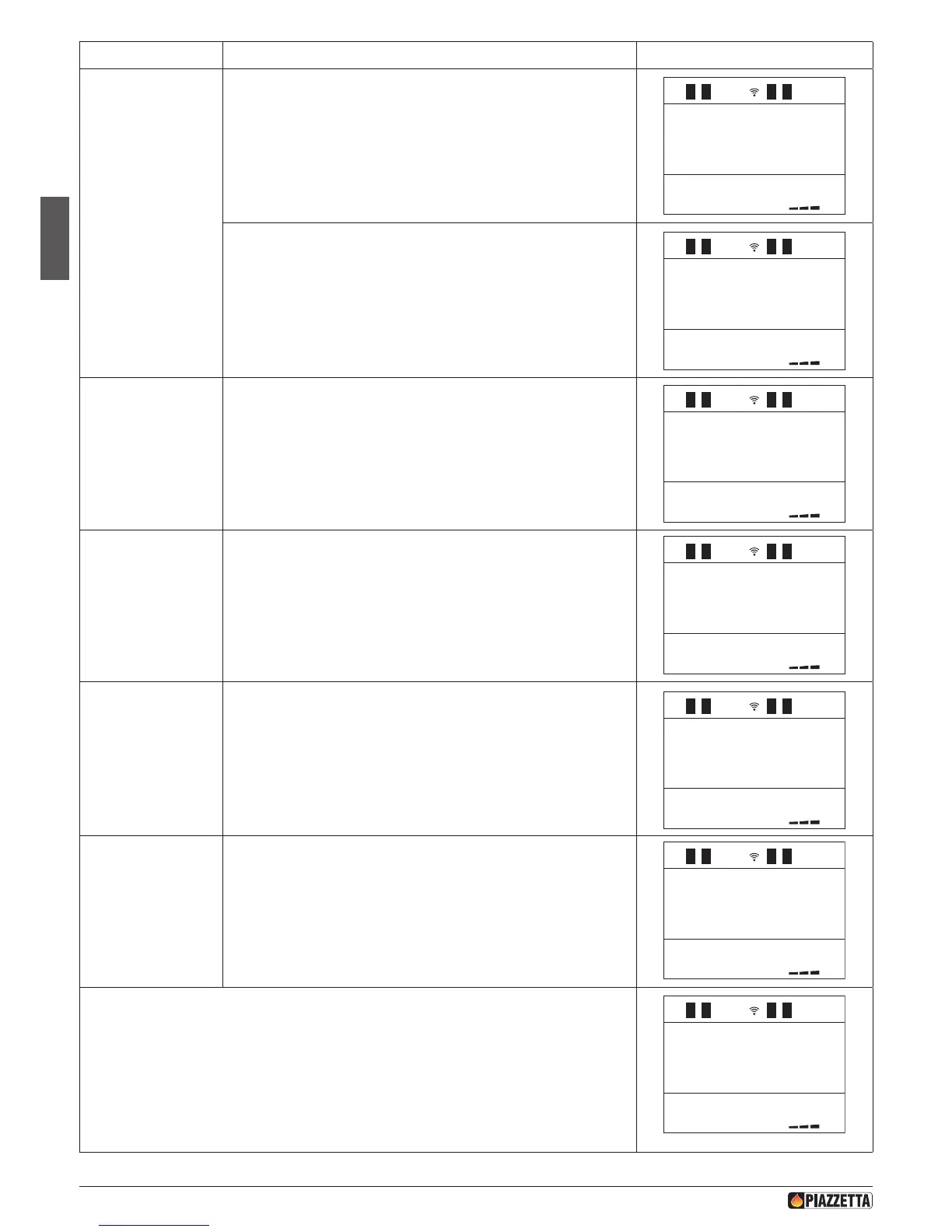
Function Action Display message
Set shutdown time
for 1st operating
cycle.
Press SELECT MENU to set the shutdown time, advancing in ten-minute
jumps (for example, you want the stove to shut down at 09.00) then
conrm by pressing the SET key.
1
1
1
1
1
SET
CHRONO
PROGRAM
WEEK-END
E NABLE
WEEK END
STARTWE
PROGRAM 1
M1
STOPWE
PROGRAM1
DAYS WE
LIT 1
SU ON
SETWE
POWER 1
SETTEMP
ROOM 1
SETWE
VENT-1
START WE
PROGRAM 2
In this stage a shutdown time need not be set. Press the SELECT MENU key,
set the readout
off
and conrm using the SET key.
1
1
1
1
SET
CHRONO
PROGRAM
WEEK-END
E NABLE
WEEK END
STARTWE
PROGRAM 1
STOP WE
PROGRAM1
M1
DAYS WE
LIT 1
SU ON
SETWE
POWER 1
SETTEMP
ROOM 1
SETWE
VENT-1
START WE
PROGRAM 2
Activate or deactivate
the rst operating
cycle on Friday,
Saturday and Sunday.
Press the top part of SELECT MENU key to select the day of the week, then
press the bottom part of the SELECT MENU key to select ON to activate
the rst operating cycle on the chosen day or OFF to deactivate the rst
operating cycle on the chosen day. Continue to do this for the three days
of the week (active days will be shown on the DAYS OF THE WEEK display)
and conrm by pressing the SET key.
01
25
.
c
01
1
1
1
1
1
1
1
1
1
1
SET
CHRONO
PROGRAM
WEEK-END
E NABLE
WEEK END
STARTWE
PROGRAM 1
STOP WE
PROGRAM1
STOPWE
PROGRAM1
SETWE
POWER 1
SETTEMP
ROOM 1
SETWE
VENT-1
START WE
PROGRAM 2
Set desired power
for the rst operating
cycle.
Press SELECT MENU to set the desired power (for example you want
power setting 1). Conrm by pressing the SET key.
1
1
1
SET
CHRONO
PROGRAM
WEEK-END
E NABLE
WEEK END
STARTWE
PROGRAM 1
STOP WE
PROGRAM1
STOPWE
PROGRAM1
DAYS WE
LIT 1
SU ON
SETTEMP
ROOM 1
SETWE
VENT-1
START WE
PROGRAM 2
Set room temperature
for the rst operating
cycle.
Press SELECT MENU to set the desired room temperature (for example you
want a room temperature of 25°C). Conrm by pressing the SET key. When
the desired temperature has been reached the stove automatically reverts
to power setting P1 The temperature can be read on the remote control or
on the stove, see section “MULTICOMFORT”.
off
06 :0020:30
09 :00
off
7
01
1
1
SET
CHRONO
PROGRAM
WEEK-END
E NABLE
WEEK END
STARTWE
PROGRAM 1
STOP WE
PROGRAM1
STOPWE
PROGRAM1
DAYS WE
LIT 1
SU ON
SETWE
POWER 1
SETWE
VENT-1
START WE
PROGRAM 2
Set desired
Multifuoco fan speed
for rst operating
cycle
Press SELECT MENU to set the desired fan speed (for example, you want
fan speed setting 1) and conrm by pressing the SET key.
When programming the timer, it is not possible to set separate fan speeds.
off
06 :0020:30
09 :00
off
7
01
25
.
c
1
1
1
1
1
1
1
1
1
SET
CHRONO
PROGRAM
WEEK-END
E NABLE
WEEK END
STARTWE
PROGRAM 1
STOP WE
PROGRAM1
STOPWE
PROGRAM1
DAYS WE
LIT 1
SU ON
SETWE
POWER 1
SETTEMP
ROOM 1
After having programmed the rst operating cycle you may, if you wish, proceed with
programming the second operating cycle by going trough the settings in the order as describes
above. The number 2 will appear on the display to indicate the second work cycle.
1
1
1
1
1
1
1
1
SET
CHRONO
PROGRAM
WEEK-END
E NABLE
WEEK END
STARTWE
PROGRAM 1
STOP WE
PROGRAM1
STOPWE
PROGRAM1
DAYS WE
LIT 1
SU ON
SETWE
POWER 1
SETTEMP
ROOM 1
SETWE
VENT-1
START WE
PROGRAM 2
DT2040073-03
H072047UK0 / DT2001513 – 04
44



 To Next Page