POLYURETHANE
MACHINERY
CORPORATION
PH-2 SERVICE MANUAL
5. DESCRIPTION
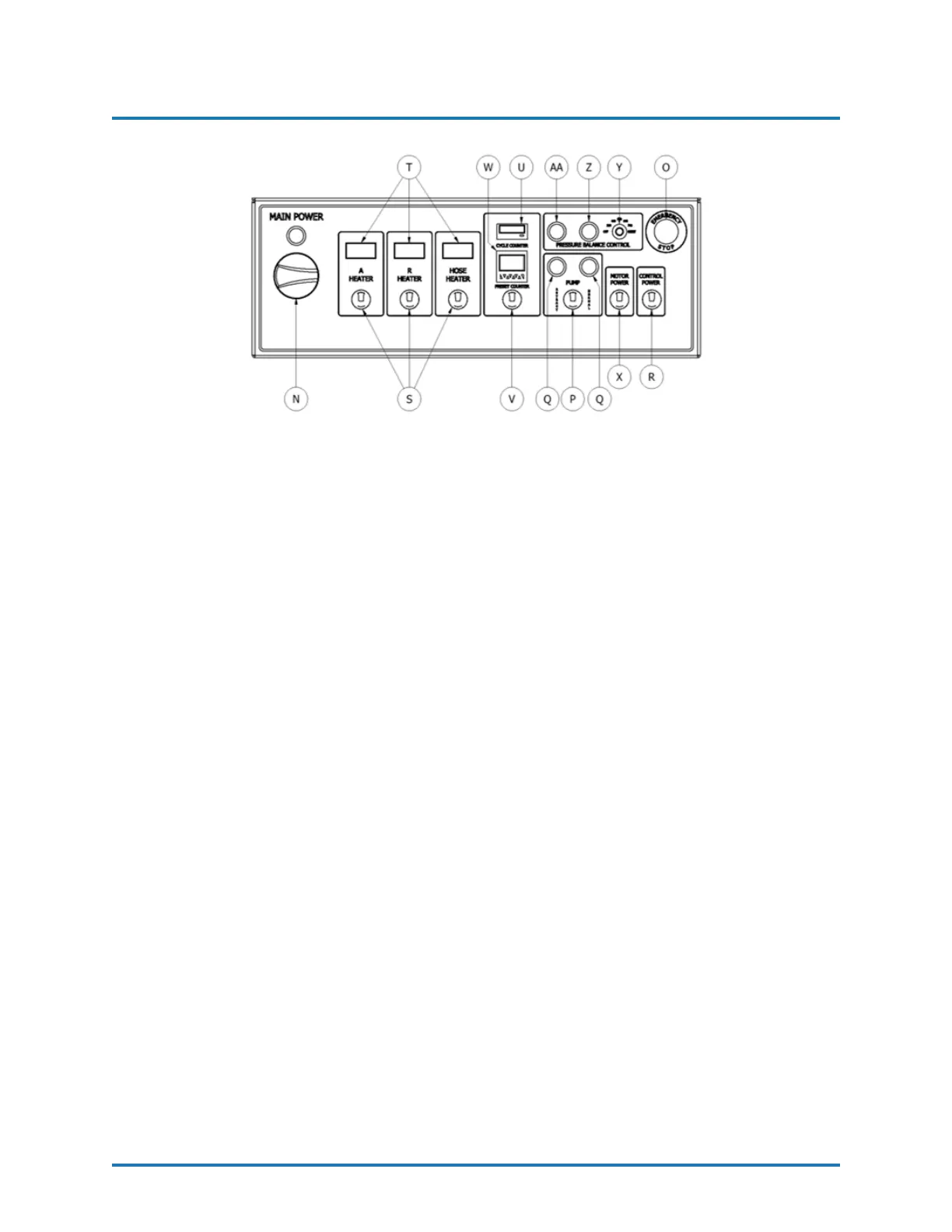
Figure 6: Front Panel Description
N. Main Power
Turns ON and OFF main power to the control panel. It must be turned ON for any
operation to be performed with the unit. When turned ON, the red pilot will light.
O. Emergency Stop
Interrupts the PH- Series control power circuit to stop all motion and heating.
P. Pump Switch
Off - Removes power from the pump circuit. The directional indicator lights will not
be lit.
Normal - Activates the normal operation of the machine. When the switch is ON,
the directional light corresponding to the stroke direction will light.
Retract - Sets the Piston Rod of the Iso (A) metering pump into the pump to prevent
crystallization of Iso (A) on the Piston Rod. Press the RETRACT key every time the
unit is stopped by the operator (See Section 11 on page 31).
Q. Direction Indicator Lights
Indicates the movement direction of the Metering Pumps. If excessive pressure is
caused in the system, the pump circuit will be disabled and the directional lights will
be OFF.
R. Control Power
Turns ON and OFF the control power to the complete electrical circuit including
Heaters and Hose Heater.
S. Heater Temperature Switch (A(Iso)/R(Poly)/Hose)
Turns ON and OFF power to the specific Heaters and Hose.
T. Temperature Controllers
Displays the temperature of the chemicals. See Section 9 on page 26 for detailed
Temperature Controller instructions.
REVISION 1.2 15


 To Next Page