POLYURETHANE
MACHINERY
CORPORATION
PH-2 SERVICE MANUAL
13. MAINTENANCE
13.6 MATERIAL HEATER
WARNING! Before performing any maintenance, make sure the
Main Power Switch is OFF and incoming power is locked OFF.
NEVER access the inside of the Control Panel with the Propor-
tioner power supply ON. The Heaters are components that reach
high temperatures; you must wait until they have cooled before
handling and bleed all material pressure to zero.
13.7 THERMOCOUPLE REPLACEMENT
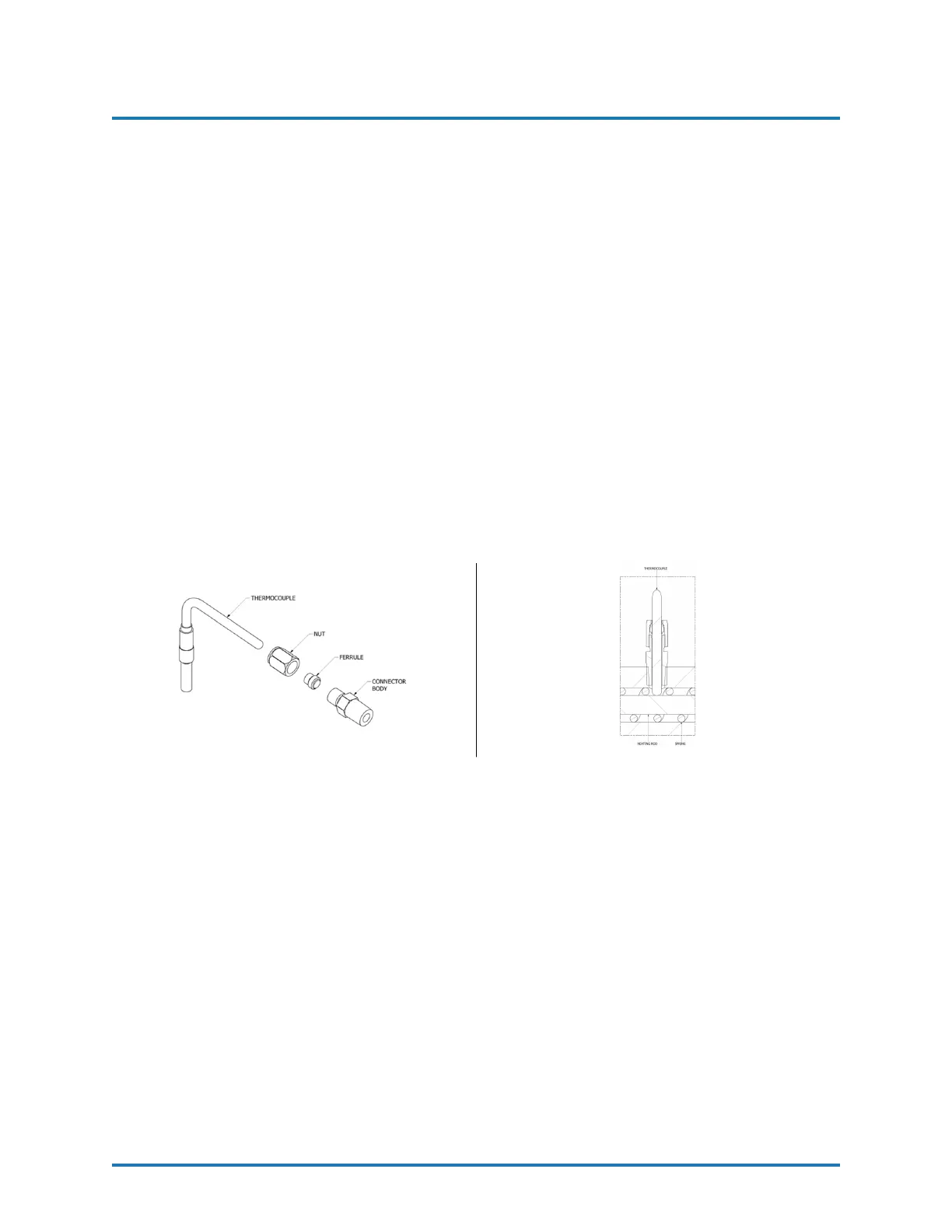
NOTE! The Thermocouple is assembled into the Connector Body
with a Ferrule and Nut. Once inserted into the Body and the Nut
is tightened, the Ferrule locks to the Thermocouple and does not
allow it to be relocated or moved. The location of the Thermocou-
ple is very important and must be done correctly before tightening
the Nut.
1. Unscrew the Nut that holds the defective Thermocouple and remove from the Body.
Disconnect Thermocouple wiring located under the Top Cover of the Heater. Remove
Body and discard.
2. Install Heating Element and Spring if also removed.
3. Install Connector Body into Heater using an open-end wrench and tighten to prevent
leakage. Teflon Tape or appropriate Thread Sealant should be used.
4. Slide the Nut and the Ferrule over the Thermocouple and insert this assembly into
the Connector Body until it comes into positive physical contact with the Heating
Rod. Make sure the Spring does not prevent the Thermocouple from making contact
with the Heating Rod.
5. Slowly tighten the Nut using an open-end wrench, ensuring the Thermocouple main-
tains positive physical contact with the Heating Rod.
6. Reinstall the Thermocouple wires.
REVISION 1.2 51


 To Next Page