POLYURETHANE
MACHINERY
CORPORATION
PH-2 SERVICE MANUAL
9. DIGITAL TEMPERATURE CONTROLLER
OMRON CONTROLLER
1. Press and hold the UP or DOWN keys to increase or decrease,
respectively, the material temperature set-point to the desired value
as determined by the material supplier or application conditions.
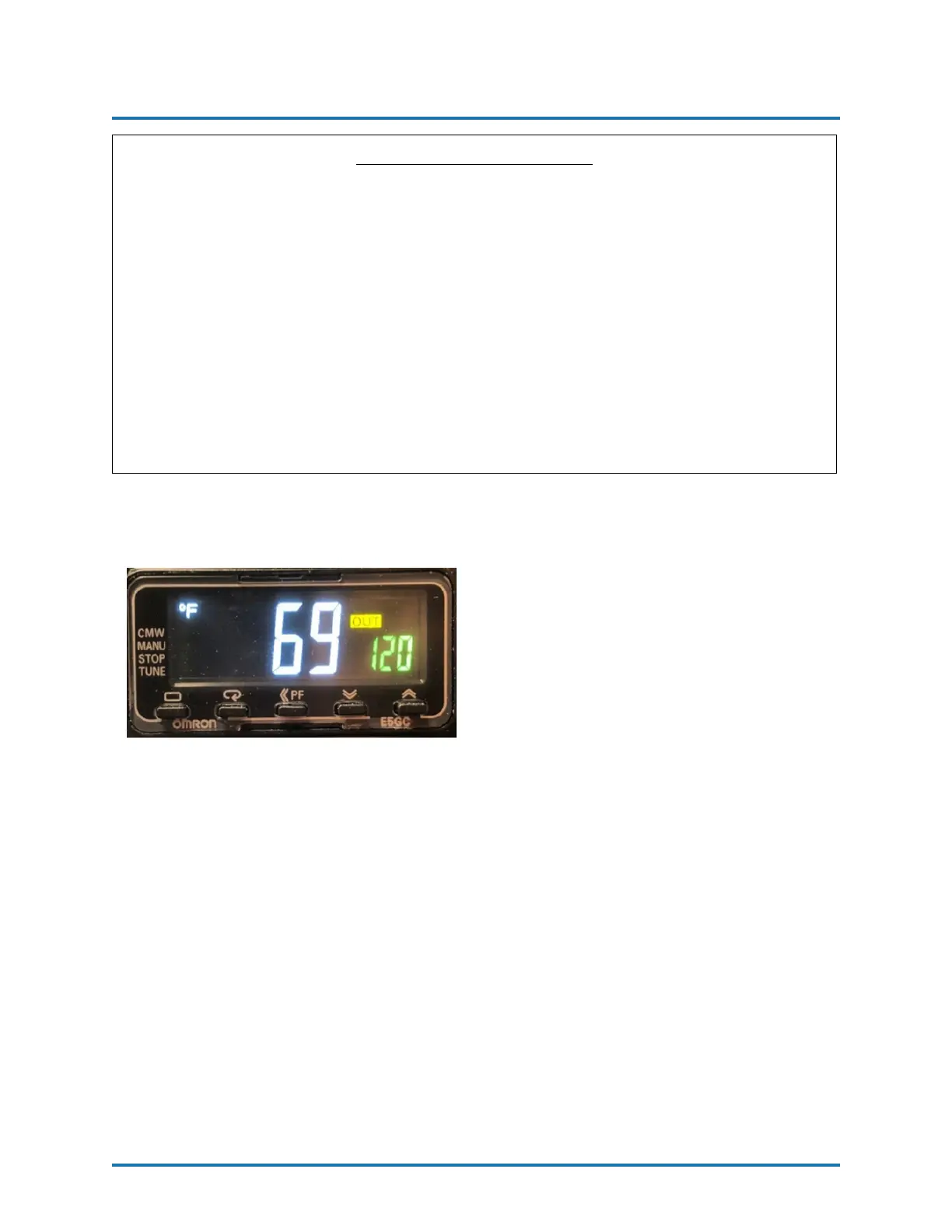
2. The smaller green numbers in the bottom right side of the controller
display the set point. The larger white numbers in the center of the
controller display the actual temperature of the material as read by
the thermocouples in the Pre-Heater and TSU assembly. See the image
below for the OMRON Heater Controller display.
3. Turn the Heater Temperature Switch (See Figure 6 on page 15) to the right
to turn ON each heater.
NOTE! The Temperature Con-
troller displays the actual ma-
terial temperature and the set
point. The YELLOW box with
the word OUT indicates that the
heaters are being powered.
WARNING! The Controllers are factory programmed and are
not field re-programmable. If a problem is encountered, contact
your PMC Distributor. Do not attempt to change any of the
programmed parameters. Do not substitute a Controller from
an alternate supplier as its use may result in equipment damage
and/or bodily injury.
REVISION 1.2 27


 To Next Page