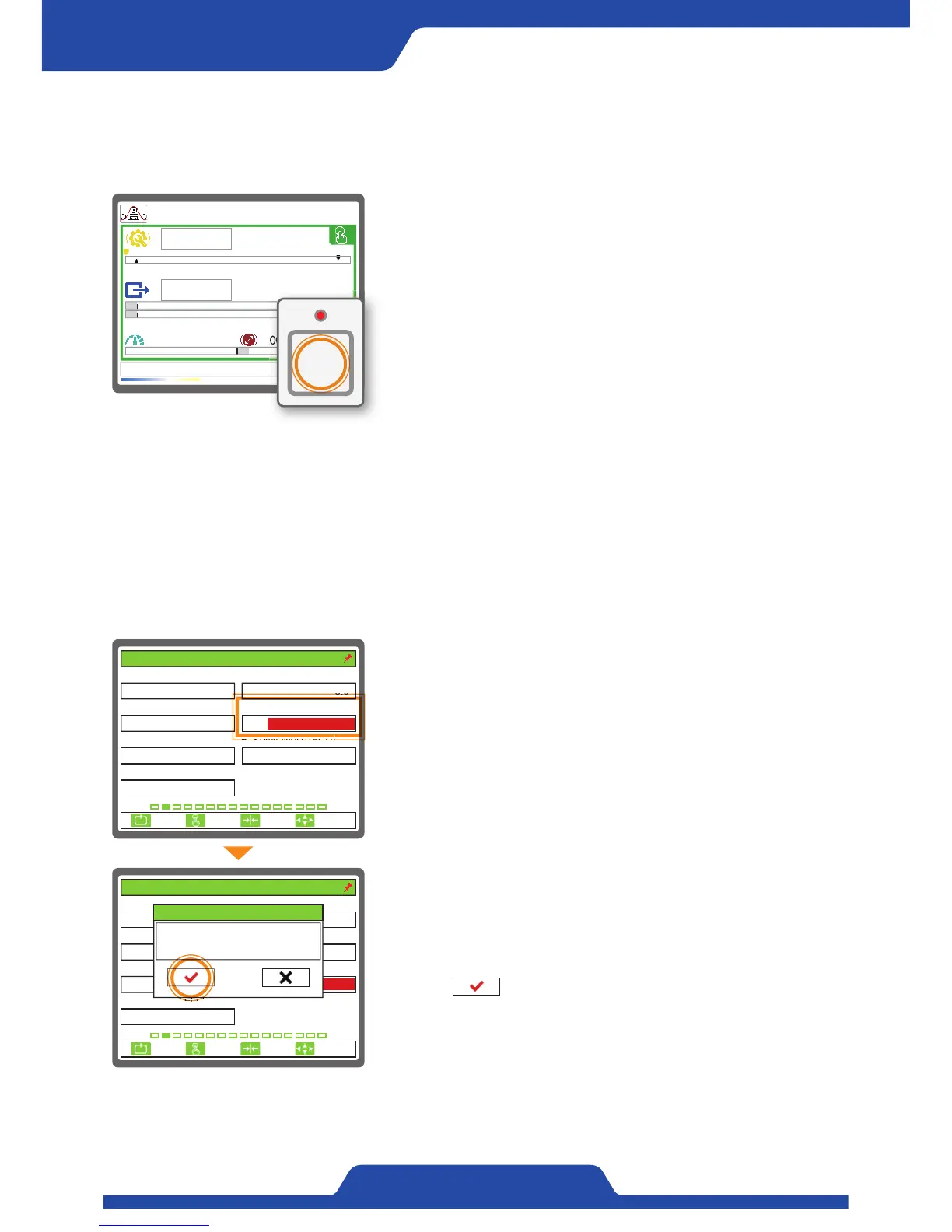
1) When pressing [zero button] longer in manual or automatic mode,
current tension becomes zero.
2) At this time, LED at the top of [zero button] starts to work.
3) It is able to also set zero by using digital input contact point.
4) In case of dancer roll, please set zero by fixing to the position (the
lowest limit of dancer roll) where tension is lowest.
2. Setting zero
※ To carry out setting zero, please remove materials on the top of the roller where tension detector is installed at
first.
1) Please set [4. CAL. TENSION]. The value of tension calibration is as
much as the load applied to a roller.
( Setting mode -> 2. TENSION CALIBRATION -> [4. CAL. TENSION] ->
Entering the value of calibrated tension values.)
3. Span Setting
※ Please complete zero setting point at first before span setting and adapt the angle of materials at the top of
roller where tension detector is installed and then apply load. For smooth tension detecting, precise span
setting should be done.
2) Activate [6. SPAN INPUT(BCD)] to complete span setting by entering
current data.
(Setting mode -> 2. TENSION CALIBRATION -> Activating an article
by pressing [Enter button] in [6. SPAN INPUT(BCD)] -> Pressing a
button ( ) to complete span setting.)
3) In case of dancer roll, please set span by fixing to the position (the
upper limit of dancer roll) where tension is maximum.
0.0kg
0.0kg
0.0mpm 100.0mm
T
5.8%
~
Tension zero!
ESC CLR SET
SELECT
1. SENSOR SELECT 2. SENSOR SIG(mV/V)
3. FULL SCALE(kg, N) 4. CAL. TENSION(kg, N)
5. ZERO INPUT(BCD) 6. SPAN INPUT(BCD)
100
PRTL
4095/ 40950/ 0
7. CALI. SCALE(%)
100.0
3.0
2. TENSION CALIBRATION
30
ESC CLR SET
SELECT
1. SENSOR SELECT 2. SENSOR SIG(mV/V)
3. FULL SCALE(kg, N) 4. CAL. TENSION(kg, N)
5. ZERO INPUT(BCD) 6. SPAN INPUT(BCD)
100
PRTL
0/ 0
7. CALI. SCALE(%)
100.0
3.0
30
2. TENSION CALIBRATION
4095/ 4095
Curr. 4095/ 4095
6. SPAN INPUT(BCD)
-150/ -150


 To Next Page