31
PORA ELECTRIC MACHINERY CO.,LTD.
PR-DTC-4100.A / AD
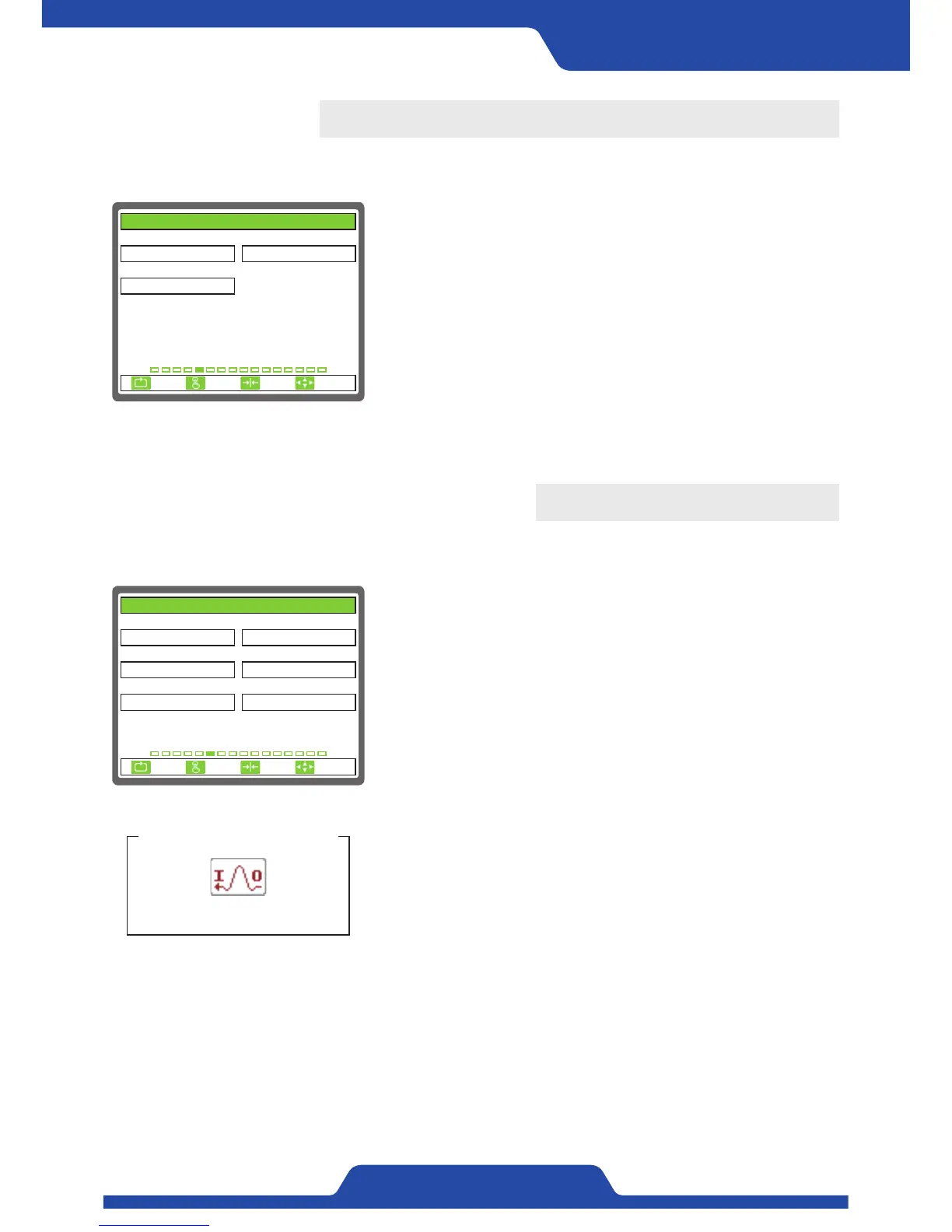
5. PID SET
It is able to set the items related to control sensitivity.
1) P GAIN: It is to set proportional control sensitivity.
●
Setting range: 0.0 ~ 10.0
2) I GAIN: It is to set integral control sensitivity.
●
Setting range: 0.0 ~ 10.0
3) D GAIN: It is to set differential control sensitivity.
●
Setting range: 0.0 ~ 10.0
※NOTE
For setting P·I·D sensitivity, please enter P·I·D sensitivity setting
mode while in automatic mode and check control output to adjust each
figure. (Please refer to page 23)
1. P GAIN 2. I GAIN
3. D GAIN
0.3
0.1
0.5
5. PID SET
ESC CLR SET
SELECT
6. ANALOG INPUT SEL.
It Is able to set the items related to analog input.
1) ANALOG 1: It Is able to set the items related to analog input.
●
Setting item: UNUSE, TENSION, TORQUE, LINESPEED, DIAMETER,
DANCER ROLL
2) ANALOG 1 INPUT: It is to set the input signal of Analog No. 1
terminal.
●
Setting item: 0...10V, 4...20mA
- The data will not be read correctly if the setting is wrong.
3) ANALOG 2: It is to set the items which is input to Analog No. 2
terminal.
- Setting item: UNUSE, TENSION, TORQUE, LINESPEED, DIAMETER,
DANCER ROLL
4) ANALOG 2 INPUT: It is to set the input signal of Analog No. 2
terminal.
●
Setting item: 0...10V, 4...20mA
- The data will not be read correctly if the setting is wrong.
5) ANALOG 3: It is to set the items which is input to Analog No. 3
terminal.
●
Setting item: UNUSE, TENSION, TORQUE, LINESPEED, DIAMETER,
DANCER ROLL
6) ANALOG 3 INPUT: It is to set the input signal of Analog No. 3
terminal.
●
Setting item: 0...10V, 4...20mA
- The data will not be read correctly if the setting is wrong.
※NOTE
An icon will not be shown when not using Analog 1, 2, 3.
ANALOG - Setting
An icon shown on a screen
1. ANALOG 1 2. ANALOG 1 INPUT
3. ANALOG 2 4. ANALOG 2 INPUT
5. ANALOG 3 6. ANALOG 3 INPUT
UNUSE
UNUSE
0...10V
0...10VUNUSE
0...10V
6. ANALOG INPUT SEL.
ESC CLR SET
SELECT


 To Next Page