21
PORA ELECTRIC MACHINERY CO.,LTD.
PR-DTC-4100.A / AD
If an error occurs and materials or a weight
is hung, please get rid of all and start from
first.
Span setting of tension detector: The load of tension detector by tension of materials changes depending on the
way where a detector is installed or the load angle of materials. To calibrate it, please proceed span setting.
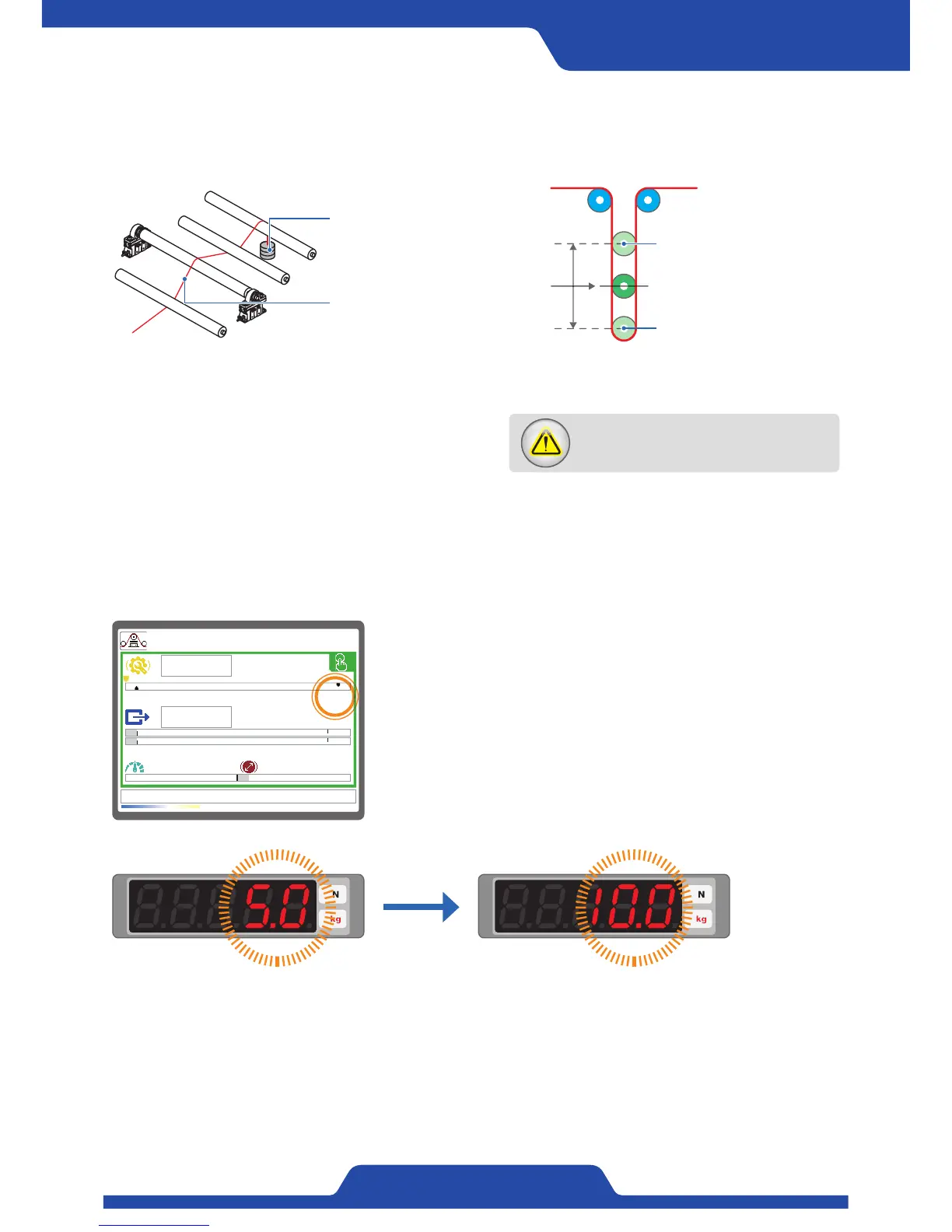
(※ Please install a counterweight whose the maximum load of a tension detector is 30~100% to a roller like below. For example, In
case that the maximum load of a tension detector is 100kg, select a counterweight which is 30~100kg.)
[ In case of dancer roll ][ In case of load cell ]
Counterweight:
30~100% weight of the
maximum load from a
tension detector.
The upper part of dancer roll
(Position to set span)
The lower part of dancer roll
(Position to set zero)
Please let a string which
has a counterweight for
the upper limit of dancer
roll (Span setting location)
pass trough in the middle
of roller like an image.
Please be sure for a
string not to pass though
below a roller where
a tension detector is
installed.
1) In manual or automatic mode, when pressing [Up/down button] at
the same time, it gets to enter scale setting mode.
2) Tension values on display becomes red color, figures indicating
tension in FND starts to flicker. At this time, adjust figures of tension
using [Dial button].
3) After complete calibration, exit scale setting mode with pressing [Up/
down button] together longer.
4. Tension calibration (Scale setting)
※ If it is not possible to span setting depending on circumstances or a user just knows the materials of tension at
a guess, it is able to calibrate tension by setting scale.
0.0kg
5.0kg
0.0mpm 100.0mm
T
5.8%
~


 To Next Page