35
PORA ELECTRIC MACHINERY CO.,LTD.
PR-DTC-4100.A / AD
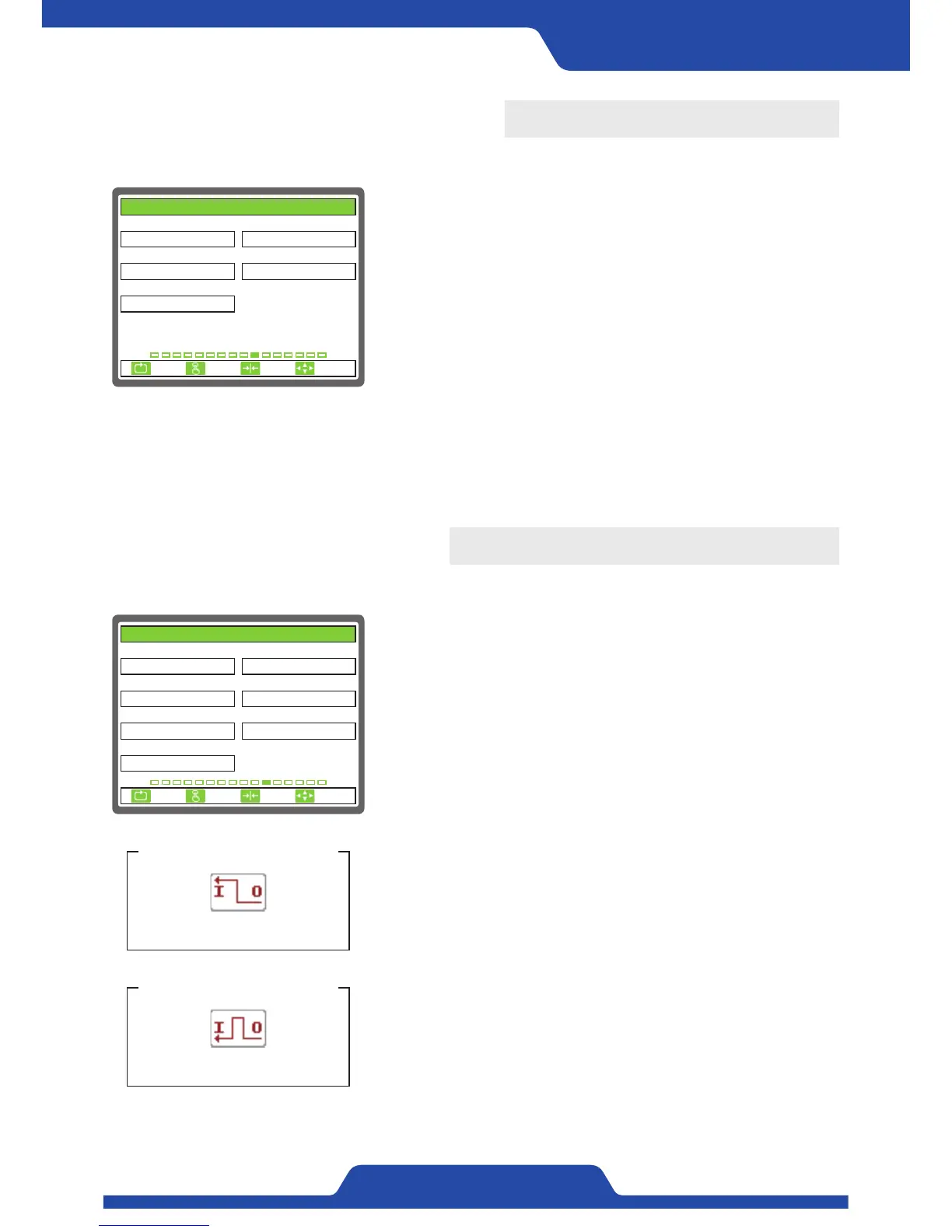
10. ANALOG OUTPUT
It is able to set the items related to analog output.
1) CONTROL OUTPUT: It is to select analog output which is used as
control output.
●
Select item: 0...5V, 0...10V, -10...+10V, 4...20mA, 0...20mA
- Please sort voltage, current and use relevant terminal.
2) CONTROL POLARITY: It is to set the way of analog control output.
●
Select item: NORMAL, REVERSE
3) CONTROL LMT(% RO): It is to set the maximum values of analog
control output.
- Setting range: 0.0 ~ 100.0
1. CONTROL OUTPUT 2. CONTROL POLARITY
3. CONTROL LMT(% RO) 4. TENSION OUTPUT
5. TENSION POLARITY
100.0
0...10V
NORMAL
0...5V
NORMAL
10. ANALOG OUTPUT
ESC CLR SET
SELECT
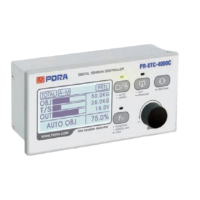
11. DIGITAL INPUT
It is able to set the items which will be used digital input terminal.
1) DIGITAL 1: It is to select the items which will be used digital input
No. 1 terminal.
●
Select item: UNUSE, AUTO, MANU, OUT ON/OFF, ZERO, EMS,
CHANGE, DIA.RESET
2) DIGITAL 2: It is to select the items which will be used digital input
No. 2 terminal.
●
Select item: UNUSE, AUTO, MANU, OUT ON/OFF, ZERO, EMS,
CHANGE, DIA.RESET
3) DIGITAL 3: It is to select the items which will be used digital input
No. 3 terminal.
●
Select item: UNUSE, AUTO, MANU, OUT ON/OFF, ZERO, EMS,
CHANGE, DIA.RESET
4) DIGITAL 4: It is to select the items which will be used digital input
No. 4 terminal.
●
Select item: UNUSE, AUTO, MANU, OUT ON/OFF, ZERO, EMS,
CHANGE, DIA.RESET
5) DIGITAL 5: It is to select the items which will be used digital input
No. 5 terminal.
●
Select item: UNUSE, AUTO, MANU, OUT ON/OFF, ZERO, EMS,
CHANGE, DIA.RESET
6) DIGITAL 6: It is to select the items which will be used digital input
No. 6 terminal.
●
Select item: UNUSE, AUTO, MANU, OUT ON/OFF, ZERO, EMS,
CHANGE, DIA.RESET
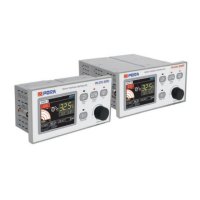
7) INPUT TYPE: It is to select the way of digital input signal.
●
Select item: HOLD, PULSE
- When selecting‘hold’, relevant operation is executed only while
relevant input is being kept.
INPUT TYPE - HOLD
An icon shown on a screen
INPUT TYPE - PULSE
An icon shown on a screen
1. DIGITAL 1 2. DIGITAL 2
3. DIGITAL 3 4. DIGITAL 4
5. DIGITAL 5 6. DIGITAL 6
ZERO
AUTO
DIA. RESETCHANGE
7. INPUT TYPE
HOLD
EMS
OUT ON/OFF
11. DIGITAL INPUT
ESC CLR SET
SELECT
4) TENSION OUTPUT: It is to select analog output which is going to be used as tension output.
●
Select item: 0...5V, 0...10V, 4...20mA, 0...20mA
- Please sort voltage, current and use relevant terminal.
5) TENSION POLARITY: It is to set the way of analog tension output.
●
Select item: NORMAL, REVERSE
- If the tension is 0 in reverse way, maximum analog values is outputted.


 To Next Page