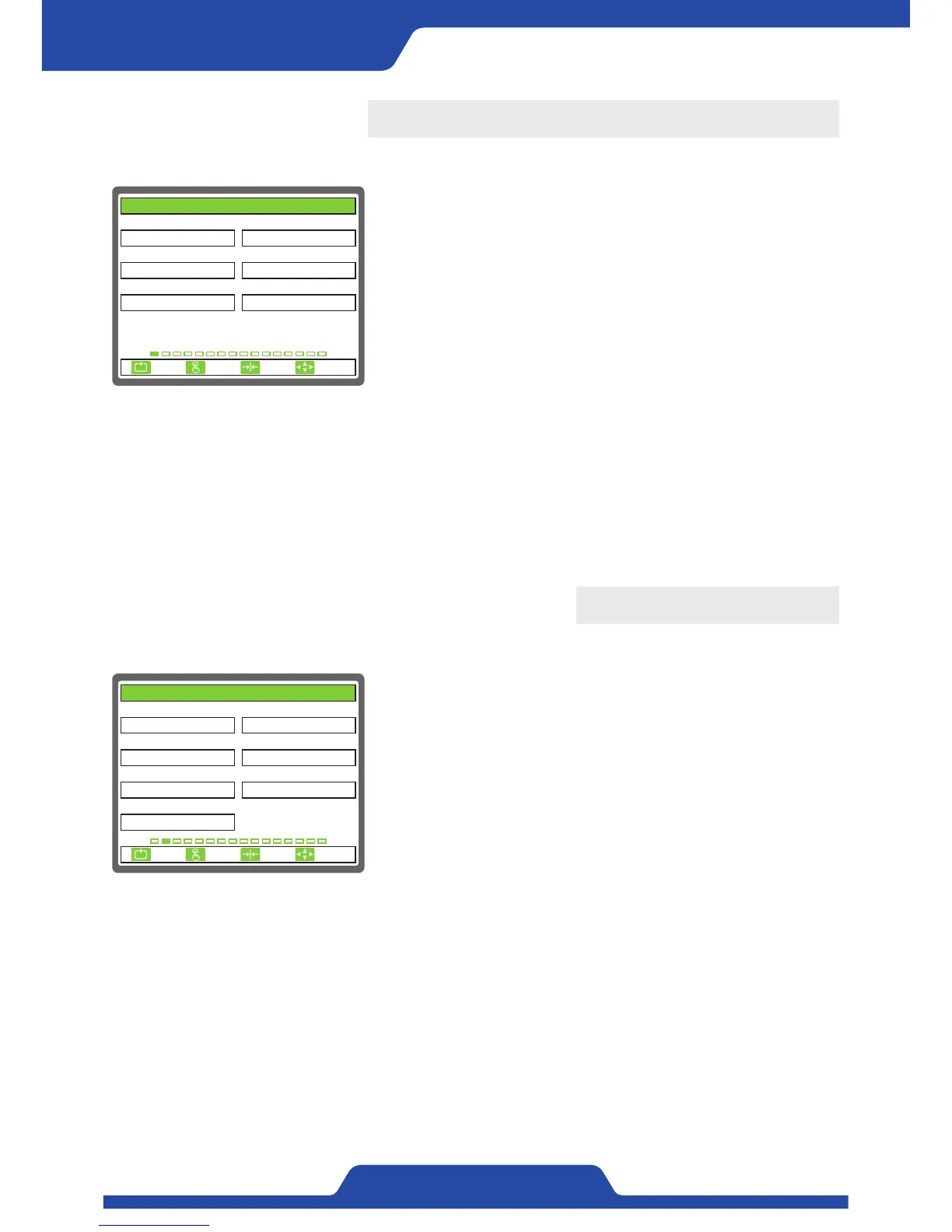
1. BASIC SET
These are the items which needs to be set basically.
1) TENSION UNIT: It is to set the unit of tension which will be shown on
a screen.
●
Setting item: kg, N
2) MAIN DISPLAY: It is to set the mode of main display.
●
Setting item: BAR GRAPH, TREND GRAPH, DATA
3) 언어/LANGUAGE: It is to set the language.
●
Setting item: 한국어(Korean), ENGLISH, 中文(Chinese)
4) START OPERATION: It is to set the way of operation when turning on
the power.
●
Setting item: LOCAL, REMOTE
1. TENSION UNIT 2. MAIN DISPLAY
3. 언어/LANGUAGE 4. START OPERATION
5. OP. MEMORY 6. DEFAULT RESET
kg
ENGLISH
BAR GRAPH
NOUSE
LOCAL
1. BASIC SET
ESC CLR SET
SELECT
5) OP. MEMORY: It is to set to decide whether a controller remembers previous operation mode when turning off
the power.
●
Setting item: USE, UNUSE
6) DEFAULT RESET: This is to initialize data (back to factory setting).
●
Setting item: NO, EXVEPT CALI, ALL RESET
- NO: This does not initialize data.
- EXVEPT CALI: Data which calibrates tension is not initialized.
- ALL RESET: All data including tension calibration data are initialized.
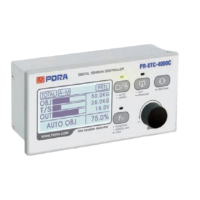
2. TENSION CALIBRATION
It is to set the items related tension calibration.
1) SENSOR SELECT: It is to set the sensor a user wants to use.
●
Setting item: PRTL, PRLX, PRTP, DANCER ROLL
- Setting value of [2. SENSOR SIG(mV/V)] changes automatically
depending on PRTL, PRLX, PRTP, DANCER ROLL. Dancer roll is only
selectable when dancer roll is set at analog input in main item of [6.
SPAN INPUT(BCD)]
2) SENSOR SIG(mV/V): It is to input the output specifications of a
tension detector.
- Setting range: 1.0 ~ 35.0
3) FULL SCALE(kg, N): It is to set the maximum values of used tension.
- Setting range: 0 ~ 20000
1. SENSOR SELECT 2. SENSOR SIG(mV/V)
3. FULL SCALE(kg, N) 4. CAL.TENSION(kg, N)
5. ZERO INPUT(BCD) 6. SPAN INPUT(BCD)
100
0/ 0
PRTL
7. CALI. SCALE(%)
100.0
30
3.0
2. TENSION CALIBRATION
ESC CLR SET
SELECT
4095/ 4095
4) CAL.TENSION(kg, N): It is to input the weight of a counterweight which becomes the standard of tension
calibration.
- Setting range: 0 ~ 20000
5) ZERO INPUT(BCD): It is to input the zero point of a tension detector.
- Setting range: -32767 ~ 32767
- Please input under the condition that a material and a counterweight are all removed.
6) SPAN INPUT(BCD): It is to input the data of a tension detector using a counterweight for calibration.
- Setting range: -32767 ~ 32767
7) CALI. SCALE(%): It is to calibrate tension by adjusting current scale of tension when there is not a
counterweight for calibration.
- Setting range: 0.0 ~ 1000.0
- Please only use this function when it is possible to estimate current tension.


 To Next Page