2. Checking abnormalities
Consumables which have short-term life are not equipped with this product. However, please check the below
regularly.
1) If the internal temperature is too high because of a heating element, direct right and etc?
2) If an alien substance and electric conductive particles are mixed inside?
3) If there is a loosening of connecting and terminal or else?
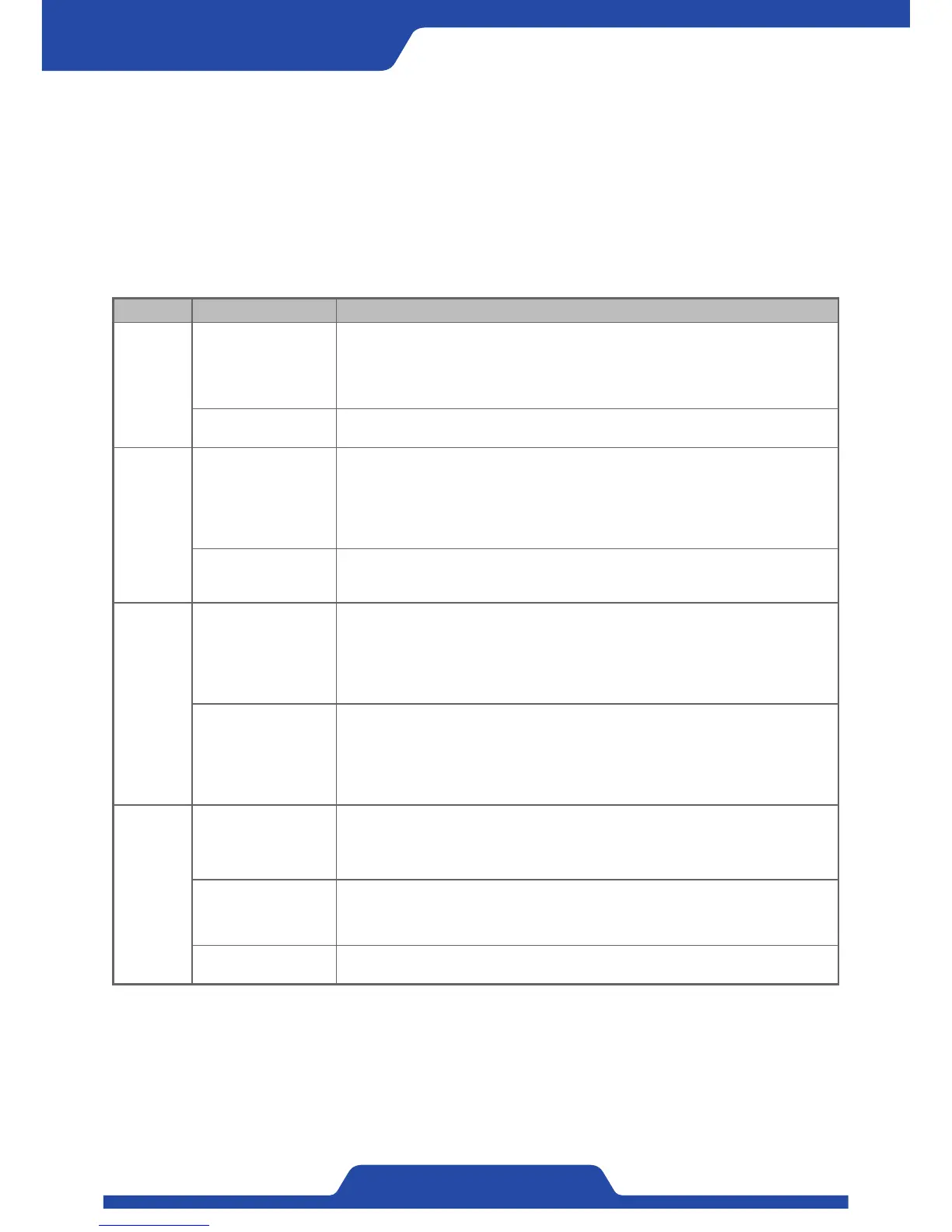
Item Symptom Response
Power
related
Controller does not
work.
1. Please check if the power voltage 100~240Vac and also the connection is right.
2. Please check if the foreign substance is inflowed.
3. Please check if the load is connected well.
4. Please contact PORA if there is a problem to power system inside a product.
HEALTH LED in front
part is off.
Please remove all electric connections except for power and contact PORA if same things
happened again.
Abnormality
of output
Control output dose not
generate.
1. Please check if the set-up output figures and real figures are matched.
2. Please check if the load at the terminal is connected well.
3. Please check current output setting (A.B shaft) and if it is connected to the shaft which
would be controlled.
4. Please check Fuse(7A) because it may be disconnection to Fuse due to overload.
Control output is shaken
severely in automatic
mode.
1. Please set P.I.D sensitivity to adjust the speed of output.
2. Please check if the tension is shaken.
Abnormality
of tension
Tension values are
shaken severely.
1. Please check if the setting is matched with a tension detecting sensor which would be
used.
2. Please check if tension calibration is done well and do re-calibrate.
3. Please check if ground connection is done well.
4. Please check if a tension detector has a problem.
Tension value does not
change.
1. Please check if the setting is matched with a tension detecting sensor which would be
used.
2. Please check if a tension detecting sensor is connected well.
3. Please check if tension calibration is done well and do re-calibrate.
4. Please check if a tension detecting sensor has a problem.
Abnormality
of operation
Buttons at front panel
do not work.
1. Please check in advance that button lock function and LED at the top of [lock button]
are on and an icon indicating lock function in LED display is shown.
2. Please check an icon in LCD display to see if remote function is activated to be hold
input.
Remote input does not
work.
1. Please check if remote input is activated. (Checking Remote LED)
2. Please check communication function (Modbus Ethernet) is being used.
3. Please check the input setting which would be used is done well. (Hold, Pulse)
Alarm LED at the front
part is off.
Please check the history table of alarm and if relevant alarm operation is right.
※If other symptoms besides that or problem occur, please contact PORA. (+82-31-455-8183)


 To Next Page