25
PORA ELECTRIC MACHINERY CO.,LTD.
PR-DTC-4100.A / AD
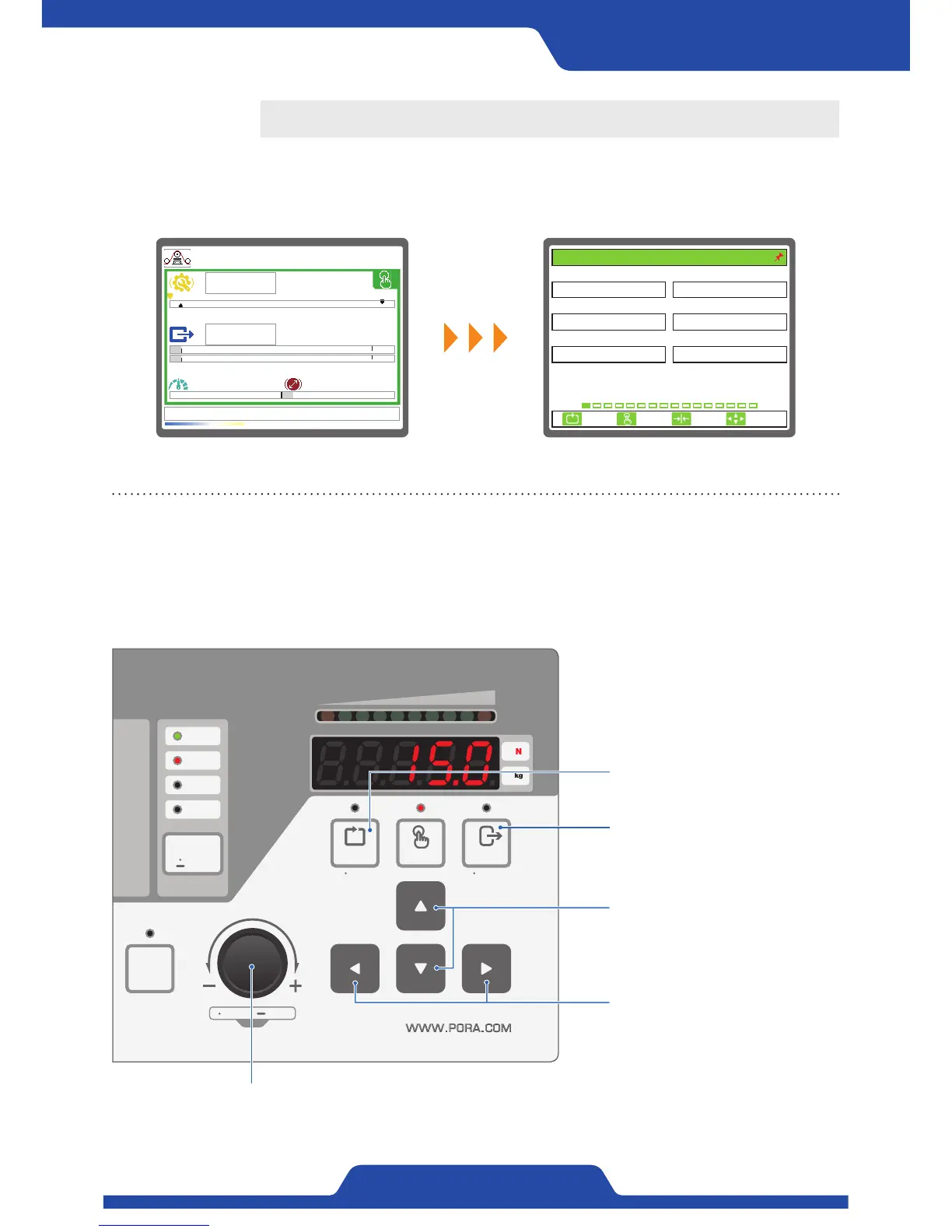
When pressing [Dial button] longer at front operational part, the screen like below will be shown.
0.0kg
0.0kg
0.0mpm 100.0mm
T
5.8%
~
Guidance on a button to be used when setting a
menu
●
Dial button
- Pressing longer: Setting executed (Only available in manual mode)
- Pressing shorter: Choosing setting item
- Dial rotation: Moving setting item or changing figures
Input button:
Using as a setting input button
Cancel button:
Using as a setting cancel button
Up/down button:
Moving a menu item to upward or
downward
Left/Right button:
Moving to left/right
Setting
1. TENSION UNIT 2. MAIN DISPLAY
3. 언어/LANGUAGE 4. START OPERATION
5. OP. MEMORY 6. DEFAULT RESET
kg
ENGLISH
BAR GRAPH
NOUSE
LOCAL
1. BASIC SET
ESC CLR SET
SELECT


 To Next Page