User’s Manual 18
3. Operation of the Mobile Computer
3.1 Keypad Description
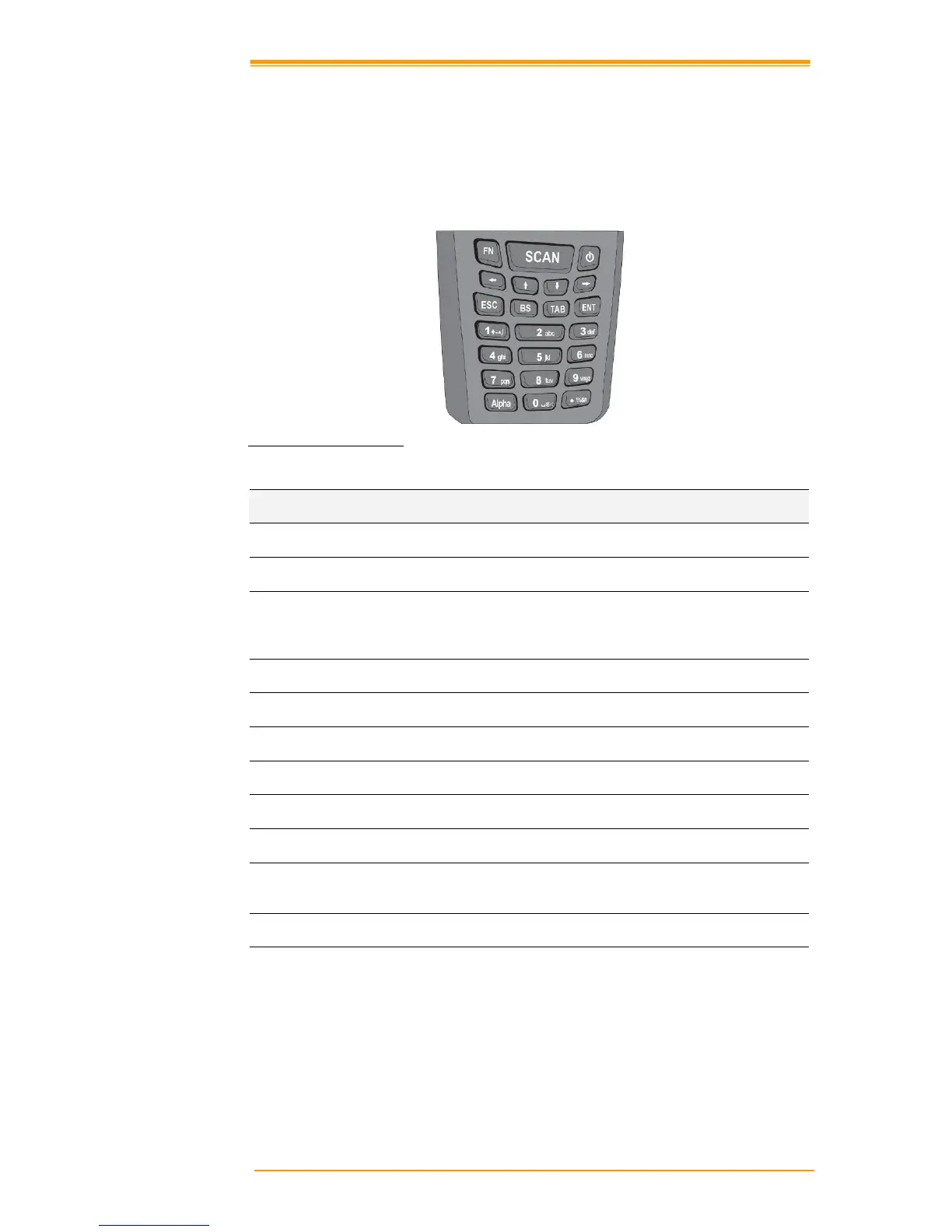
The TPC7 050 keypad consists of 23 rubber keys, including Cursor key, 0~9, Alpha key, Function,
Escape, Backs
pace, TAB and Enter key. Please refer to the picture below.
Figure 3-1 Keypad Layout
Key Define
Function
Function Key The Function key is used to perform alternative key function
Scanning Enable scanner, only if the scan function is required.
Power Switch When the unit is off, pressing the Power key turns the unit on.
Alternatively, when the unit is on, this key must be pressed and held down
for about two seconds in order to turn the unit off.
Shift Left Cursor moves left
Shift Up Cursor moves up
Shift Down Cursor moves down
Shift Right Cursor moves right
Esc Exit and back to the last layer.
Back space The Backspace key is used to erase previously input characters.
TAB The Tab key is used to toggle between data fields or to place the cursor at
pre-determined places in a programming or word processing application.
Enter Item selection confirmed or data input completed
Alpha Switch Transform alphabet and numeral mode. This Alpha key is also used to
toggle CAPS at Alpha Mode



 To Next Page