User’s Manual 27
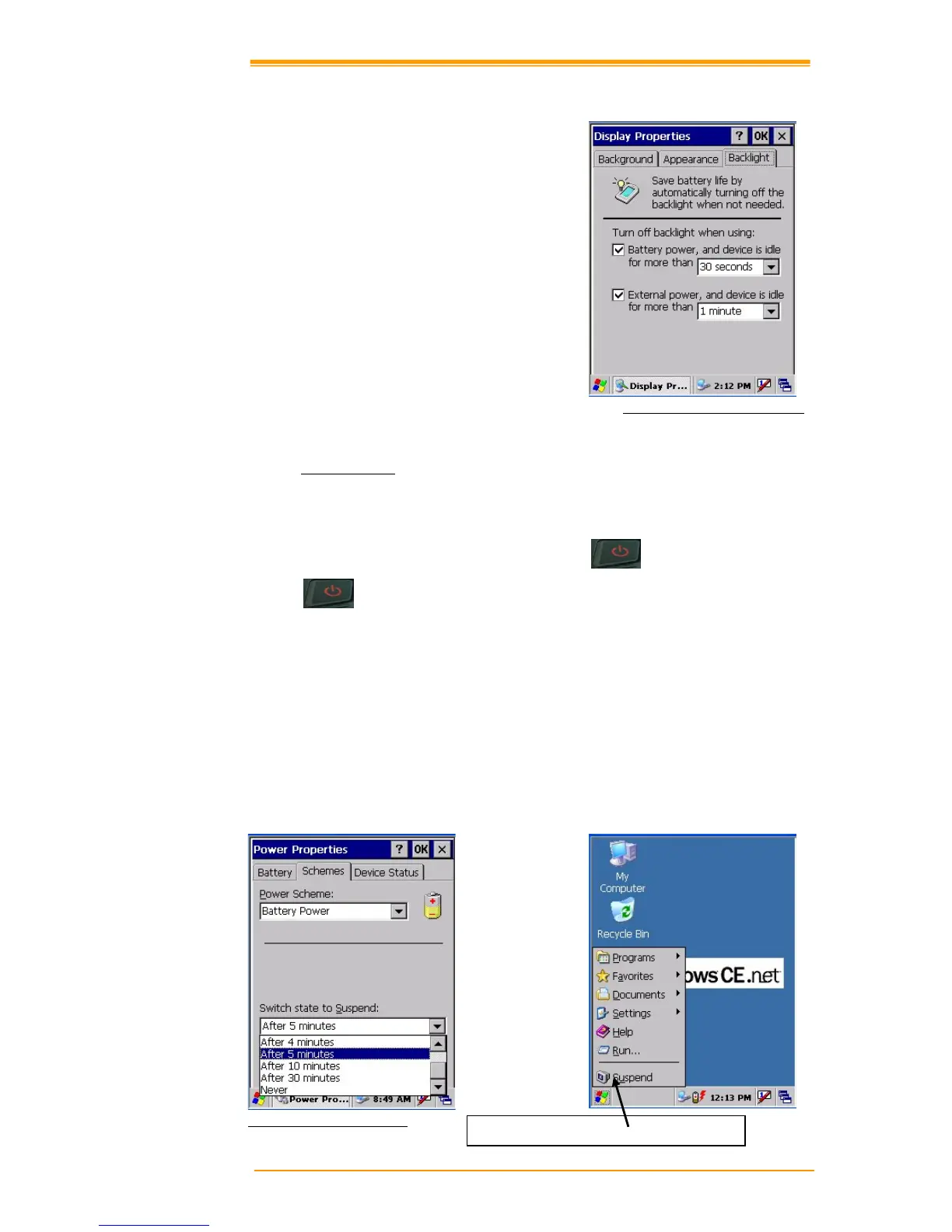
Automatically turn off the backlight when using external power:
Tap the check box to toggle this function.
Available idle times are: 15 and 30 seconds,
and 1, 2, 5, 10, 15 and 30 minutes.
Figure 3-10 Display Properties
3.6.3 Suspend Mode
The TPC7050 will go into suspend mode when it is idle for a period of time. Customize the idle
duration using the Power control panel (refer to Figure “Schemes Tab”). Suspend mode
appears just like you have turned the unit off. Press the
key to suspend the TPC7050.
Press the
key again for the TPC7050 to resume its previous state.
Use the Battery Power control panel to set the duration to switch to Suspend mode when the
system uses battery power. This saves battery power when the TPC7050 is not in use.
Entering Su
spend Mode:
The following puts the TPC7050 in suspend mode:
! Press <Po
wer> key while the unit is on.
! The duration timer for “Switch state to Suspend” expires, which indicates that
there has been no use for a specified of time.
! The battery pack discharges completely.
! Tap Start > Suspend
Figure 3-11 Suspend Mode
Tap here to put the TPC7050 into suspend mode



 To Next Page