___________________________________________________________________________________________________________
Part Number 6300-095D Page 22 of 43
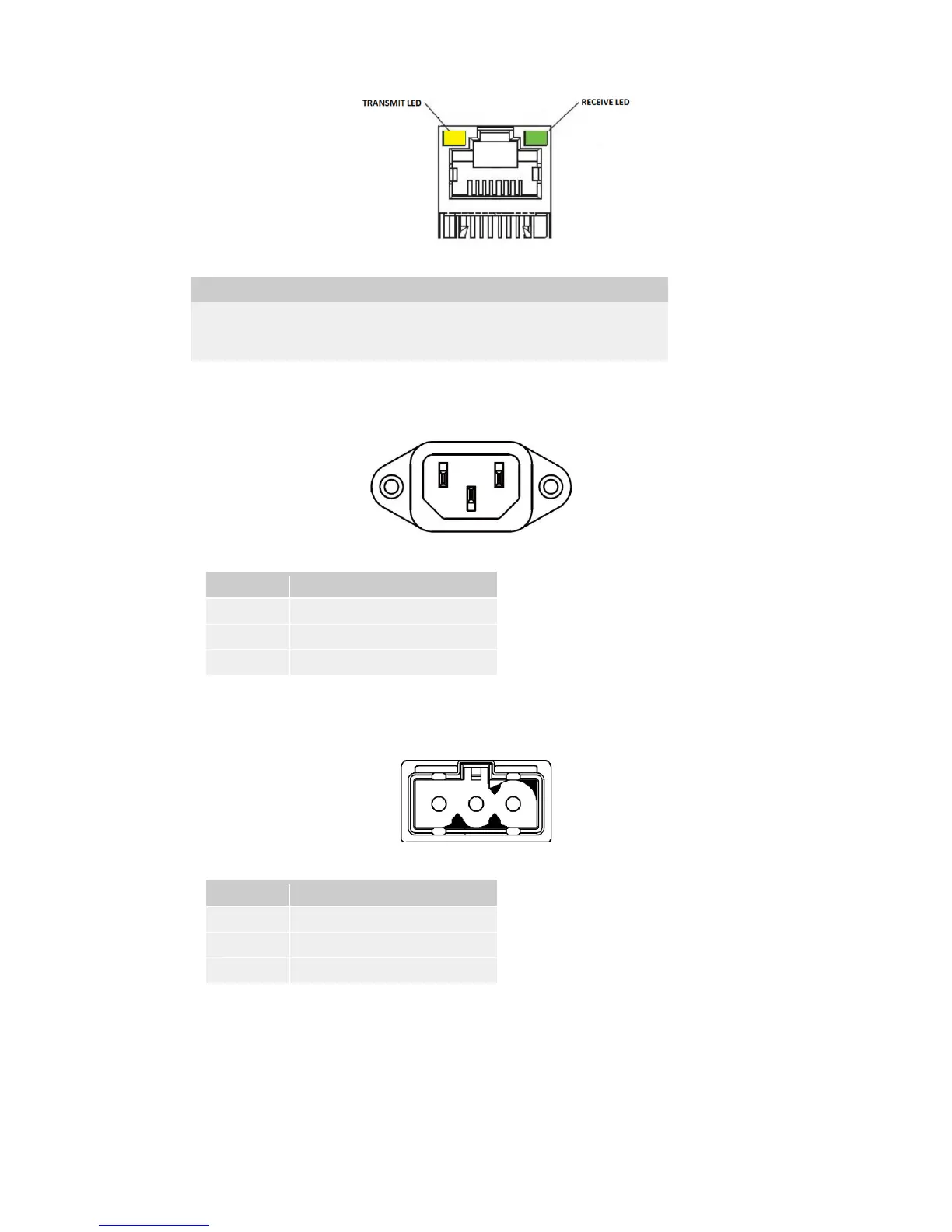
• Hub Ports: The PowerShield Controller has 8 hub ports that can be used to communicate with Hubs or
mSensors. The behaviour of the LEDs on each hub port are as follows:
Transmit Yellow
Flashes when the Controller is transmitting data.
Receive Green
Flashes when the Controller is receiving data.
• Power Connector: The PowerShield Controller is available in AC input or DC input models.
The
AC input model has a standard 3-pin male IEC 60320 C14 appliance inlet as shown below:
1 2 3
Pin Function
1 (Left) Neutral
2 (Centre) Earth
3 (Right) Live
The D
C input models are fitted with a male 3 way input socket as shown below:
1 2 3
Pin Function
1 (Left) DC supply positive
2 (Centre) Earth
3 (Right) DC supply negative
The DC input models are supplied with a mating female screw terminal plug. Refer to Appendix 8 for wiring
details of the DC input model plug.
• Cable Tray: The case features a cable tray that extends beyond the rear panel connectors. Cables can be
secured to the cable tray to prevent them being accidentally unplugged and provide some strain relief.



 To Next Page