23
ADMIN: User Menu
In the User Menu, the Administrator can add, edit and remove
Add A New User:
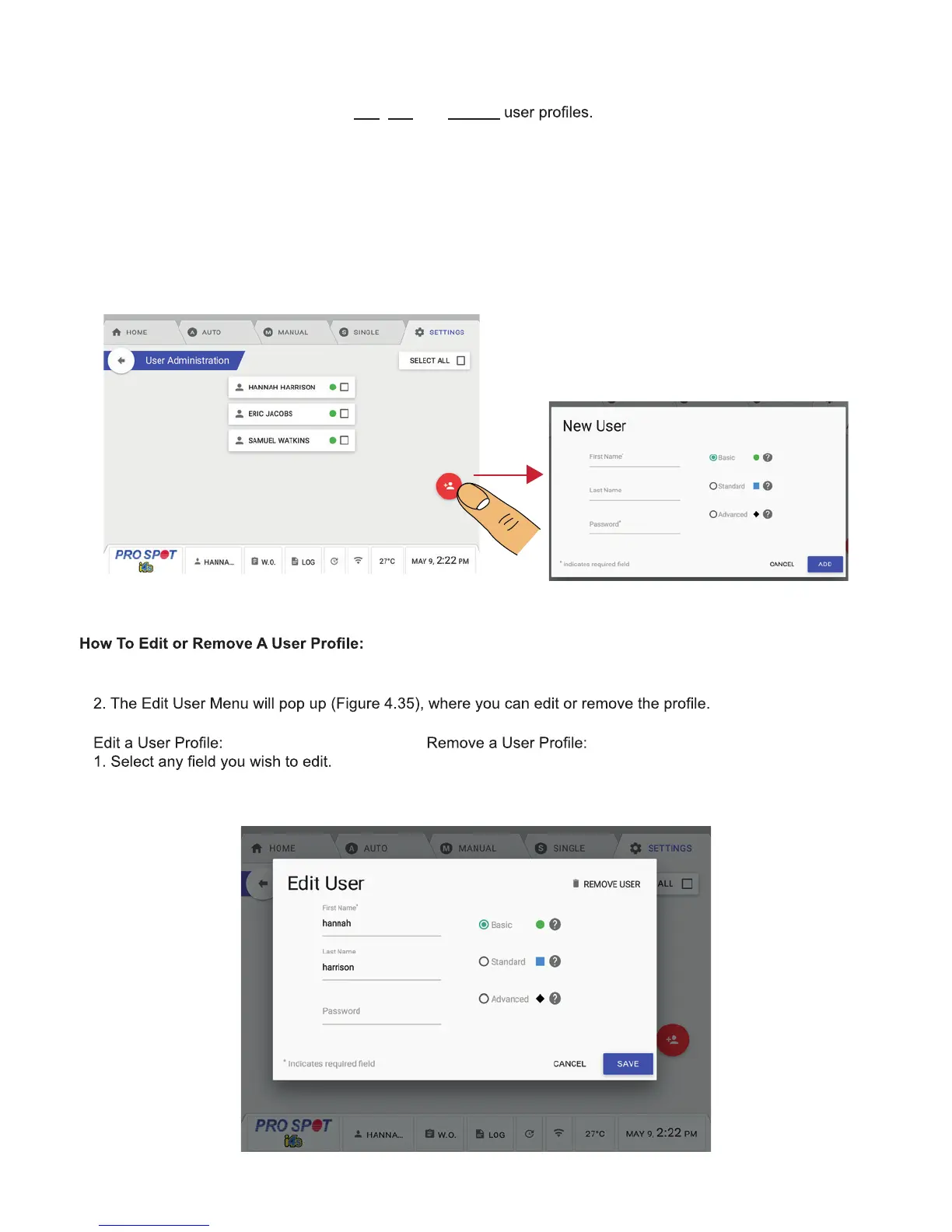
1. Navigate to the User Menu and select the red Create User Button in the bottom right (Figure 4.33).
2. Once you select Create User, a new user prompt will pop up and ask you for the New User details (Figure 4.34).
3. Enter the user’s information and determine their user level - Basic, Standard or Advanced. Then press the Add
button to add the user.
Basic User Settings: Not permitted to change any advanced settings.
Standard User Settings: Permitted to change advanced settings.
Advanced User Settings: Permitted to change Auto Mode advanced settings.
1. Navigate to the Users Menu and select the user you want to edit or remove.
2. Once your edits are done, hit save.
1. Press the Remove User button located on the top
right-hand side, then hit save.
Figure 4.33 Figure 4.34
Figure 4.35



 To Next Page