Beta Draft Confidential
2-16 Internet Managed Thermostat Configuration Guide, Release 1.0
Part No. 600-03001-550, Rev. 1
CHAPTER 2: Configuring the Thermostat Using the Web Interface
Special Days Examples
This section describes some examples of adding Special Days to the thermostat.
Example 1
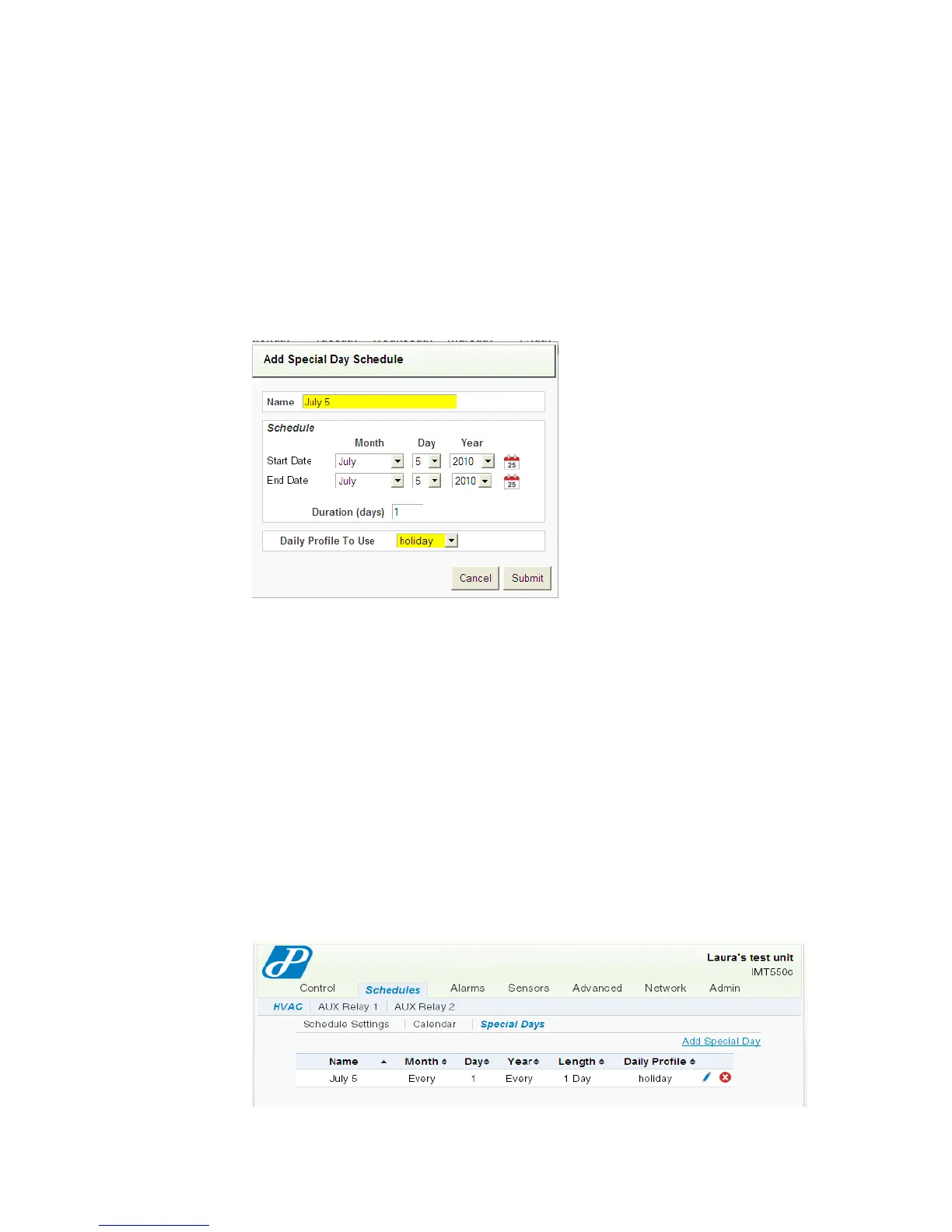
Figure 2-13 shows an example of changing the July 5, 2010 from a Profile 1 to a
holiday profile. This represents a change to the default weekly schedule for July 5,
2010 and requires a single Special Day entry in the Special Days table.
Figure 2-13 Special Days - Example 1A
You can enter this information in the Special Days table using either of the following
methods:
Configure the Profile (see Daily Profile Definitions (page 2-11)) to reflect the
desired settings. Click directly on the date on the Calendar. The Add Special Day
Schedule page appears and automatically populates the Start Date and End
Date. One day is the default duration, but you can change this field to any number
of days less than the 60 day maximum. Modify the fields as necessary. Click
Submit. The Special Day displays on the Special Days table and Calendar.
Configure the Profile (see Daily Profile Definitions (page 2-11)) to reflect the
desired settings. From the Special Days page, click Add Special Days. The Add
Special Days Schedule appears. Modify the fields as necessary. Click Submit.
The Special Day displays on the Special Days table and Calendar.
Figure 2-14 Special Days - Example 1B



 To Next Page