Beta Draft Confidential
Advanced Page
Internet Managed Thermostat Configuration Guide, Release 1.0 2-35
Part No. 600-03001-550, Rev. 1
Override Settings
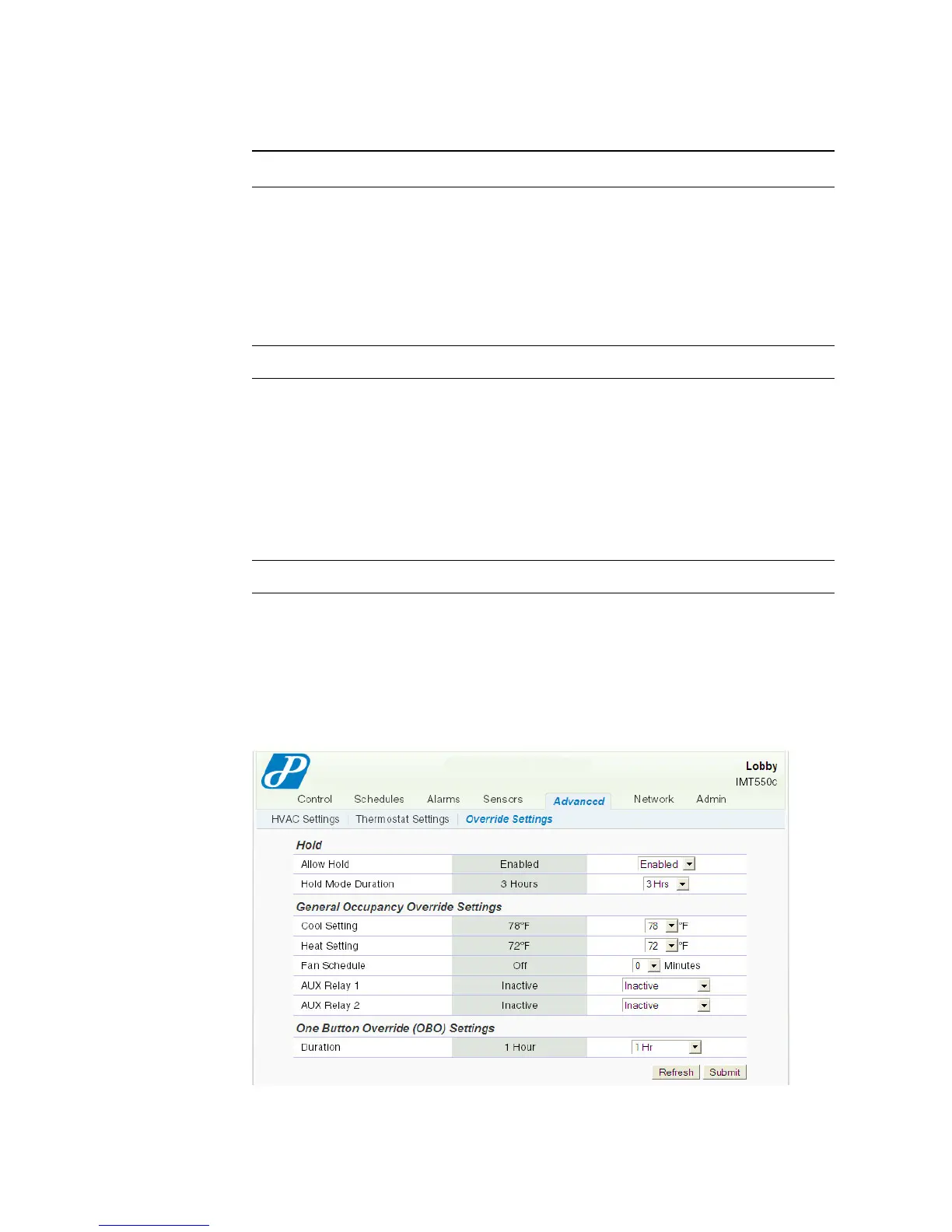
The Advanced - Override Settings page displays the override cool, heat, and AUX
Relay settings, for example.
Figure 2-26 Advanced - Override Settings Page
Setpoint Deadband Establishes the temperature limits above and below the
established setpoint, within which the heating or cooling cycle is
activated and maintained. The anticipator algorithm operates
within this differential range about the setpoint. Optimal comfort
is achieved when this differential is set to 2 (default) or +/- 1°F
about the setpoint. Reduced cycle time is achieved with a larger
differential setting (e.g. 4) or +/- 2 °F about the setpoint.
0,1,2,3,4,5,6,7,8,9,10°F (0,1,2,3,4,5°C)
LCD Button Lockout
Button Lockout When enabled, this feature prevents a user from directly altering
the settings of the thermostat from the thermostat’s button
interface. The button lockout icon appears on the thermostat
LCD screen.
Disabled (default) – Allows normal thermostat button
activity.
Enabled – Prevents unwanted user access at the thermostat
button interface except for limited or no temperature
adjustments.
Setpoint Override
Table 2-9 Advanced - Thermostat Settings Field Descriptions (Continued)
Field Description



 To Next Page