Function Description
5. UP key To increase a displayed numerical value and to
change the variables (flashing display). move up in
the operating menu.
6. DOWN key To lower a displayed numerical value and to
change the variables (flashing display). To move
down in the operating menu.
7. BACK KEY Back to the continuous display or to the start of the
respective setting menu
8. CHANGE key To change within a menu level and to move from a
changeable variable to another changeable vari‐
able within a menu option. When inputting numer‐
ical values, the cursor moves one space on
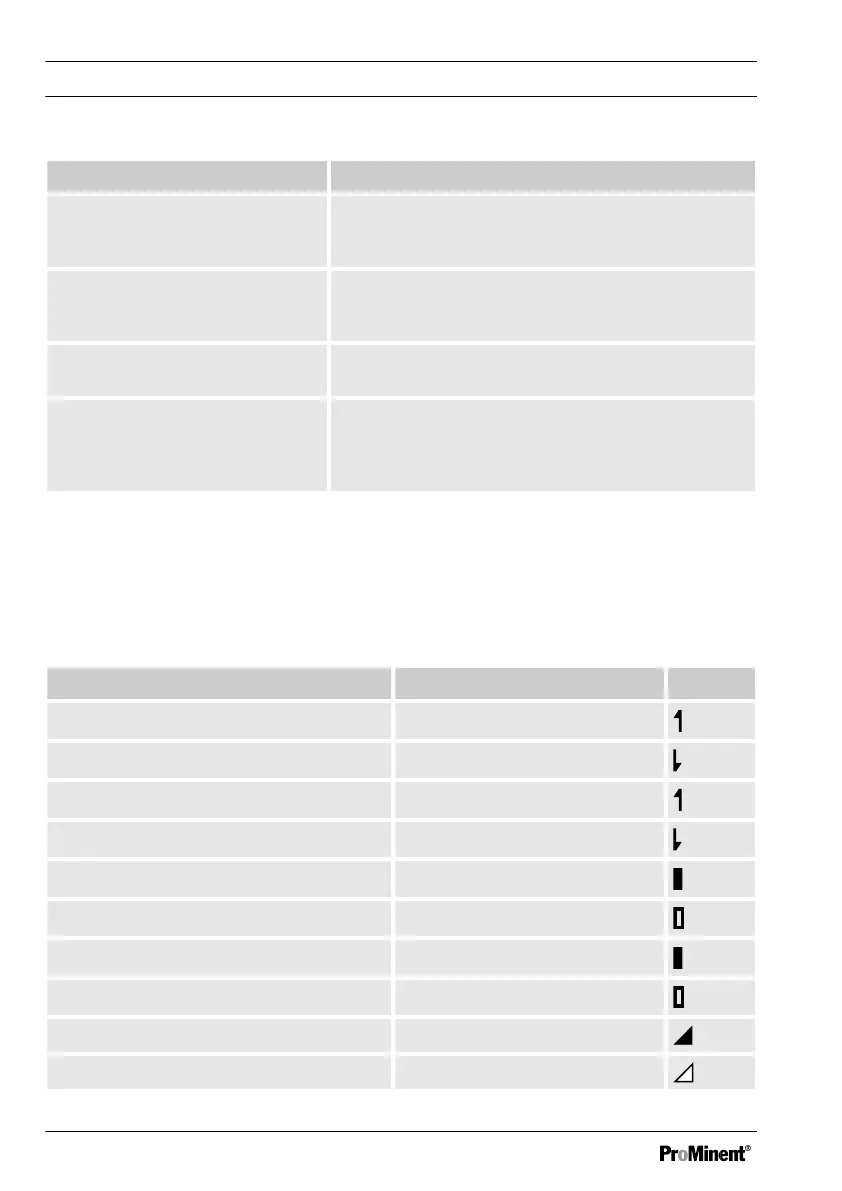
6.2 Display Symbols
The display of the DULCOMETER
®
D1Cb / D1Cc
uses the following symbols:
Meaning Comment Symbol
Limit transgression - relay 1 upper Symbol left
Limit transgression - relay 1 lower Symbol left
Limit transgression - relay 2 upper Symbol right
Limit transgression - relay 2 lower Symbol right
Metering pump 1 activation off Symbol left
Metering pump 1 activation on Symbol left
Metering pump 2 activation off Symbol right
Metering pump 2 activation on Symbol right
Solenoid valve 1 activation off Symbol left
Solenoid valve 1 activation on Symbol left
Operating diagram/ Display Symbols
60















 To Next Page