ð
You can now save the entire modified numerical value using the key.
5.
By multiple pressing of the
key you access the next menu point
6.7
Reduced / Complete Operating Menu
The DULCOMETER
®
D1Cb / D1Cc allows settings to be made in two different compre‐
hensive menus (reduced / complete). All of the parameters of the controller are preset
and can be changed in the complete operating menu.
The controller is delivered with a restricted operating menu. If adjustments are neces‐
sary, the parameters can be changed by switching to the complete operating menu.
general setting
information
Identcode:
D1CB xxxxxxxxxx
Vxxxxxxxxxx
Srnr: xxxxxxxxxxx
alarm relay
access c.:
5000
operating menu
english
reduced
A0088_GB
operating menu
Calib timer
wash timer
_
_
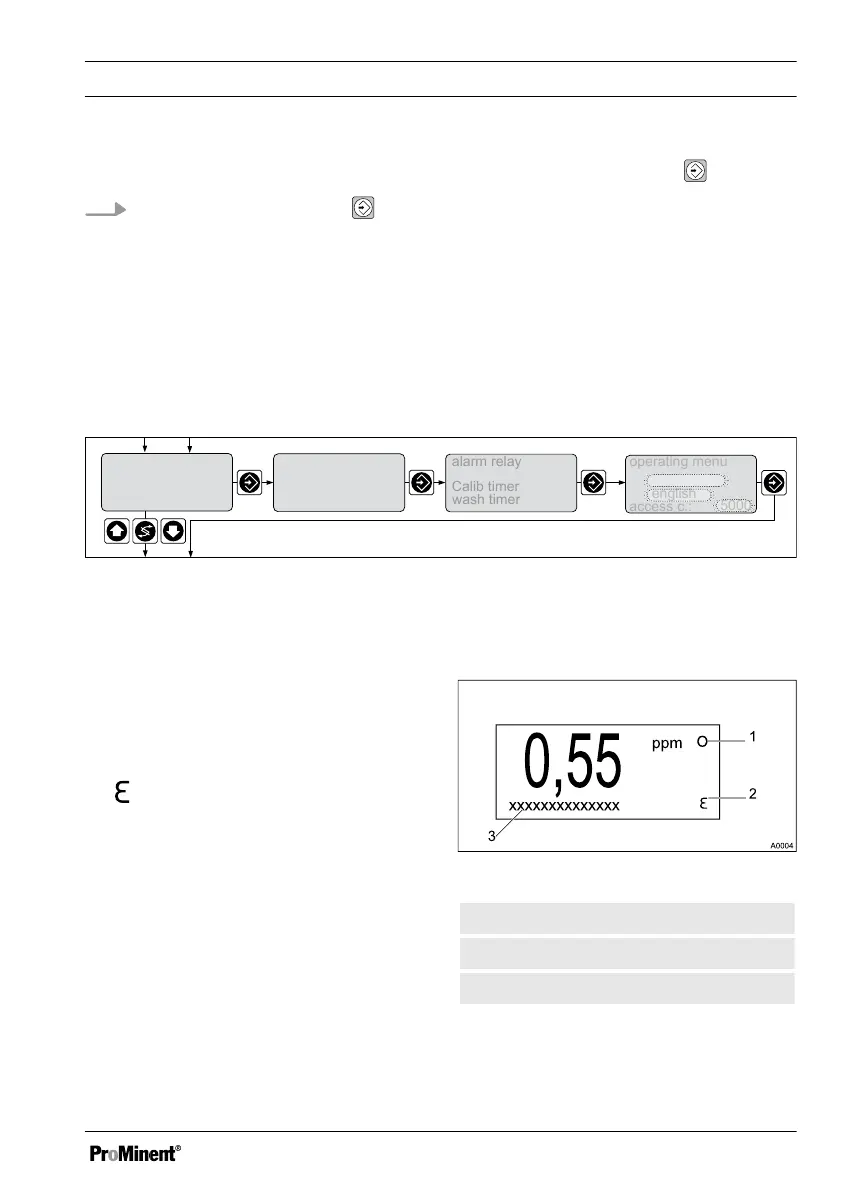
Fig. 32: Reduced / complete changeover
6.8 Fault Messages
Any fault messages and notes which arise
are shown in the bottom line of the perma‐
nent display 1. Faults which have to be
acknowledged (acknowledging them
switches the alarm relay off) are shown by
the
symbol.
Faults/notes, which remain after acknowl‐
edgement, will be displayed alternately. If
a correction variable is being processed,
the value will be displayed in the same
line as the faults/notes. Faults, which are
rectified automatically by changing oper‐
ating situations, are removed from the
permanent display 1 without the need for
acknowledgement.
6.8.1 Fault display
Fig. 33: Fault display
1. Stop function
2. Fault
3. Fault in plain text
Operating diagram/ Display Symbols
67















 To Next Page