Proroute GEM420 4G M2M Router
GEM420 User Manual 119
Scheduling menu.
9. Enable: Check the box if you want to enable the rule. Each rule can be enabled or
disabled individually.
Afterwards, click on “Save” to store your settings or click “Undo” to give up the
changes.
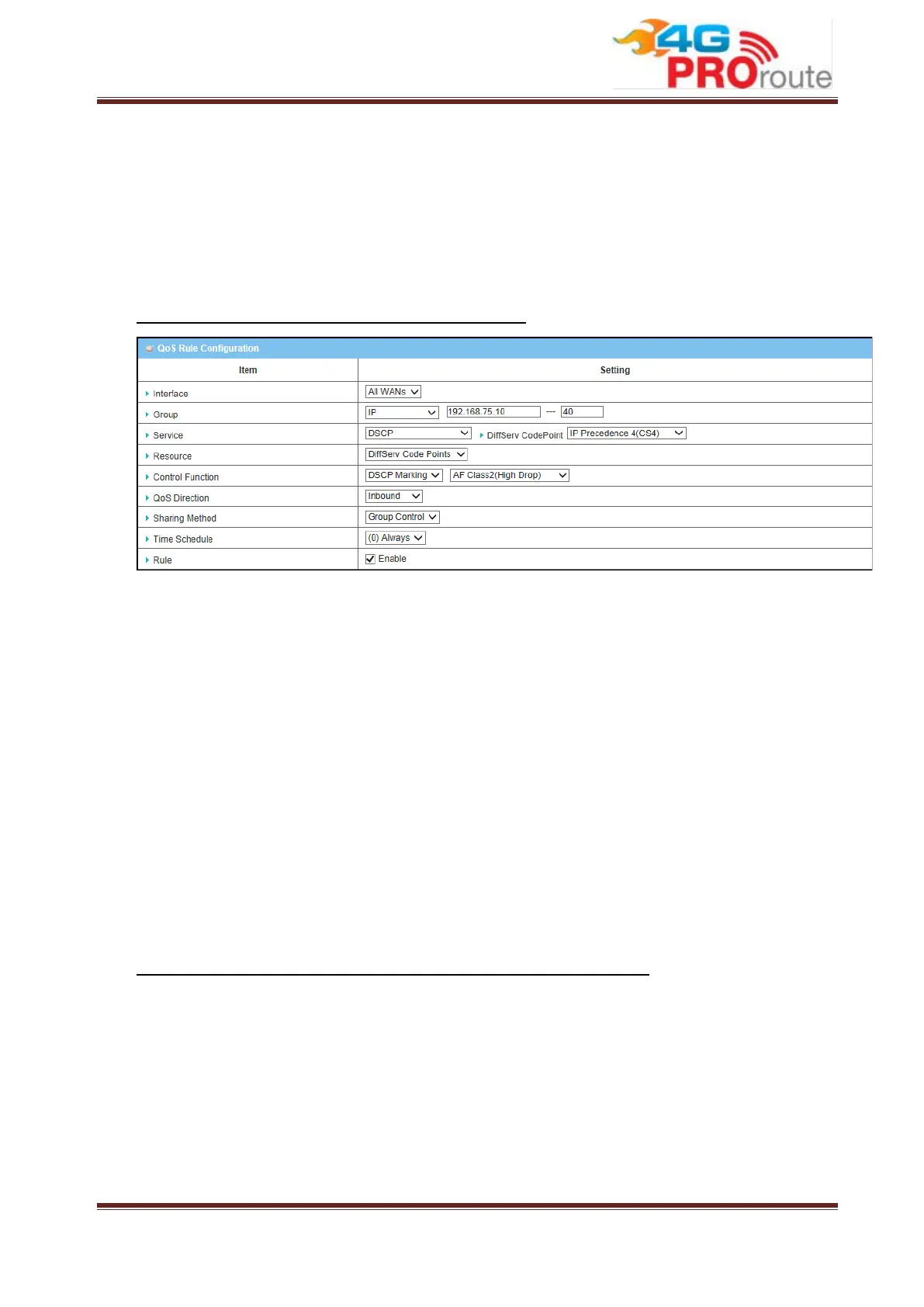
Example #1 for adding a “DSCP” type QoS rule
Interface: Select “All WANs”.
Group: Select “IP” and enter IP range: 192.168.75.10 ~ 40.
Service: Select “DSCP” with DiffServ CodePoint is CS4.
Resource: Select “DiffServ Code Points”.
Control Function: Select “DSCP Marking” with “AF Class 2(High Drop)”.
QoS Direction: Select “Inbound” for inbound traffic only.
Sharing Method: Select “Group Control”.
Schedule: Leave the default value of “(0) Always” as it is.
This rule means IP packets from all WAN interfaces to LAN IP address 192.168.75.10
~ 192.168.75.40 which have DiffServ code points with “IP Precedence 4(CS4)” value
will be modified by “DSCP Marking” control function with “AF Class 2(High Drop)”
value at any time.
Example #2 for adding a “Connection Sessions” type QoS rule



 To Next Page