Proroute GEM420 4G M2M Router
GEM420 User Manual 158
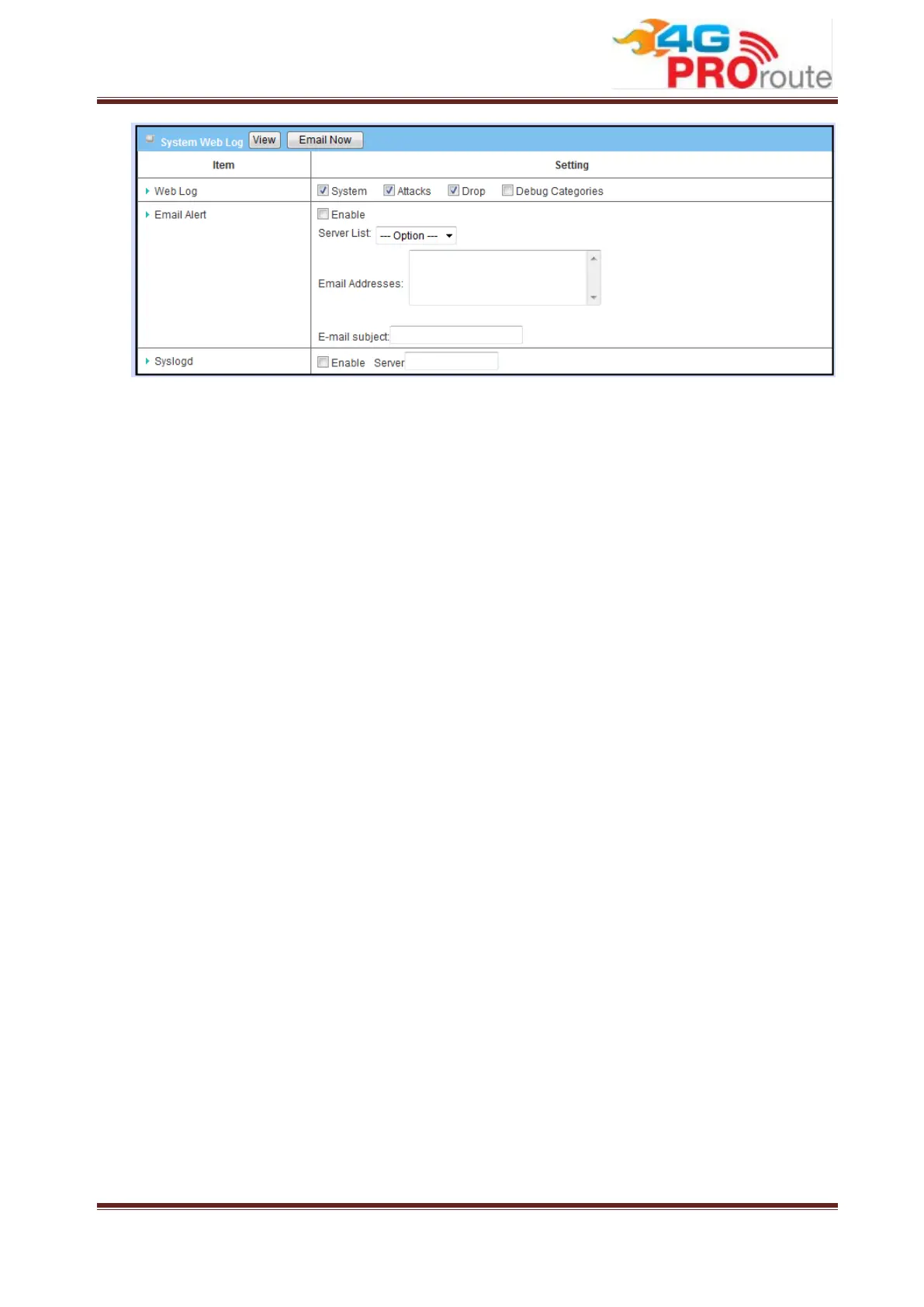
1. Web Log: You can select the log types to be collected in the web log area. There
are “System”, “Attacks”, “Drop”, and “Debug” types for you to select.
2. Email Alert: This device can also export system logs via sending emails to
specific recipients. The items you have to setup include:
Enable: Enable email alert function.
SMTP Server: Port: Input the SMTP server IP and port, which are connected
with ':'. If you do not specify port number, the default value is 25.
For example, "mail.your_url.com" or "192.168.1.100:26".
E-mail Addresses: The recipients are the ones who will receive these logs.
You can assign more than 1 recipient, using ';' or ',' to separate these email
addresses.
E-mail Subject: The subject of email alert is optional.
Press “Email Now” to send system logs immediately.
3. Syslogd: Enable this function to send system logs to remote syslog server
periodically. Please enter the IP address of remote syslog server.
3.4.1.4 System Tools
The device supports many system tools, including system time configuration, FW
upgrading, system rebooting, system resetting to default, waking on LAN and
configuration settings backup.



 To Next Page