Proroute GEM420 4G M2M Router
GEM420 User Manual 32
3.1.1.1 Physical Interface
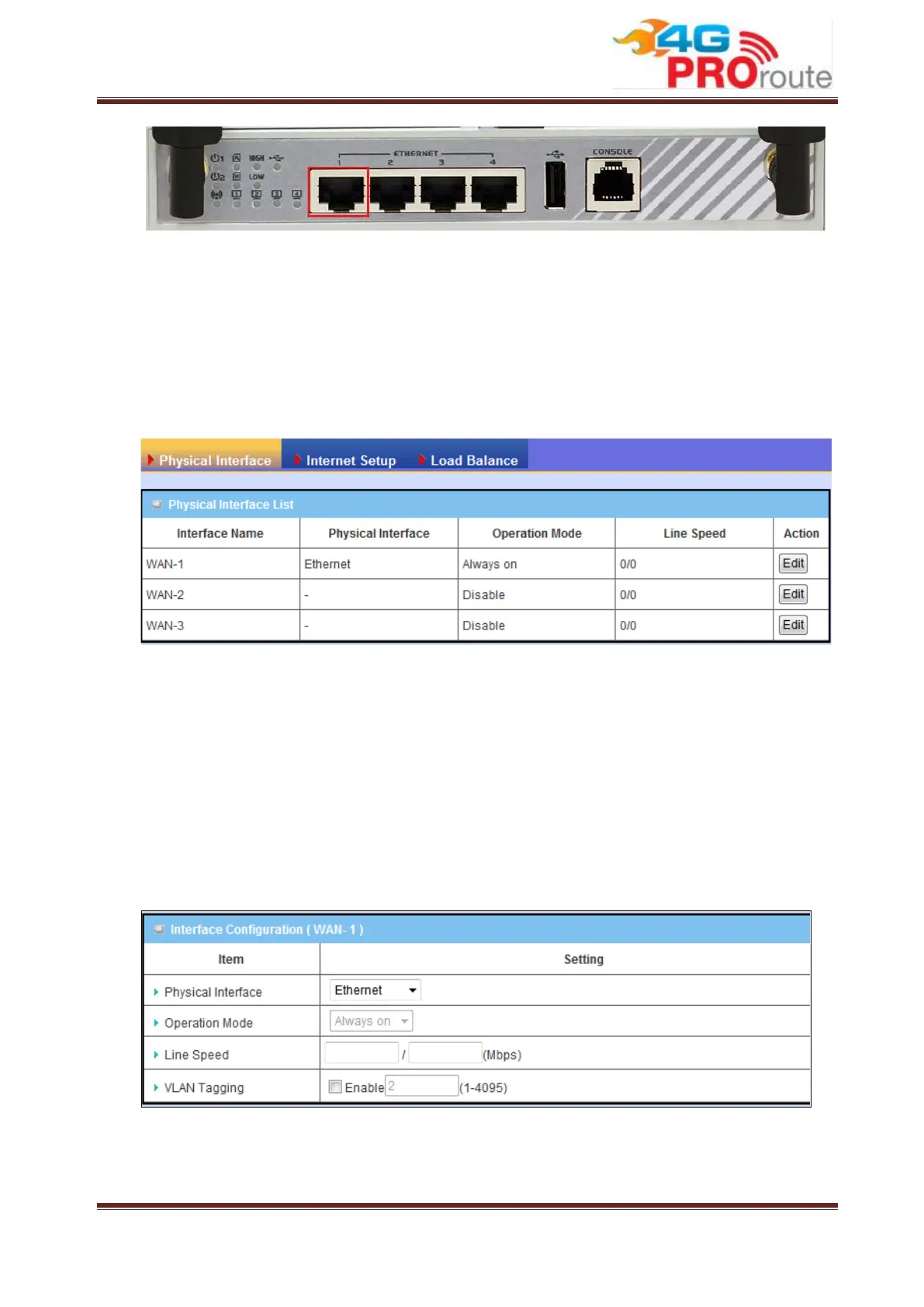
Click on the “Edit” button for each WAN interface and you can get the detail physical
interface settings and then configure the settings as well. By default, the WAN-1
interface is forced to “Always-on” mode, and operates as the primary internet
connection; the interfaces WAN-2 and WAN-3 are disabled.
1. WAN-1: The operation mode of this interface is forced to “Always-on” mode,
and operates as the primary Internet connection. You can click on the respective
“Edit” button and configure the rest items for this interface.
2. WAN-2: The operation mode of this interface is disabled by default, you can click
on the respective “Edit” button to configure.
3. WAN-3: The operation mode of this interface is disabled by default, you can click
on the respective “Edit” button to configure.
1. Physical Interface: Select the WAN interface from the available list. For this
gateway, there are “Ethernet”, “3G/4G”, and “USB 3G/4G”
items. If you want to



 To Next Page