Proroute GEM420 4G M2M Router
GEM420 User Manual 46
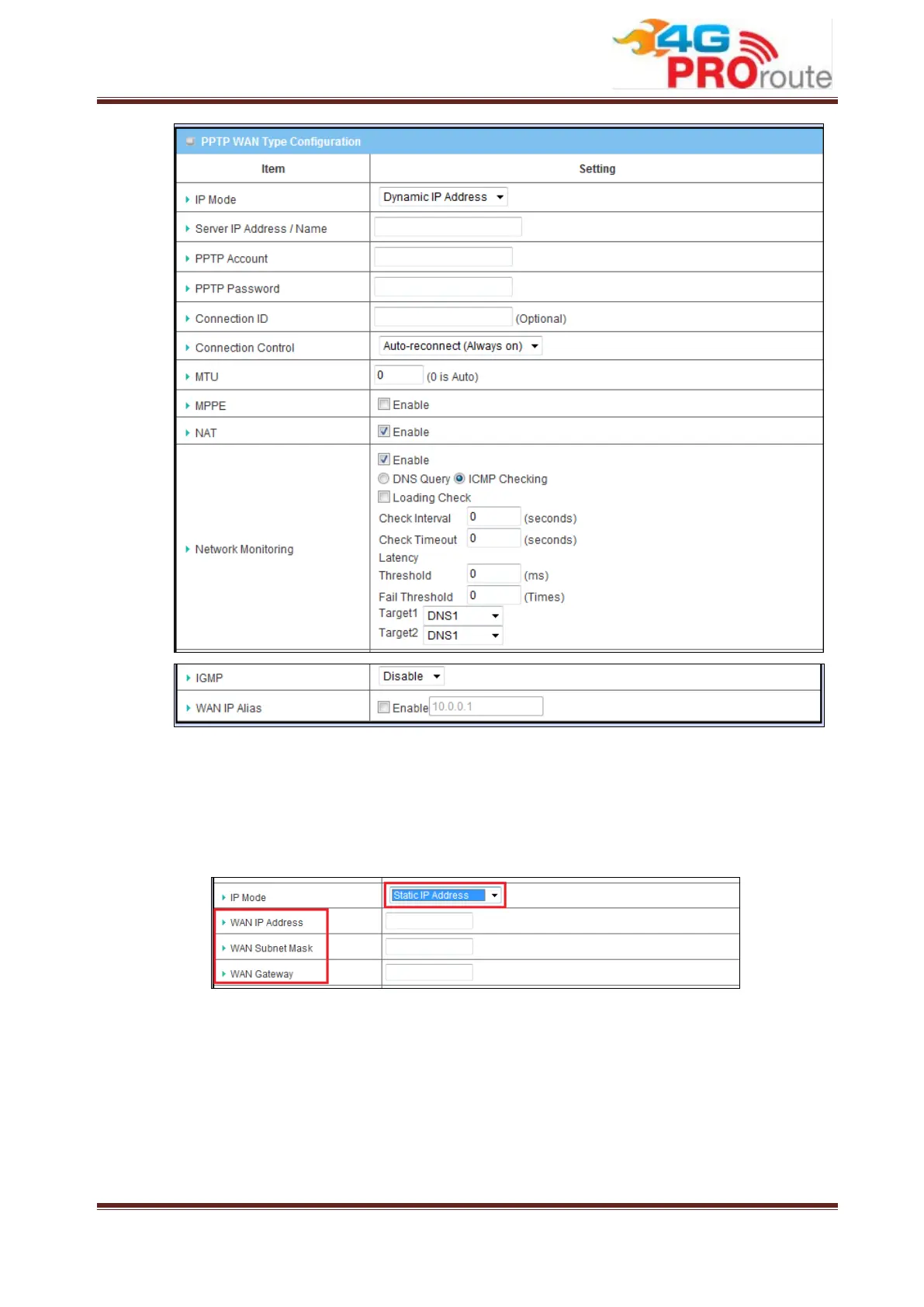
1. WAN Type: Choose “PPTP” from the drop list.
2. IP Mode: Please check the IP mode your ISP assigned, and select “Static IP
Address” or “Dynamic IP Address” accordingly. If you select “Static IP
Address” option, you have to specify additional “WAN IP Address”, “WAN
Subnet Mask”, and “WAN Gateway” settings provided by your ISP.
3. Server IP Address/ Name: IP address of the PPTP server provided by ISP.
4. PPTP Account and Password: The account and password your ISP
assigned to you. Please note the account and password is case sensitive.
For security concern, the password you input won’t be displayed on web UI.
5. Connection ID: Optional, input the connection ID if your ISP requires it.
6. Connection Control: Select your connection control scheme from the drop
list: “Auto-reconnect (Always-on)”, “Dial-on-demand” or “Manually”. If



 To Next Page