ProtaSteel 2021 - Quick Start Guide 42
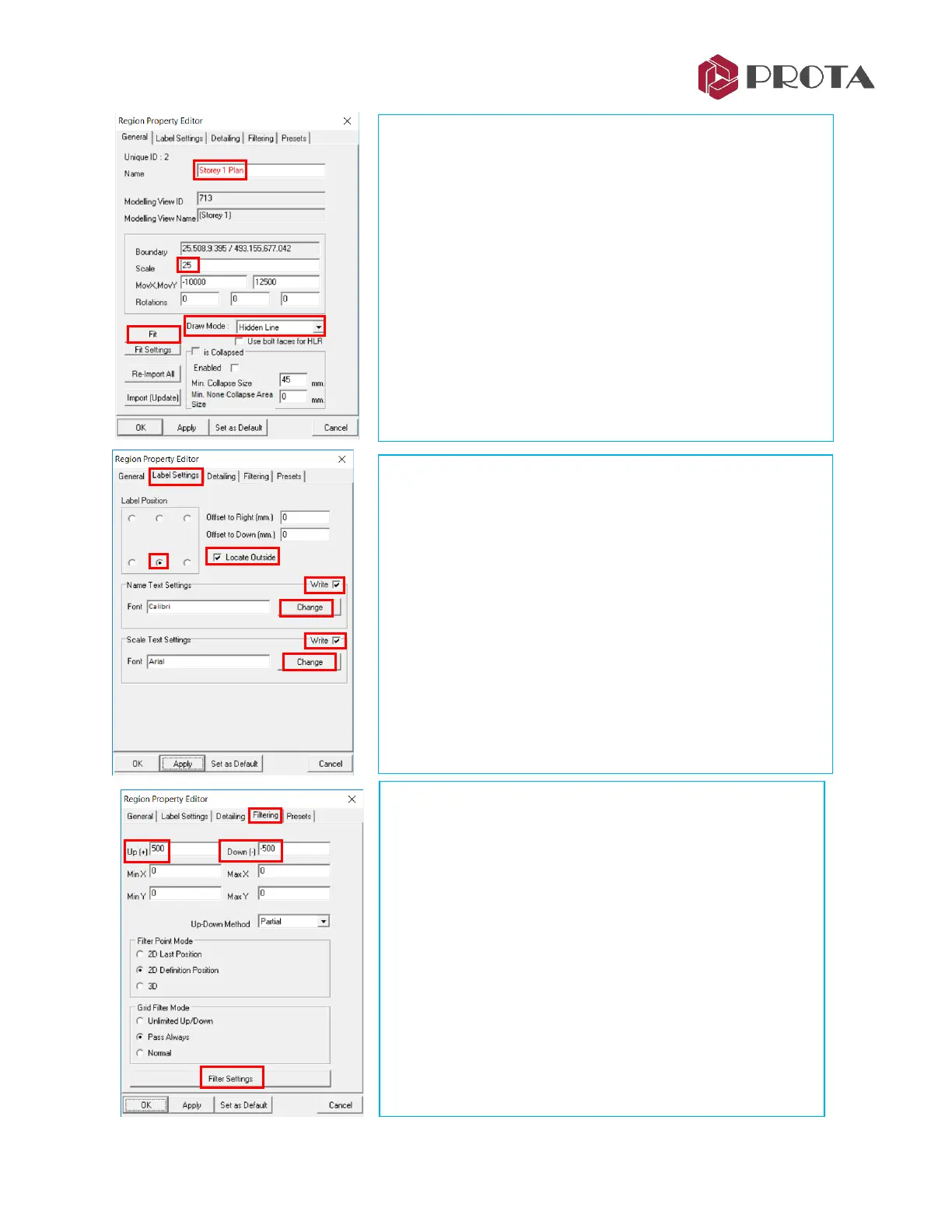
Veiwport Proper Editor dialog will appear. In the General tab,
the following can be changed :
• Name of the region
• Scale
• MovX, Mov Y : Coordinates of view
• Rotation : States the rotation angle
• Drawing Mode : Line/All Visible/Hidden Line/Full Dashed
➢ Change the Name to Storey 1 Plan
➢ Change Scale to 25
➢ Change Draw Mode to Hidden Line
→
Apply
The drawing will be updated to scale & hidden line.
➢ Pick Fit to auto fit all the elements & the new title
➢ Go to Label Settings tab
The Label Settings dialog allow you to change :
• Label Position
• Offsets
• Name & Scale Text Settings
➢ Pick Locate Outside so the label will be place outside the
region border
➢ Tick Write next to Name & Scale Text Settings
➢ Pick Change under Name Text Settings
➢ Change Name Text Height to 10mm
→
OK
➢ Change Scale Text Height to 10mm
→
OK
→
Apply
Notice that the name & scale appears larger in the drawing.
➢ Go to Filtering tab
The options here controls what is shown in the drawing :
• Up (+) & Down (-) filters objects in & out of the paper
• Min X & Max X filters objects in the X plan direction
• Min Y & Max Y filters objects in the Y plan direction
• Up-Down Method :
- Partial : Any element that exists partially within the above
extents will be shown
- Full : Only elements that exist fully within the above extents
will be shown
• Filtering Settings – expose more filter options
➢ Change Up(+) to +500 & Down (-) to -500
→
Apply
→
Girts disappears as they are placed slightly above the
floor level
➢ Pick Filter Settings



 To Next Page