ProtaSteel 2021 - Quick Start Guide 47
Further customization of the connection detail can be done.
Plate, Bolts & Weld Annotation Tools
The bolts, plates and welds are automatically annotated in the above example. If you wish, you can
manually do so by using the plate, bolts & weld annotation tools
➢ Hold down CTRL key
→
select all the annotations of the “Front” detail
→
delete them
➢ Click & drag a window (right to left) to select bolts & plates to be annotated (does not matter if
other objects are selected)
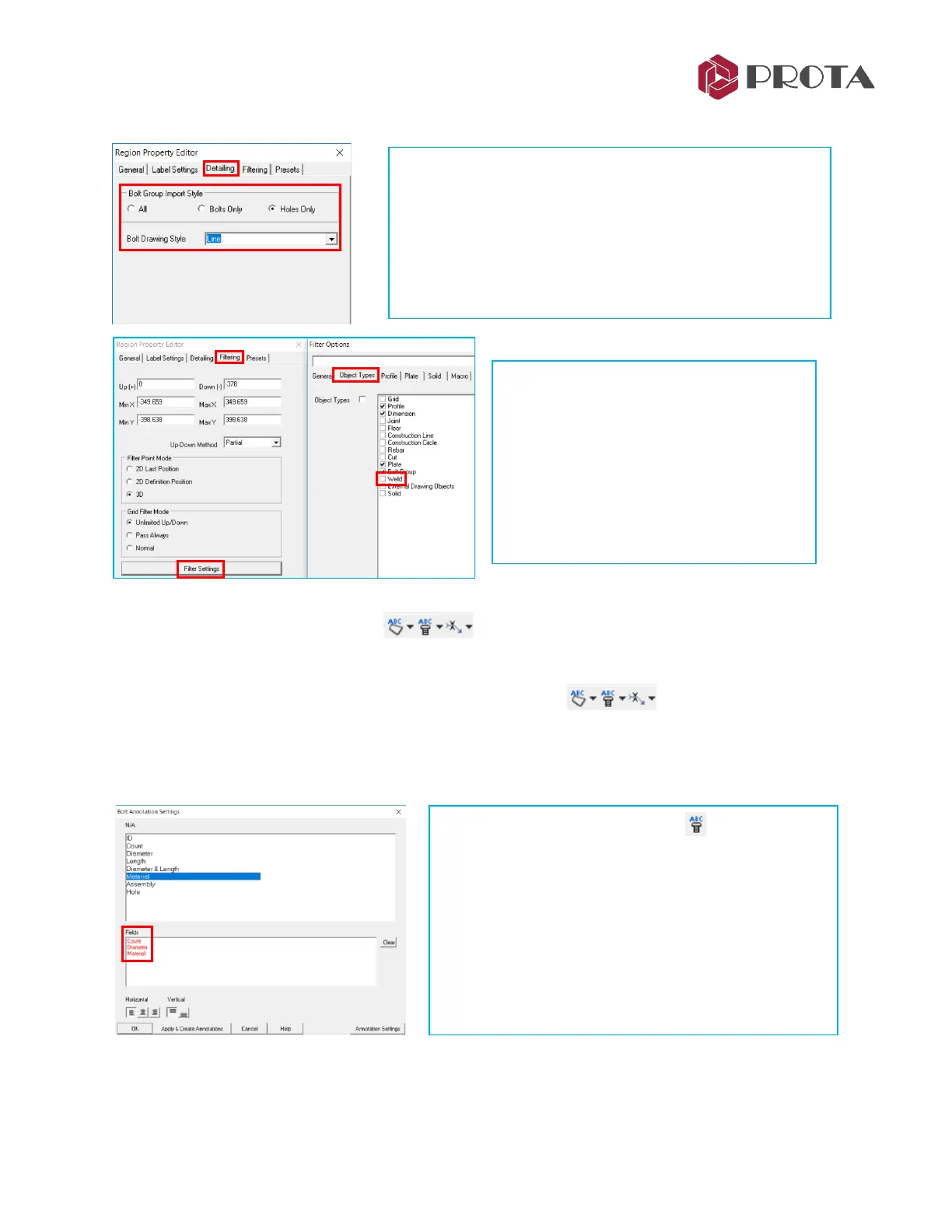
➢ Double-click in the detail region of the connection to
access the Viewport Property Editor
Under Detailing tab, you can change :
• Bolt Import Style
• Bolt Drawing Style
➢ Try the various options & click Apply
➢ Go to Filtering tab → Pick Filter
Settings
➢ Go to Object Types
You can choose to turn on/off objects.
➢ Untick Weld
→
OK
→
Apply
The welds shown in thicker lines will be
hidden.
➢ Right-click on Bolt Annotation access the
Settings
➢ Pick Clear to remove existing settings
➢ Click & Drag Count, Diameter & Material to the
bottom Fields
➢ Pick Annotation Settings to view/change font type,
color, etc
→
OK
➢ Pick “Apply & Create Annotations”



 To Next Page