EasyManua.ls Logo

Raddy RF919 - Page 22

Default Icon
63 pages
Print Icon
To Next Page IconTo Next Page
To Previous Page IconTo Previous Page
Loading...
Extended Manual for RF919 v2.1
© 2024 page 22 of 63
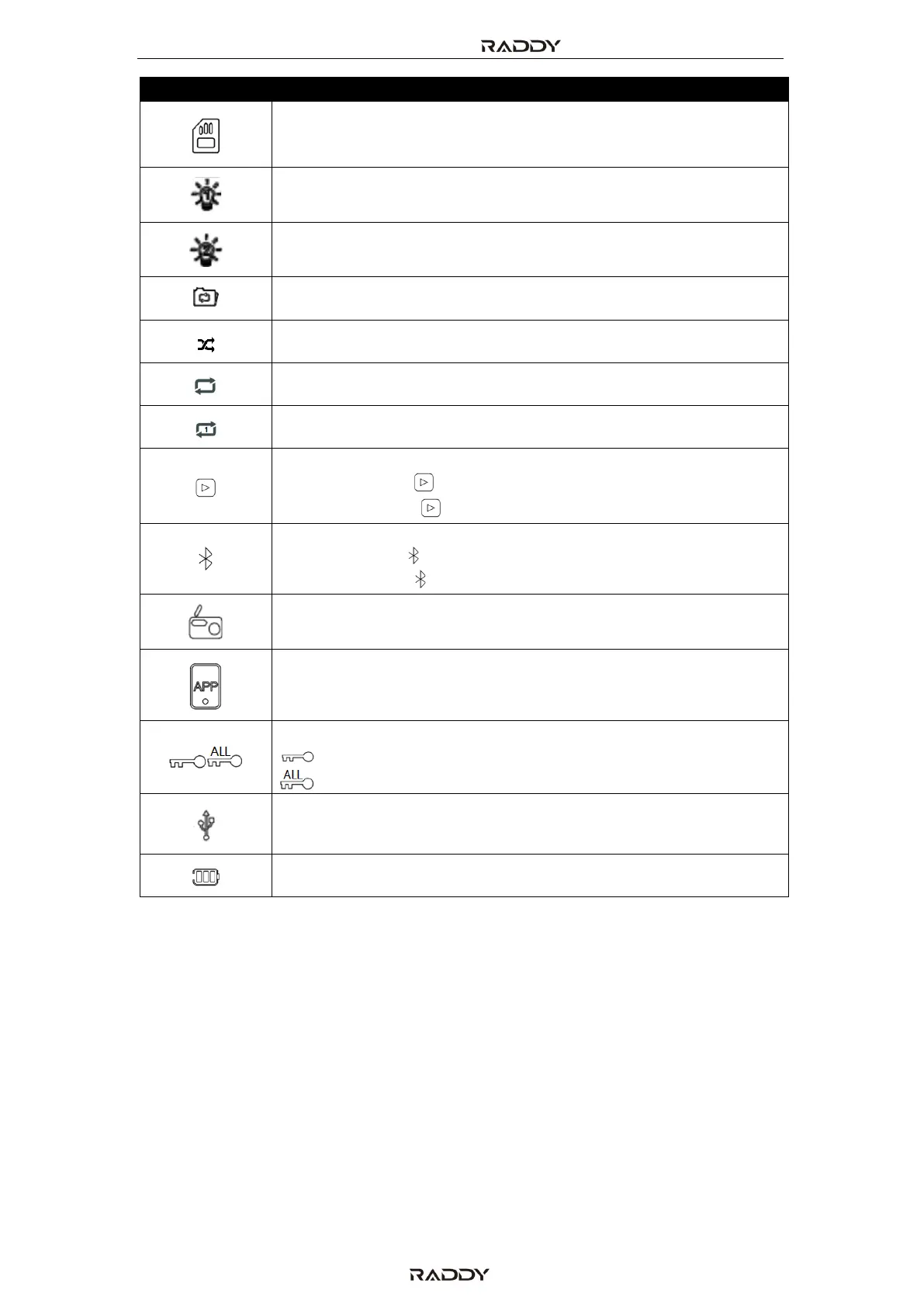
Icon
Parameter
TF card is inserted
Indicator for the primary screen to be steady on
Indicator for the secondary screen to be steady on
Repeat tracks in current folder
Play random track
Repeat all tracks
Repeat current track
Bluetooth & TF card playback
o flashing “ ”: pause
o constant “ ”: play
Bluetooth connection:
o flashing : waiting for connection
o constant “ ”: successful connection
Radio receive mode
Radio is successfully connected to the mobile APP
Lock:
lock the tuning knob
lock all
Power for charging the battery is supplied via USB-C connector
Current charging level of battery

Table of Contents

Related product manuals