Extended Manual for RF919 v2.1
© 2024 page 44 of 63
.
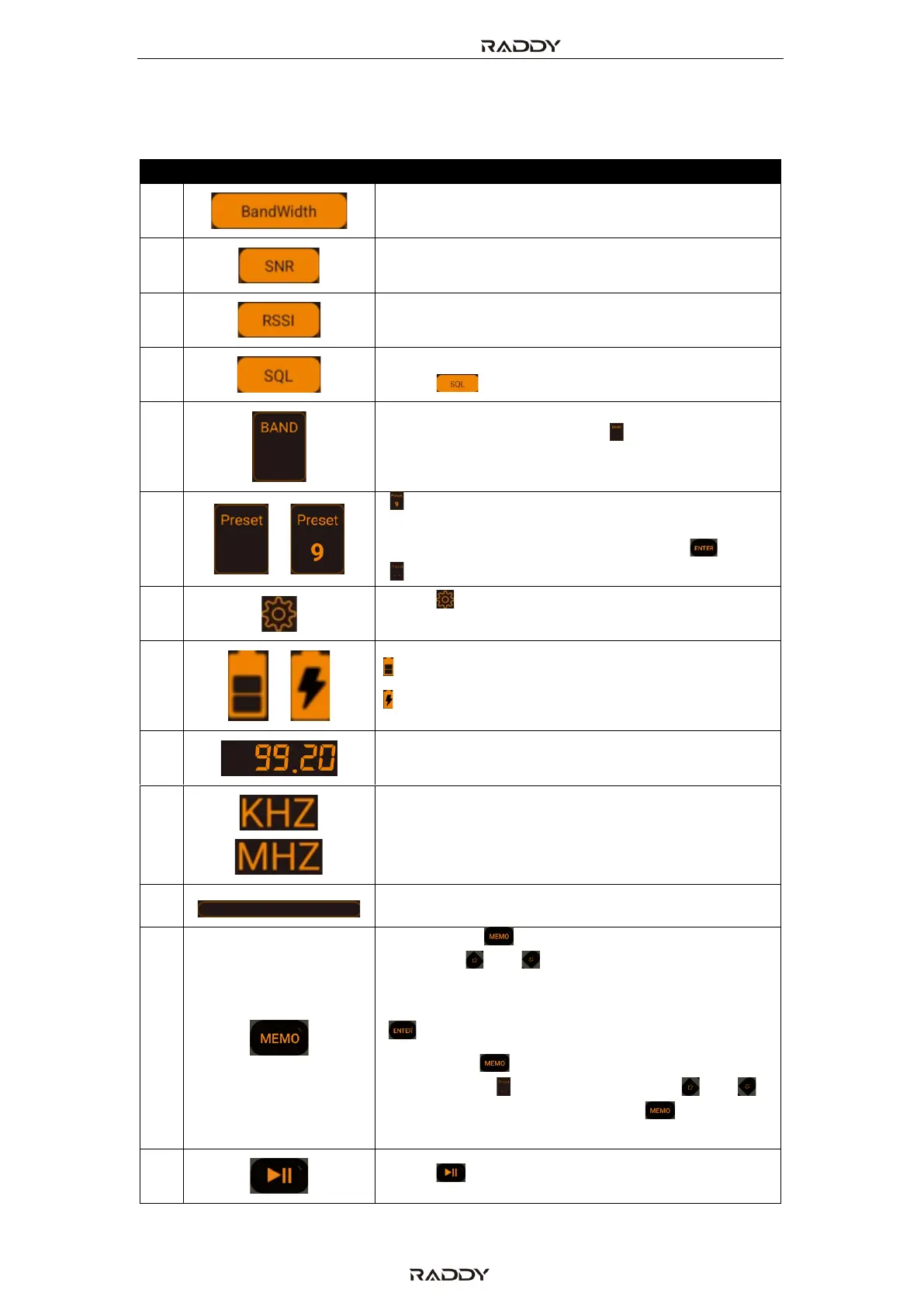
11.2 The APP symbols and controls
Bandwidth setting of currently selected band
Received Signal Strength Intensity
In the SW, CB, AIR, VHF and UHF band mode,
press [ ] to modify the squelch settings.
Band selection. Short press [ ] to select FM, AM,
SW, AIR, CB, UHF, WB or VHF (see also #23).
„ “ Number of previously stored channel. Use
numerical keypad to recall a specific channel
and confirm numerical input with [ ].
„ “ flashing, no stored stations
Press [ ] to view the details on Firmware
version, Model and support email address.
Remaining battery capacity
Battery currently being charged
Short press [ ] to switch to channel mode.
Then use [ ] or [ ] to select a previously saved
channel or use the numerical keypad to enter
the channel number and confirm the input with
[ ].
Long press [ ] to save the current frequency
to a channel. „ “ starts flashing. Use [ ] or [ ]
to select a channel. Short press [ ] to confirm
storage of frequency to the selected channel.
Press [ ] to Play & pause



 To Next Page