Line Scan
© Radiodetection 2016 37 RD1500 Operation Manual
8.1 Selecting a line
To select the desired line, press the + and - buttons under Line Number on the bottom of the
screen. Alternatively, you can also use the + and - buttons beside the word Line on the upper
part of the screen. If the line number is white, then that line is empty, whereas lines that already
contain data are shown in red.
To collect data without saving it, press No Save Mode. Any data collected will NOT be saved,
but screen shots can still be taken with the Camera button. These screen shots get placed in
the currently selected project. Two features that are only available in No Save Mode (the Pause
button and the ability to draw arrows) are described in Section 8.6.
If the line number is white (Figure 8-1), Press Start to enter data acquisition. All data collected
will be saved under this line number.
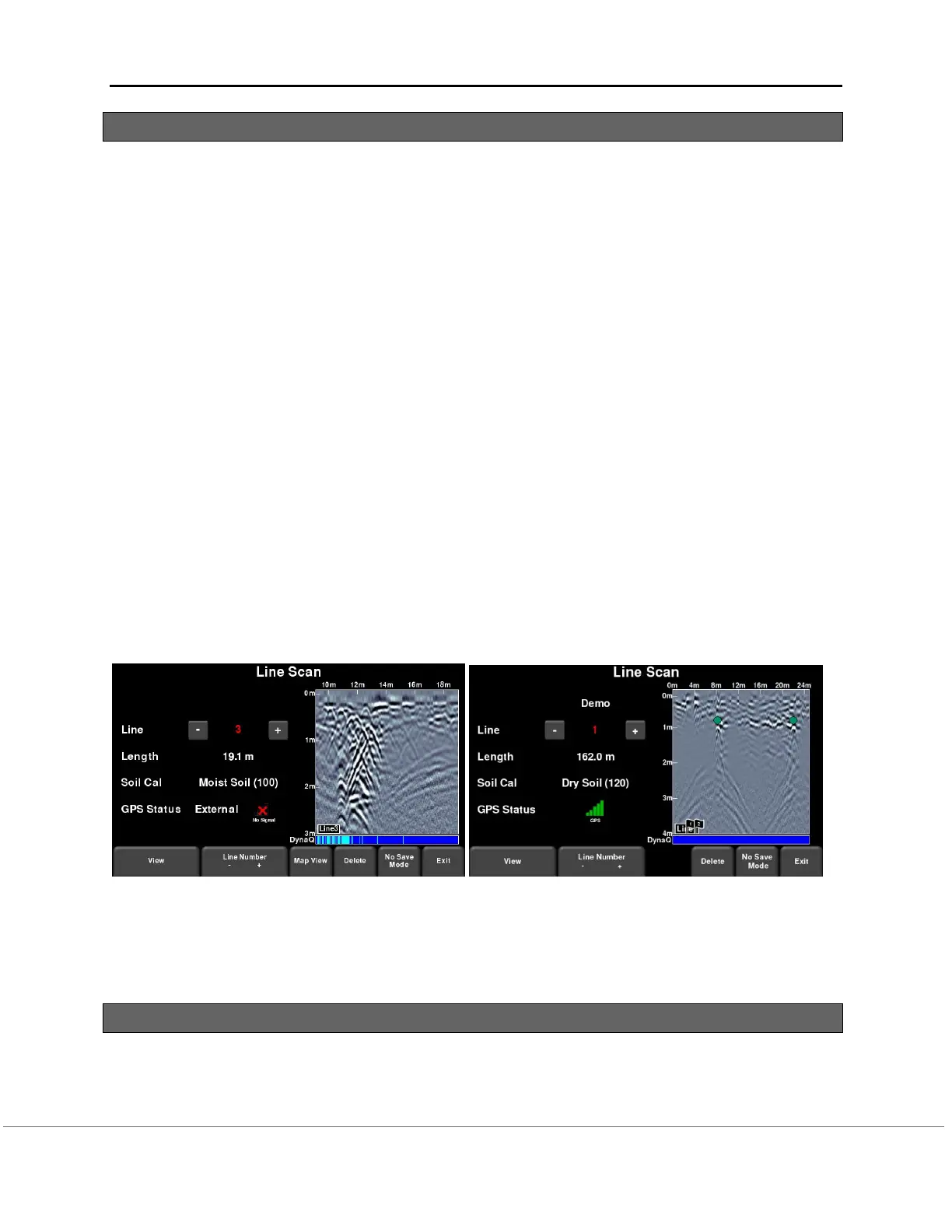
If the line number is shown in red (Figure 8-2), you will see the data preview on the right side of
the screen. If it’s a long line, only the last part of the data will be shown. From this screen, you
will have the following options available:
View – press this button to review the previously collected line. See Section 6.6 on Line
Scan menu options
Delete – pressing this will delete the line. It will prompt you to confirm before deleting.
The details of the MapView button are explained in Section 11.
Figure 8-2: Line Scan mode, showing a line that was previously collected (a) RD1500 on left, (b)
RD1500 Enhanced on right. The RD1500 has the MapView option on this screen.
8.2 Acquiring Data
Press the Start button to begin collecting data. The screen will change to the data acquisition
screen. As the system is pushed along a straight line, the GPR data collected scrolls onto the
screen from the right and moves to the left (Figure 8-3).


 To Next Page