Grid Scan
RD1500 Operation Manual 51 © Radiodetection 2016
Section 9 - Grid Scan
Grid scans are conducted to generate depth slices over a given area. This is useful for locating
all known and unknown objects, as well as their orientation, in a graphical manner that is easy
to interpret.
From the main menu (see Figure 5.2 or 5.3), press the Grid Scan button to enter the Grid setup
menu.
9.1 Grid Parameters
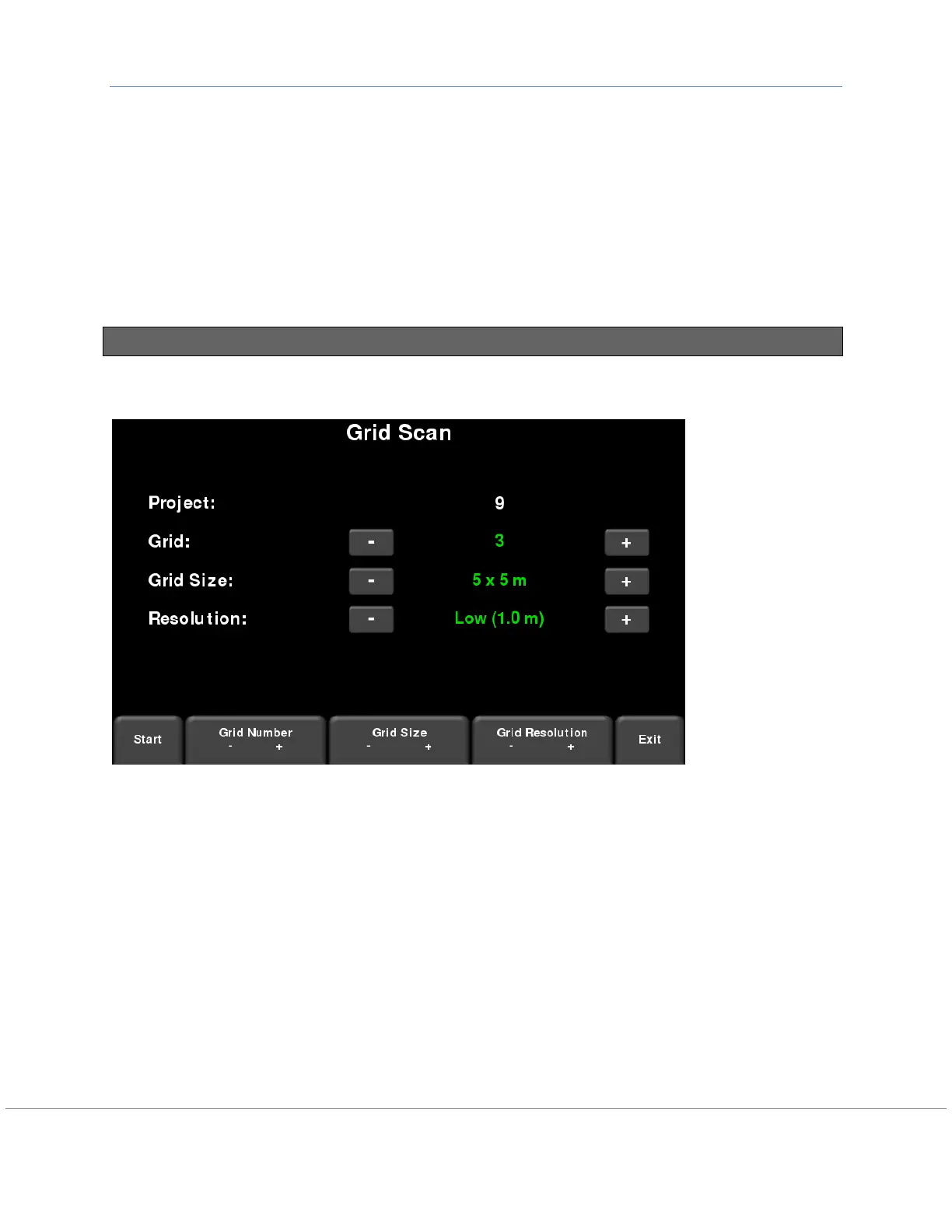
The screen will change to look like Figure 9-1, which will allow you to set the parameters of the
grid, before data acquisition begins.
Figure 9-1: Grid Scan setup, from the Enhanced system. On the standard RD1500, it will be the
same, except there will not be a project number
Grid Number
To select a grid number, press the + and - buttons under Grid Number at the bottom of the
screen. Alternatively, you can press the + and - buttons on the screen beside Grid on the upper
part of the screen. Grids that contain no data will have the text shown in green.
If a grid already contains some data, it will be shown in red and you will not be able to change
the size or resolution. You will just have the option to select:
Slice View – view the depth slices
Delete Grid – delete all the data in this grid
You can press Start to enter a previously collected grid, either to view data or recollect a line.


 To Next Page