9. Chose one and press <Open>, then the image is placed on the label.
Notice:
Graphic images placed on the label can be printed only when they
are downoladed to the printer memory. It is described in the instruction
manual „Label Editor R02” accessible in the program menu on the
overlap: „Info / User manual”.
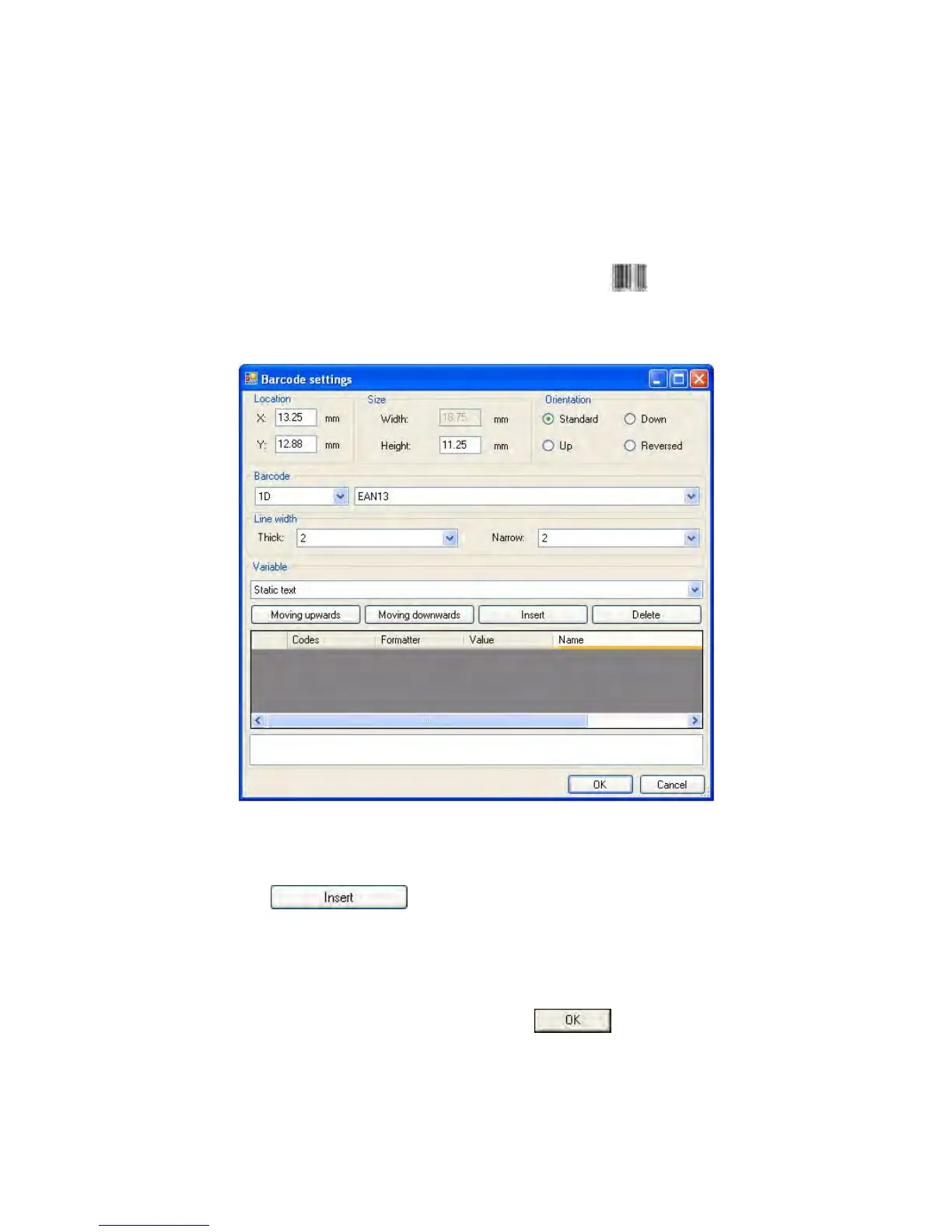
10. In order to add a barcode to the label chose < Barcode> and
then click on the workspace of label, then window <Barcode
settings> opens:
11. Chose <Barcode> from the list e.g. EAN-13.
12. Chose from list <Variable> item „7 Net mass in adjustment unit”
and press
, then the variable is placed in the table
of variables show below.
13. In column <Formatter> type:V6.3 (mass in EAN13 as a 6-digit code
with 3 decimal places).
14. Confirm the entered item by pressing , then the barcode
is automatically placed on the label.
15. Save the created pattern chosing from the menu „File / Export *.lb”.
- 178 -


 To Next Page