10
10
Select Days To Water
ESP-Me Advanced User Manual
Option Three:
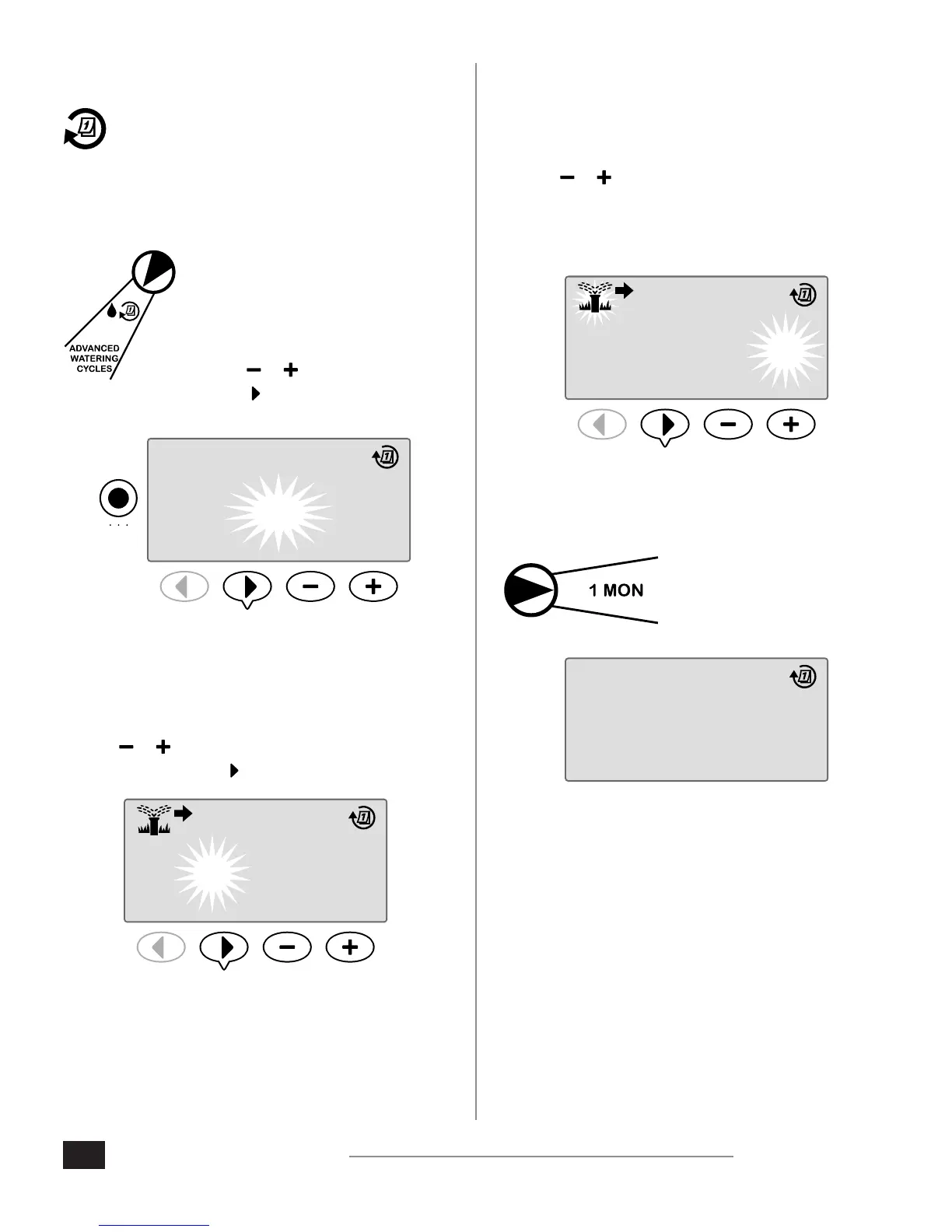
Cyclic Days
Set watering to occur at specic intervals, such as
every 2 days, or every 3 days, etc.
To schedule Cyclic Days:
1. Turn the dial to Advanced
Watering Cycles.
2. Press the Program Select button to
select the desired program.
3. Press or to select CYCLIC, then
press .
PROGRAM
SELECT
A B C D
CYCLIC
PGM
D
Day Cycle
The DAY CYCLE can be set from 2 to 31 days. For example,
to water every other day, set the day cycle to “2”. To water
every 3rd day, set the day cycle to “3”, etc.
4. Press or to set the desired DAY CYCLE (between
2-31 days), then press .
PGM
DAY CYCLE DAYS REMAINING
TU
2 0
NEXT
D
Days Remaining
The DAYS REMAINING can be set from 0 to 31 days. For
example, if you want to begin watering tomorrow then
set the DAYS REMAINING to “1”.
5. Press or to set the DAYS REMAINING (between 0-31
days) before the next watering day. The NEXT watering
day updates on the display to indicate when watering
will start.
PGM
DAY CYCLE DAYS REMAINING
3 1
NEXT
WE
D
In the example, watering occurs every 3 days. Since days
remaining is set to 1, watering begins on the next calendar
day (shown in the example as Tuesday).
NOTE: CYCLIC is displayed
when the dial is turned to
any Select Days to Water
position.
CYCLIC
PGM
D












 To Next Page