13
13
Advanced Options
ESP-Me Advanced User Manual
Manual Watering Operations
Start watering immediately for any station or program.
NOTE: All manual watering operations include the
Seasonal Adjust value.
For manual watering, either by station or by program, two
options exist to start watering:
1. After setting the desired watering time, press and HOLD
the Hold to Manually Start button to begin watering
immediately.
OR
2. After setting the desired watering time, turn the dial to
the AUTO RUN position to begin watering immediately.
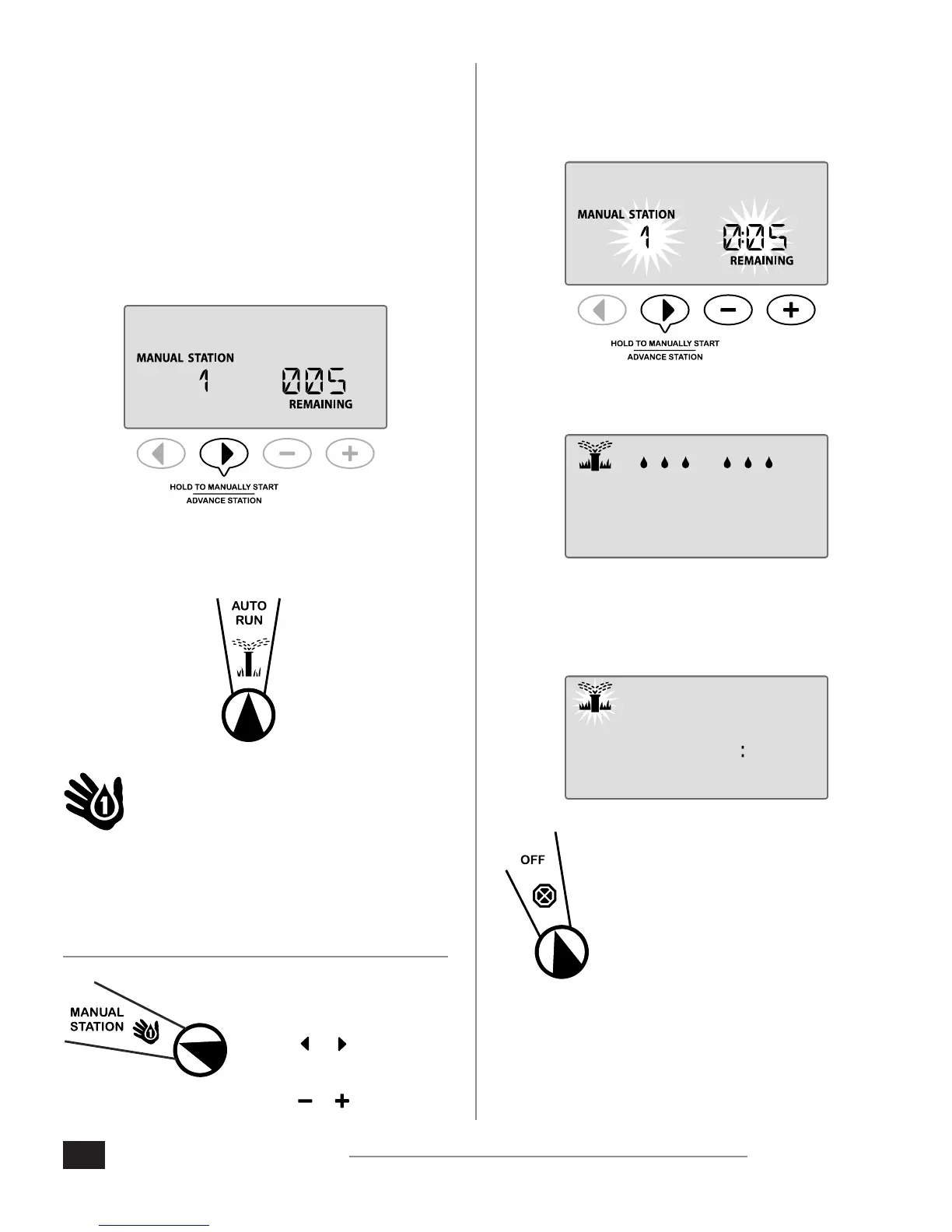
Manual Station
Start watering immediately for any station.
Automatic irrigation events will be queued when manual
watering is in progress.
NOTE: All manual watering operations include the
Seasonal Adjust value.
1. Turn the dial to Manual
Station.
2. Press or to select the
desired Station.
3. Press or to set the time
REMAINING.
4. Press and HOLD the Hold to Manually Start button
to begin watering, or you may return the dial position
to the Auto Run position and irrigation will begin
immediately.
5. Irrigation will begin and “STARTED” will appear on the
display.
STARTED
STATIONMANUAL
During Manual Watering:
In AUTO RUN mode, the display shows a blinking sprinkler
symbol, the active Station Number and the remaining Run
Time.
1 020
MINUTESHOUR
REMAINING
RUN TIME
STATIONMANUAL
6. To cancel manual watering, turn the
controller dial to OFF for three seconds
and then back to AUTO RUN.












 To Next Page