4 - STORE FUNCTIONS
22
4.2 Programming Stores Data (Files REFDAT01 - REFDAT06) via a PC
All store names and extended information are contained in the index files REFDAT01 - REFDAT06. There is 1
file for each e.g. for 'Product', 'Customer' etc. New store information can be added in MS Excel, or via the
instrument keypad. Existing store information however, can only be edited in MS Excel, and not via the
instrument.
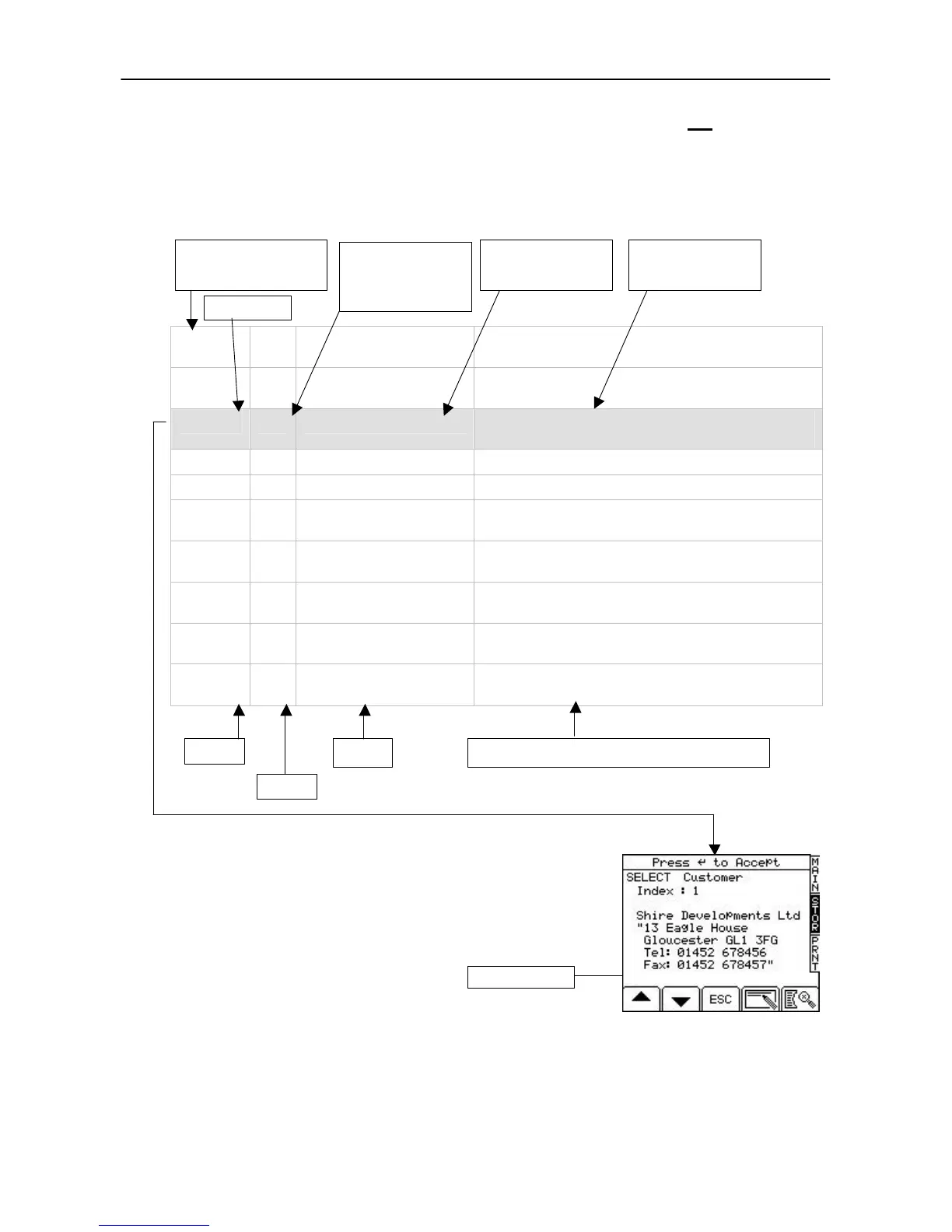
Here is an example file (REFDAT02.CSV for Customers - Store Reference 2) opened in MS Excel.
Customer
(Ref 2)
Undefined Reference 2
Type Data
Extended Reference for Index 0 Undefined Reference 2
Type Data
1
Shire Developments Ltd 13 Eagle House, Gloucester GL1 3FG, Tel: 01452
678456, Fax: 01452 678457
2
R. Bird & Son 145 Birmingham Road, South Stow, Glos GL45 9HY
3
Cosy Homes Ltd 16 Bentford Avenue, Wotton u Edge, Glos GL9 5BN
4
DRG Properties Ltd The Copse, Shurdington Lane, Cheltenham, Glos GL52
6QZ, Tel: 01452 877987 Fax: 01452 877988
5
McPhee plc Andrews Lane, Chippenham, Wilts KD3 8LL, Tel: 01467
956324, Fax: 01467 956325
6
Axion Maintenance Ltd Unit 4, Whitminster Ind. Estate, Whitminster, Glos GL4
3WS, Tel: 01453 866677
7
J.Robertson 6 Park Business Centre, Ryeford, Glos GL6 8WS,
Tel/Fax: 01453 866677
8
Styles and Allen Ltd The Old Coachhouse, Witney, Glos GL11 3FG, Tel:
01689 453332, Fax: 01689 453330
The information in the "Extended Reference" field of the .CSV file
appears inside quotes on the STOR screen. Using commas in the
extended reference field acts as a 'return' to position the next line on the
screen.
The instrument displays a maximum of 8 lines (20 characters per line)
of store information.
NOTE 1: If any comma delimited text string exceeds 20 characters, that text will
scroll across the screen page. Also, any extended information beyond 4
delimited text strings (e.g. as per the example above) will scroll across
line 8.
NOTE 2: Line 2 is for programming a target weight preset, to which the instrument will default for the next load. The
target weight should be entered in the 'truck' store reference, for each truck. For other store references this
column is left at zero, and line 2 on the STOR screen stays blank.
After completing the required entries, simply save the .CSV file back onto the data card.
Store Reference name
appearing on the
instrument and printout
by command to print
'CE').
See Note 2
Reference Index
Name
Extended Reference
Index Name
(unlimited characters)
Index #
Scrolling line
Line 1
Line 2
Line 3 Lines 4 - 8 (a comma = hard return) See Note 1



 To Next Page