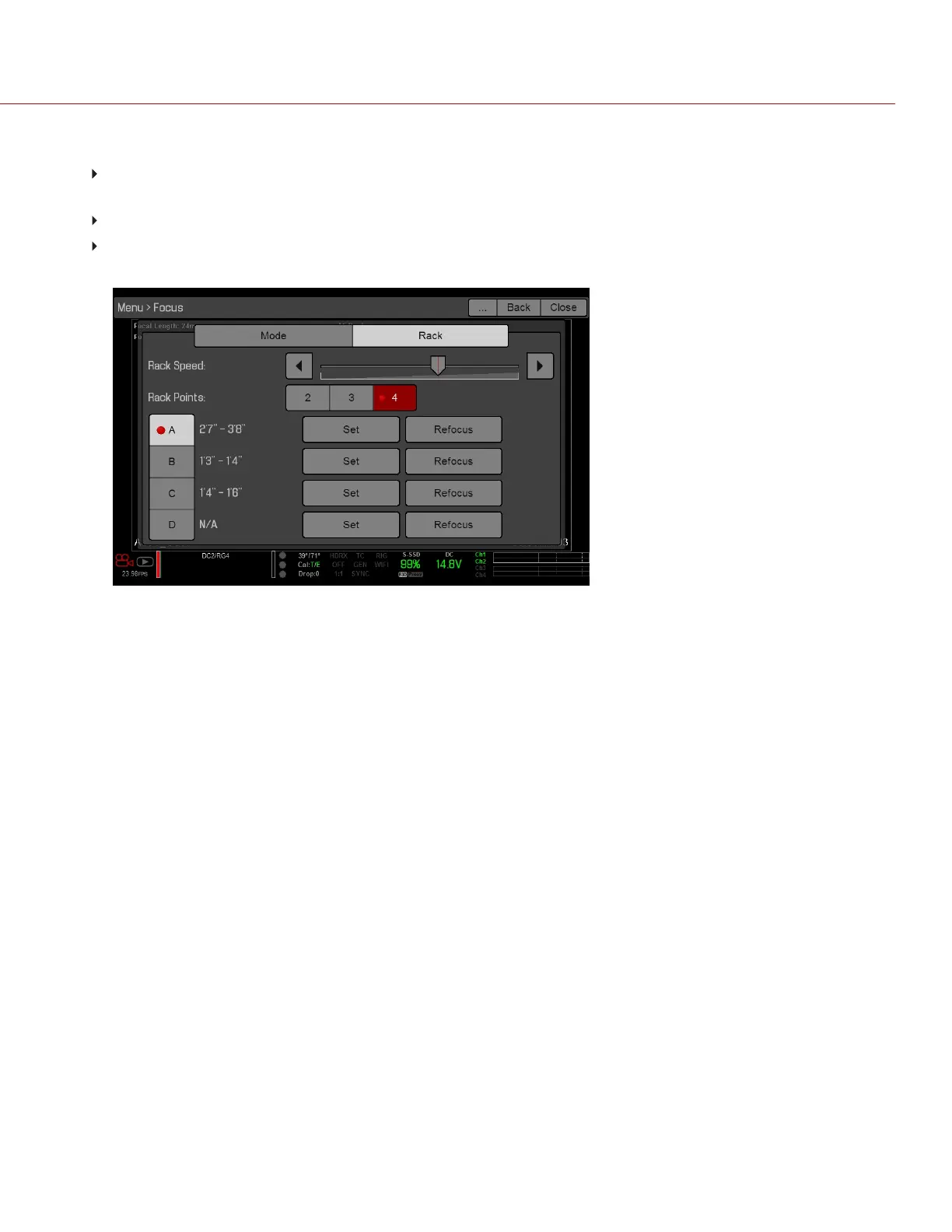
8. To set the focal distance for each point, do any of the following:
If the focal distance is N/A, select a rack point. The camera uses an autofocus algorithm to calculate the focal
distance.
Select a rack point, manually change the focal distance, and select Set.
Select a rack point, and select Refocus. The camera uses an autofocus algorithm to re-calculate the focal
distance.
Figure: Set Up Rack Points
9. To set a rack point location, follow the instructions below:
A.
Select the rack point: A, B, C, or D.
B.
Select Close to return to the main screen.
C. Tap and hold the touchscreen where you want the rack point to be, or press and drag the rack point. When you
move a rack point, the camera autofocuses.
NOTE: To prevent a rack point from being accidentally moved, the rack point is less sensitive to touch than the
other focus targets. To fine-tune the rack point location, first drag the rack point farther than it needs to be, and
then drag it to where you want it to be.
NOTE: To view the focus distance for each rack point on the main screen, go to Menu > Settings > Display >
Modes and enable Rack Show Distance mode. For more information, go to "Lens" on page127.
C OPYRI GHT © 2017 R ED.C O M , I NC 955- 01 38 _V6.3, REV-D | 150
WEAPON/EPIC-W OPERATION GUIDE



 To Next Page