18 | City Series CV40E-12
owner's information
1 | 1
Battery Holder Battery Replacement & Battery Back up if 120 volt power is lost
witihin home
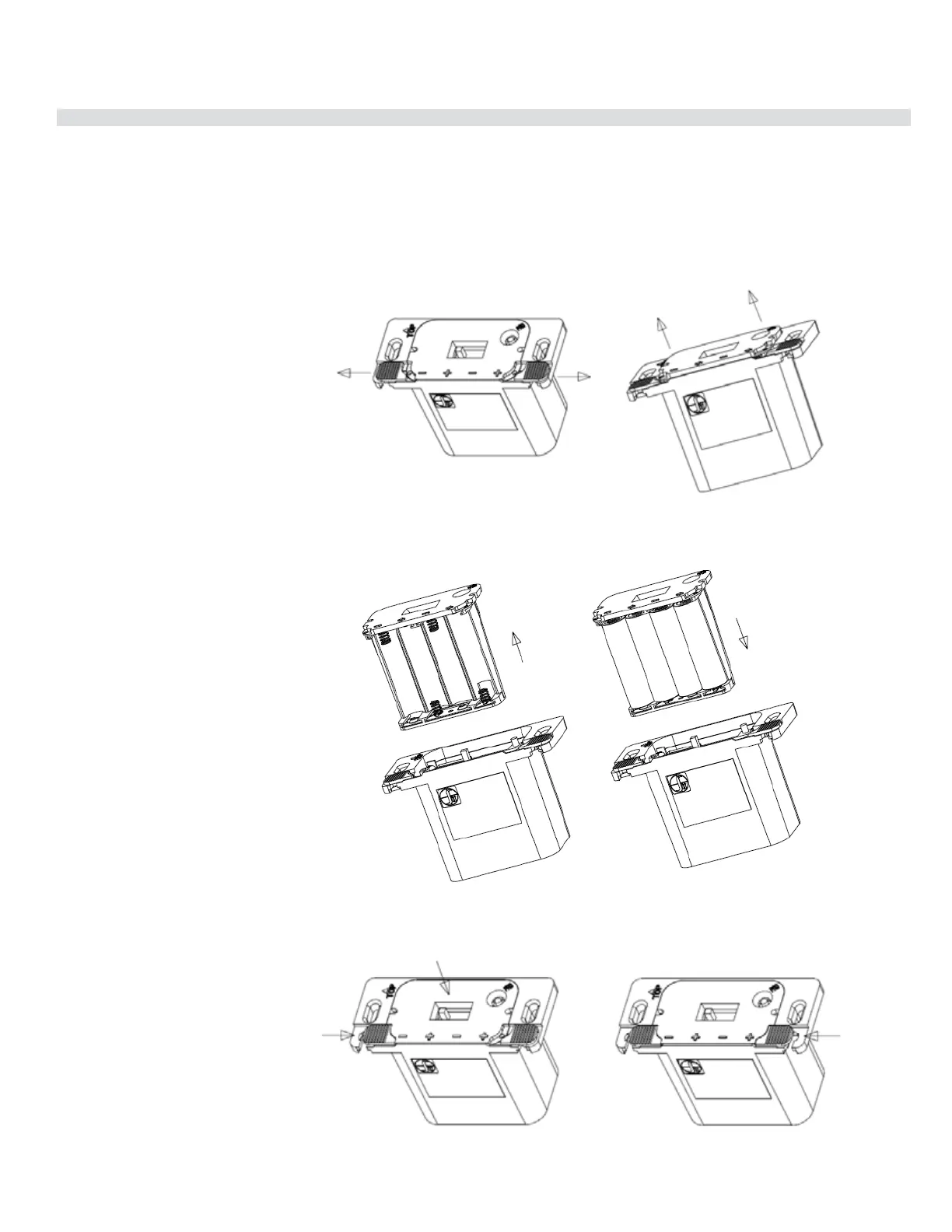
How to replace/add the batteries on battery holder (Proflame 2).
Note : If a wall switch cover plate is installed, first remove cover plate by removing 2 small phillips head screws
STEP 4 Reinstall wall cover plate with 2 Phillips head screws.
Replace 4 x AA batteries and insert the battery
compartment back into remote receiver/battery holder
Move both the left/right slides
as shown below.
will be pushed out slightly,
to allow to easily extract it
compartment from the remote
receiver/battery holder
Keeping the battery compartment
pressed in, close the left slide
Proame II Battery Holder Battery Replacement & Battery Pack up if 120 Volt Power is lost
IMPORTANT
Non-Power Vent Model: Install the 4 AA batteries during power outages to run the main burner. However, the lights will not operate
Power Vent Model: This appliance will not operate if 120 volt power is lost within the home. This will not operate with 4 AA batteries due to the power
vent blower motor requiring AC power to operate.




 To Next Page