City Series CV40E-12 | 19
owner's information
WIFI Dongle Installation (Optional)
920-561
06.29.22
1
CITY SERIES 40
WIFI Dongle Installation Instructions
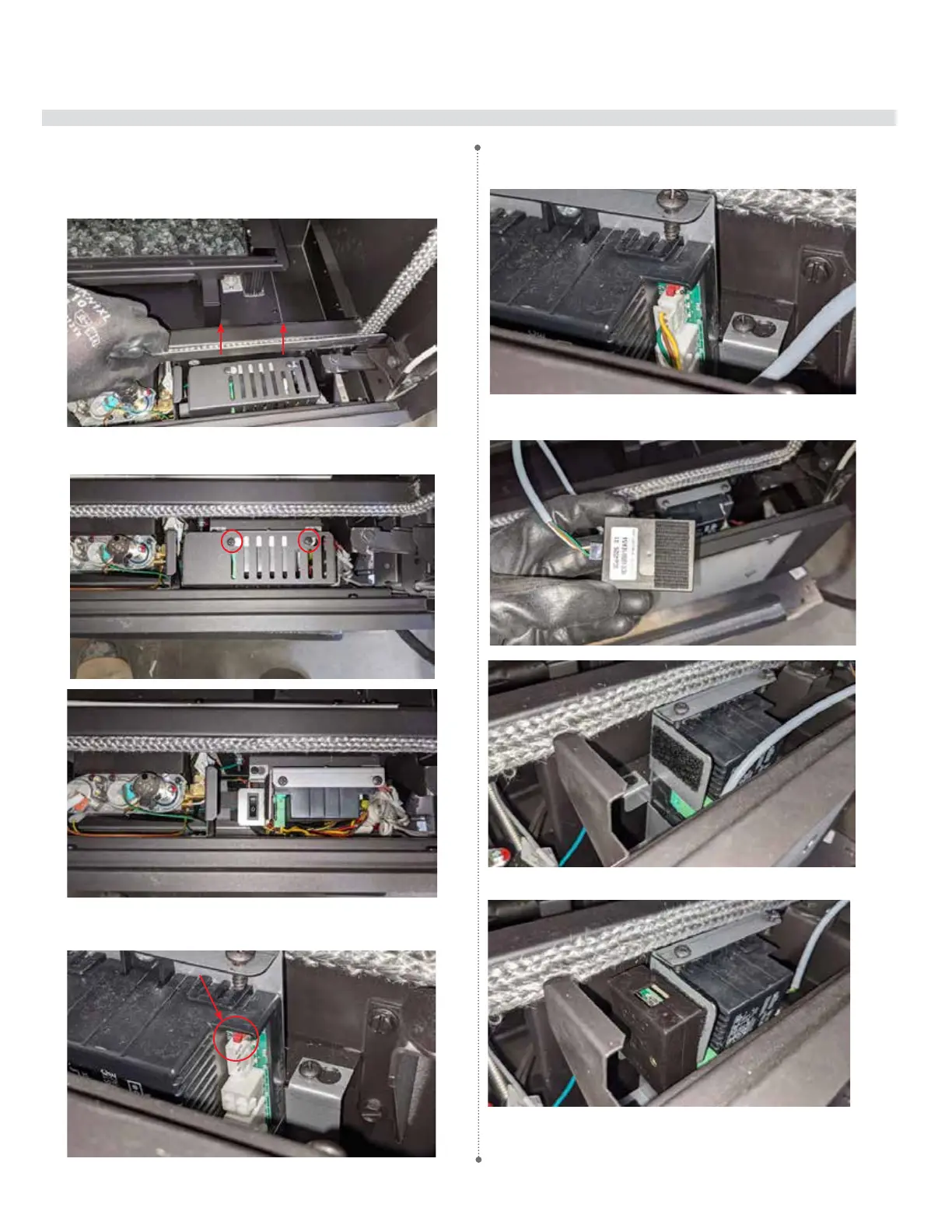
1.Removethesafetyglassandreboxglass–seemanual.
2.RemovethefrontlowerreboxglasspadtoallowaccesstotheIFCcover.
3.Locatethe2screwsontheIFCcoverandremovethecovertoaccessthe
IFC.
4.LocatetheWIFIdongleconnection(X0A)onthesideoftheIFC.
5.LineupthetabsonthedonglewiththenotchesontheIFCconnection
andinsertthecableintotheconnection.
6.ApplyVelcrostripstothebottomofthedongleandtothesideofthe
IFCbracket.
7.PlacethedongleontotheIFCbracket.
X0A
8.Reversesteps1,2and3.




 To Next Page