City Series CV40E-12 | 83
maintenance
Valve Replacement
Important: Always shut o gas supply/120 volt power prior to servicing
the gas valve.
1. Turn o unit and allow to cool to room temperature.
2. Remove outer enamel or steel panels—see instructions in the panel removal
section in this manual
3. Remove outer safety glass panels and inner panels (rebox glass)–see
instructions in this manual.
4. Remove all media and logs (if installed) — set aside.
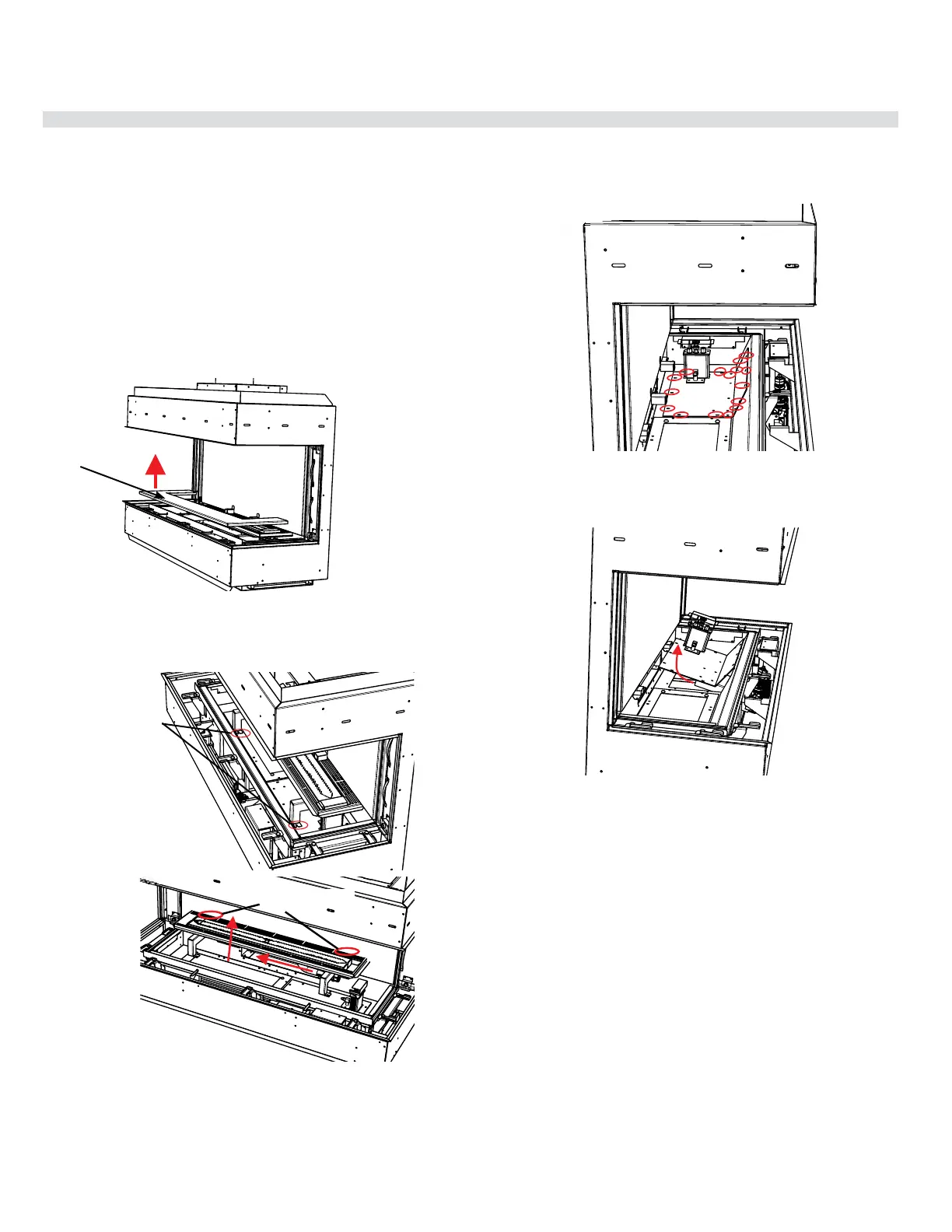
5. Remove inner base panel.
7. Remove 16 screws in locations shown below.
8. Lift valve tray out partially and disconnect exible gas connection on the
valve inlet side, remove valve tray- replace with new valve tray.
9. Reverse steps 6-1 to complete.
Inner base
panel
Remove 16 screws securing valve tray
CB40E shown
6. Loosen 4 screws in locations shown below (2 at front and 2 at rear)—slide
burner to the left away from the orice and lift out.
Front
screw locations
Back screw locations




 To Next Page