GB.45
GUIDANCE (4/6)
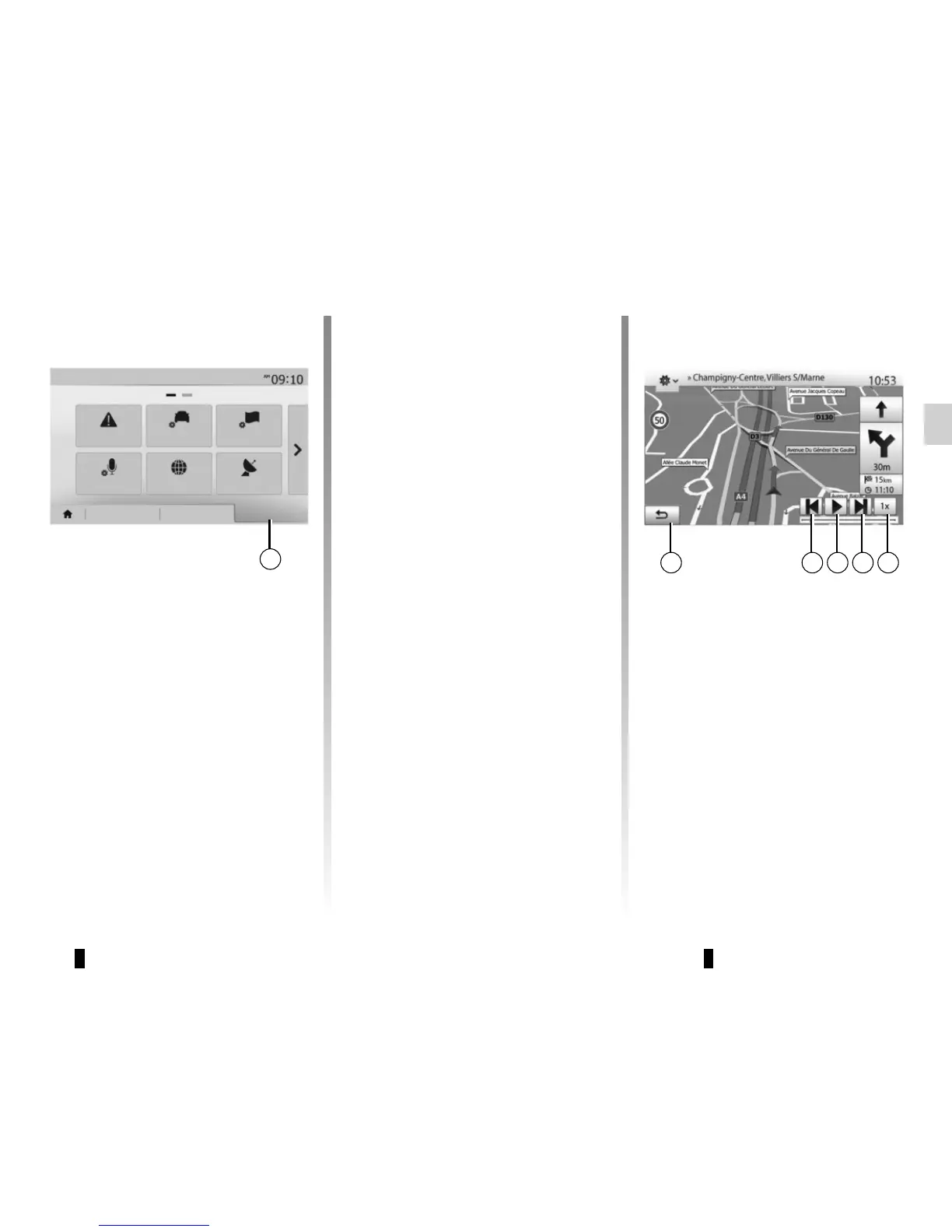
“Simulate navigation”
Press “Home” > “Nav“ > “Route“ >
“Overview“ > “Options“ > “Simulate
navigation“ to simulate the route you
will take to the destination.
– Start or pause the simulation by
pressing 18.
– Press 20 to increase the speed of the
simulation.
– You can leave the route simulation at
any given moment by pressing 16.
– To move to the previous/next ma-
noeuvre, press 17 or 19.
1716 18 19 20
15
RouteDestination
Warnings
Route settings
Map settings
GPS
Coordinate
format
Voice settings
Navigation
Options
– the special points and sections of the
route (e.g. toll gates, toll roads, mo-
torways, etc.);
– alternative routes (e.g.: “Short” ,
“Fast” , “Economical”).
Press 15 to display the following op-
tions:
– “Warnings”;
– “Route settings”;
– “Map settings”;
– “Voice settings”;
– “Coordinate format”;
– “GPS";
– “Map Update”;
– “Traffic”.
NB: for further information, please see
overleaf.
Route overview
Press “Home” > “Nav” > “Route” >
“Overview” to get a map with an over-
view of the active route.
The following information will be given:
– the name and/or address of the des-
tination;
– The total time of the route;
– The total distance of the route;



 To Next Page