repligen.com XC-LAB-UG-V4
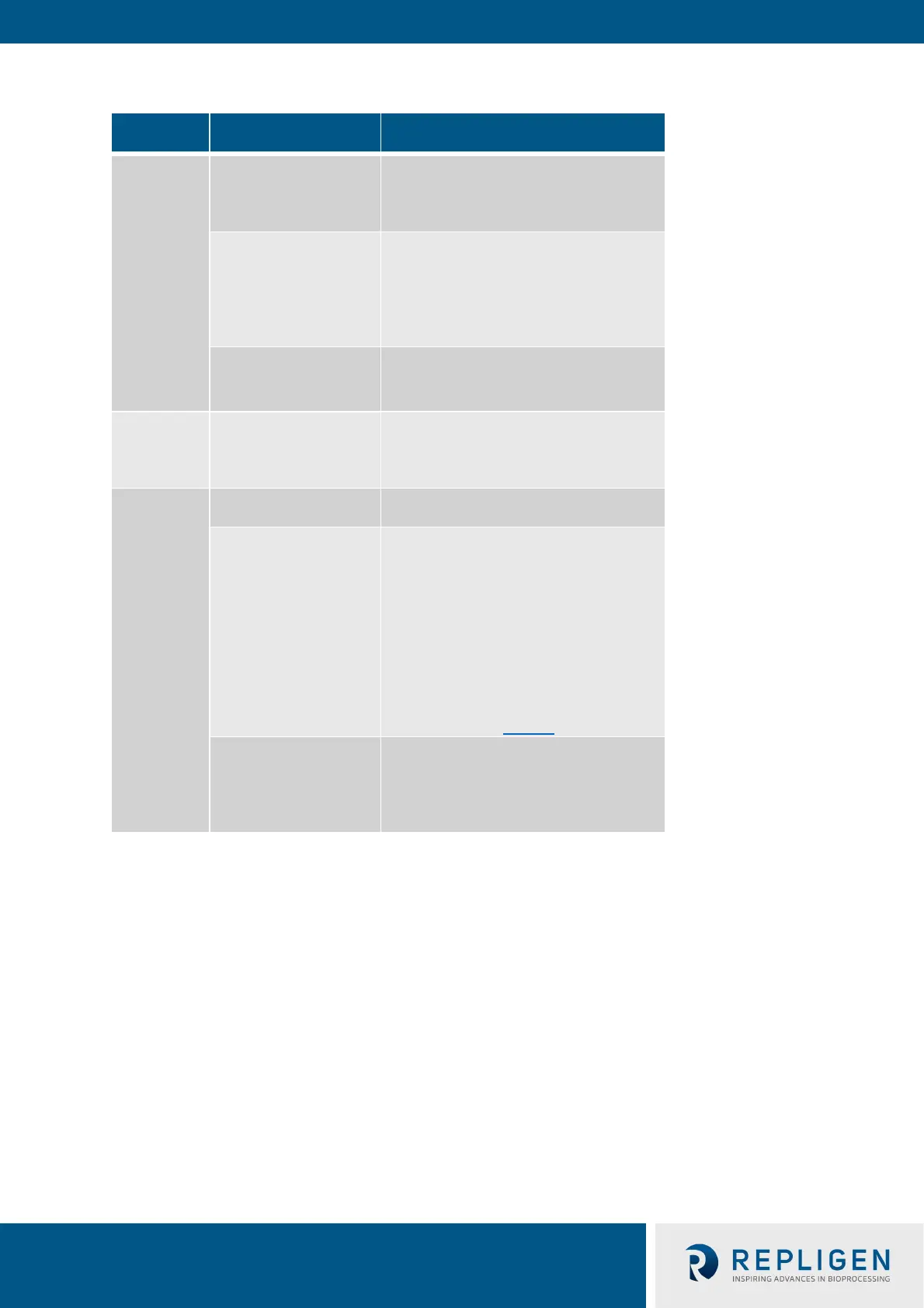
Table 12. Starting, pausing and stopping XCell ATF® Device(s) in Dual Mode
Actions
In-phase
and out-of-
phase
Start
Open either the ATF-A or ATF-B flow Pop-
up , select mode for dual control and then
press Start.
Pause
1. Software: Open either ATF -A or ATF-
B Flow Pop-up and press Pause
2. Software: Press the All Pause buttons
on ATF Main screen
3. Hardware: Press either Pause button
on controller Face B (Figure 6)
Stop
Software: Press the All Pause buttons on
ATF Main screen
Start
1. Software: Open either ATF -A or ATF-B
Flow Pop-up and press Pause
2. Hardware: Press either Pause button on
Independent
Start
Open the relevant ATF flow Pop-up and
then press Start.
Pause
4. Software: Open either ATF -A or ATF-
B Flow Pop-up and press Pause
5. Software: Press the All Pause buttons
on ATF Main screenn to
respective ATF unit (A or B) to pause.
For example if the all pause was
pressed for ATF B while running in
independent
paused and ATF A continues to run.
Hardware: Press either Pause button on
controller Face B (Figure 6)
Stop
Press Stop on the ATF Flow pop-up. Upon
re-start, the controller starts without
utilizing previous settings. A Stop is
recommended to be used only at the end
Note: It is not possible to re-start in dual mode unless both ATFs are paused and re-started together.
Note: After pressing STOP, the setpoint value remains the same, which is the only user editable
parameter. The most significant difference between STOP and PAUSE is that PAUSE keeps the
XCell ATF® Device in a hold position where it can resume when START is pressed a second time.
Pressing STOP stops the running session; when start is subsequently pressed it goes through
the start initiation process (Priming).



 To Next Page